

Snippad: Smart AI Keyboard
Mehmet Emin Bozkurt Utilities iPhoneiPadiPod touch
Snippad: Smart AI Keyboard is a free Utilities app for iPhone and iPad by Mehmet Emin Bozkurt. Requires iOS 16.4. Updated September 15, 2026.
- Price
- Free
- on the App Store
- Size
- 73 MB
- Age 4+
- Updated
- Sep 15
- 2026 · v1.0.10
Screenshots


About Snippad: Smart AI Keyboard
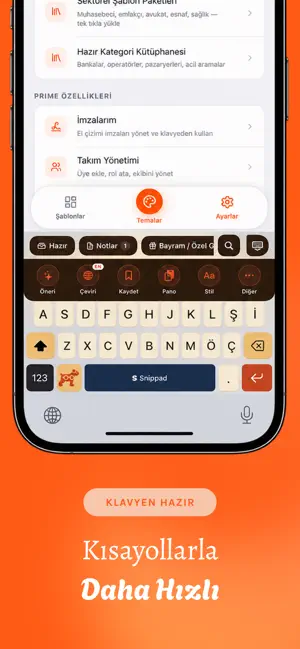
Snippad is a smart keyboard that makes typing faster. Themes, AI, translation and templates — all in one place, without ever leaving the app you're in. THEMES FROM A PHOTO OR YOUR MOOD Pick an outfit or any photo you like; Snippad pulls out its color palette and restyles your keyboard to match. Or choose a theme by mood and your keyboard adapts instantly. SNIP AI — INSIDE THE KEYBOARD One tap on any text you've written: - Explain — simplify a complicated sentence - Suggest — get a better phrasing - Shorten — condense long text - Reply — generate a quick answer to an incoming message All instantly, inside whatever app you're using. INSTANT TRANSLATION Translate any text straight from the keyboard, right where you are. No app switching, no copy-paste. MANAGE YOUR TEMPLATES Save your most-used messages, addresses, IBANs, emails or canned replies and paste them with a single tap from the keyboard. Use templates with variables (name, date, amount) to fill in the blanks instantly. AND MORE - Stickers: add your own images to the keyboard - Clipboard history: never lose what you copied - Signature drawing and quick paste - Text styler, sound and haptic settings Write less, say more with Snippad. Unlock every feature with a subscription. Payment is charged to your Apple Account at confirmation of purchase and renews automatically unless cancelled at least 24 hours before the end of the period. You can manage it in Settings. Terms of Use: https://www.apple.com/legal/internet-services/itunes/dev/stdeula/
What’s new
Version 1.0.10 · Updated September 15, 2026
This update makes the keyboard smarter and faster: • Brand & tech words stay intact — typing "figma", "slack" or "notion" no longer gets autocorrected. • The keyboard learns from you: words you type often now appear in suggestions and complete in a few taps. Everything stays on your device — nothing is sent. • In your template list, phone numbers, emails, addresses and links now have clear color icons — tap once to call, email or open in Maps. • A cleaner look for the Classic theme. • Snip AI chat now returns ready-to-copy text more neatly. • Minor improvements and bug fixes.
App privacy
The developer, Mehmet Emin Bozkurt, reported these privacy practices to Apple.
Data Linked to You
The following data, which may be collected and linked to your identity, may be used for the following purposes:
- Contact Info: Email Address, Name
- User Content: Photos or Videos, Other User Content
- Identifiers: User ID
Used for: App Functionality
Data Not Linked to You
The following data, which may be collected but is not linked to your identity, may be used for the following purposes:
- Identifiers: Device ID
- Usage Data: Product Interaction
Used for: Analytics
Alternatives to Snippad: Smart AI Keyboard
Looking for apps like Snippad: Smart AI Keyboard? Here are 6 similar apps on the App Store.
-
 Keyra AI Keyboard
-
 Practigram: Word Guess Puzzle
-
 HiLock
-
 MomFit: Pregnancy Workouts
-
 Chisel Keyboard
-
 Typeleast: AI Voice Keyboard
| App | Rating | Price | Last updated | Compare |
|---|---|---|---|---|
| Snippad: Smart AI Keyboard | – | Free | September 15, 2026 | |
| Keyra AI Keyboard | – | Free | Aug 6, 2026 | Compare |
| Practigram: Word Guess Puzzle | – | Free | Jul 2, 2026 | Compare |
| HiLock | – | Free | Oct 12, 2026 | Compare |
| MomFit: Pregnancy Workouts | – | Free | Jul 24, 2026 | Compare |
| Chisel Keyboard | – | Free | Oct 19, 2026 | Compare |
| Typeleast: AI Voice Keyboard | – | Free | Oct 17, 2026 | Compare |