

BrainRest: Screen Time Limit
Nguyen Thanh Thien Productivity iPhoneiPadiPod touch
BrainRest: Screen Time Limit is a free Productivity app for iPhone and iPad by Nguyen Thanh Thien. Requires iOS 17.0. Updated October 19, 2026.
- Price
- Free
- on the App Store
- Size
- 96 MB
- Age 4+
- Updated
- Oct 19
- 2026 · v1.1.1
Screenshots

About BrainRest: Screen Time Limit
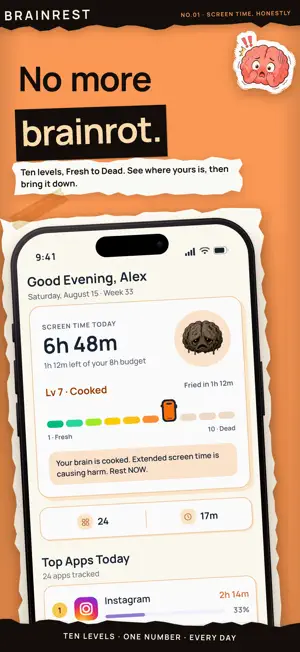
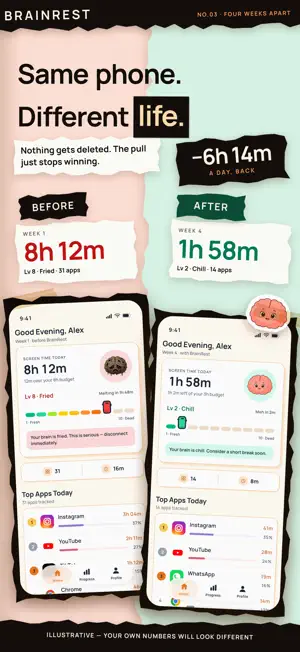
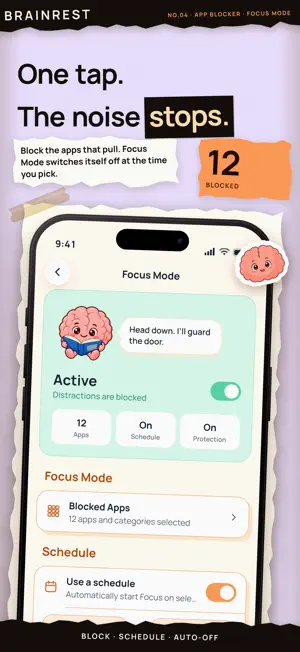
The brain you end the day with is not the one you woke up with. BrainRest turns your screen time into something you can actually feel. Your Brain Level climbs from 1 to 10 as the hours pile up — Fresh, Chill, Meh, Tired, Struggling, Fading, Cooked, Fried, Melting, Dead — and a Brain Buddy sits on your home screen looking exactly as cooked as you do. Then it helps you bring the number back down. BrainRest requires a subscription or a one-time Lifetime purchase. There is no free tier and no free version — every feature described below, including app blocking, Focus Mode and the Bedtime Schedule, needs a paid plan. The annual plan starts with a 7-day free trial. SEE WHERE THE HOURS GO • Daily and weekly screen time, broken down app by app • Tap any app for its own hourly chart and week-over-week trend • A calendar of every tracked day, so streaks and slides are obvious • Your Brain Level, recalculated as you use your phone BLOCK WHAT KEEPS PULLING YOU BACK • App limits — set a daily cap and get shielded when you hit it • Focus Mode — one tap, distractions locked, with an auto turn-off time • Bedtime Schedule — your phone goes quiet at night and wakes when you do • Shields you can't swipe past by accident WIDGETS THAT NAG, GENTLY Seven home-screen widgets: Brain Buddy, the Daily Goal ring, Top Apps, and Pulse in single, stacked and wide layouts. The number you're avoiding, right where you keep looking. YOUR USAGE STAYS ON YOUR PHONE Screen time and per-app usage are read from your device and never leave it. There is no cloud copy of your usage and nothing about your habits is sold. Your account exists to keep your settings and goals, nothing more. WHY IT WORKS Most screen time apps show you a chart and hope you feel bad. BrainRest gives the number a face and a consequence, then puts the block one tap away — at the exact moment you would have opened the app anyway. The average person spends over four hours a day on their phone. That is roughly sixty days a year. BrainRest is the plan to take some of it back. PRICING A paid plan is required to use BrainRest. Nothing is sold separately and no feature costs extra — every plan includes everything described above. • Monthly — $9.00 per month • Annual — $69.00 per year, starting with a 7-day free trial • Lifetime — $199.00, a one-time purchase that never renews Payment is charged to your Apple Account at confirmation of purchase. A subscription renews automatically unless auto-renew is turned off at least 24 hours before the end of the current period, and your account is charged for renewal within 24 hours of the end of the period. Manage your plan or turn off auto-renew in Settings > Apple Account > Subscriptions. Any unused portion of a free trial is forfeited when a subscription is purchased. —— Terms of Use: https://brainrest.pro/terms Privacy Policy: https://brainrest.pro/privacy
What’s new
Version 1.1.1 · Updated October 19, 2026
Meet Brain Buddy! • Your animated brain mascot now cheers, worries and naps with you across the app, on the block screens and in your reports. • New app details: tap any app to compare today with a usual day, see pickups and first and last use, hour-by-hour and day-by-day charts, a month calendar and a tip based on your own numbers. • Widgets now change color and mood with your brain level. • A fresh look with iOS's new glass controls. • Screen time now counts everything, with system screens in their own System row. • Manage your subscription right from Account. • You stay signed in, even when the connection drops. • Fixes for Pro access, free trials and purchases.
App privacy
The developer, Nguyen Thanh Thien, reported these privacy practices to Apple.
Data Linked to You
The following data, which may be collected and linked to your identity, may be used for the following purposes:
- Contact Info: Email Address
Used for: Product Personalization, App Functionality
Data Not Linked to You
The following data, which may be collected but is not linked to your identity, may be used for the following purposes:
- Contact Info: Name
- User Content: Photos or Videos
Used for: App Functionality
Alternatives to BrainRest: Screen Time Limit
Looking for apps like BrainRest: Screen Time Limit? Here are 6 similar apps on the App Store. The highest rated is ScreenHalt (5.0/5), and all 6 are free to download.
-
 Priovely
-
 ScreenHalt
5.0
ScreenHalt
5.0
-
 RotStop: Screen Time Blocker
4.8
RotStop: Screen Time Blocker
4.8
-
 STP
STP
-
 Ascend - Daily Habit Tracker
-
 Draw Floor Plan: Design Studio
1.0
Draw Floor Plan: Design Studio
1.0
| App | Rating | Price | Last updated | Compare |
|---|---|---|---|---|
| BrainRest: Screen Time Limit | – | Free | October 19, 2026 | |
| Priovely | – | Free | Sep 18, 2026 | Compare |
| ScreenHalt | 5.0 / 5 (8) | Free | Oct 15, 2026 | Compare |
| RotStop: Screen Time Blocker | 4.8 / 5 (9) | Free | Oct 20, 2026 | Compare |
| STP | – | Free | Aug 30, 2024 | Compare |
| Ascend - Daily Habit Tracker | – | Free | Oct 5, 2026 | Compare |
| Draw Floor Plan: Design Studio | 1.0 / 5 (1) | Free | Oct 18, 2026 | Compare |