

DriveDeck: Car Widgets & HUD
EntertainTech Solutions Navigation iPhoneiPadiPod touch
DriveDeck: Car Widgets & HUD is a free Navigation app for iPhone and iPad by EntertainTech Solutions. Rated 4.0/5 from 44 ratings. Requires iOS 17.0.
- Rating
- 4.0
- 44 ratings
- Price
- Free
- on the App Store
- Size
- 77 MB
- Age 4+
- Updated
- Oct 20
- 2026 · v1.4.4
Screenshots


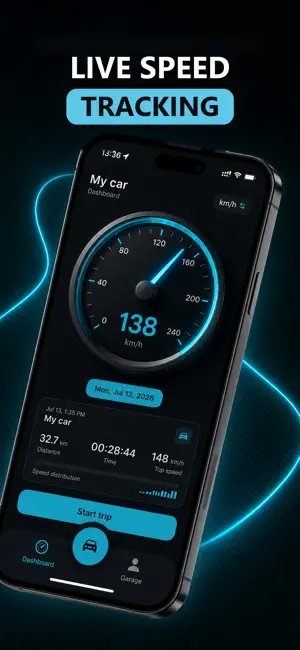
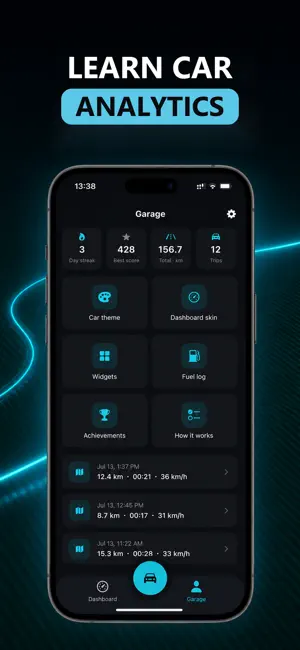
About DriveDeck: Car Widgets & HUD
DriveDeck turns your iPhone into a real car dashboard: a live GPS speedometer, a drive-mode HUD, automatic trip logs, car sounds and 15+ Home & Lock Screen widgets, all styled to match your car. SPEEDOMETER & DRIVE MODE • Live speed from GPS, in km/h or mph • Drive Mode: full-screen speed, map and Apple Music controls in one view • HUD: giant digits that reflect off your windshield, with a mirror toggle for night driving EVERY TRIP, RECORDED • Distance, time, average speed and route, updated live • Trips keep recording in the background, even if the app is closed • Hands-free: start and end trips on their own when your iPhone connects to CarPlay or your car's Bluetooth • Your current trip on CarPlay (iOS 26) and Apple Watch • Drive log, drive score and personal records CAR SOUNDS • 60+ clips for connecting, disconnecting and arriving home • AI Sounds: your car greets you by name. Pick a voice, a language and a phrase, or write your own • Plays by itself in the car after a one-time setup in Shortcuts WIDGETS THAT RIDE WITH YOU • Speedometer, last trip, drive stats, drive log, records and drive score • License plate, dial and HUD clocks, brand logo, my car card and your own photo • Editor to reframe, add captions and stickers • Lock Screen widgets: one tap from your Lock Screen to driving YOUR PERSONAL AI WIDGET • Pick your car and a photo of you, and AI renders a one-of-a-kind widget • Cinematic, Neon or Showroom styles, ready to share MADE FOR YOUR CAR • Pick your brand and the dashboard takes on its colors • A dark carbon-and-cyan look designed for the road • No account, no sign-up • Available in 21 languages PREMIUM DriveDeck is free to start. Premium unlocks all car sounds and AI Sounds, your personal AI widget, every Home & Lock Screen widget, the drive-mode HUD and all car themes. • Subscriptions: weekly and yearly options • Payment is charged to your Apple ID at confirmation of purchase • Subscriptions renew automatically unless auto-renew is turned off at least 24 hours before the end of the current period • Your account is charged for renewal within 24 hours prior to the end of the current period • Manage or cancel anytime in your App Store account settings • Terms of Use: https://www.apple.com/legal/internet-services/itunes/dev/stdeula/ • Privacy Policy: https://blowy.tech/CarWidgetsPrivacyPolicy.html Questions or feedback? [email protected]
Ratings & reviews
4.0
44 ratings
What’s new
Version 1.4.4 · Updated October 20, 2026
- New: AI Styles. Put your car into a ready-made style and use the picture as a widget - Garage → History: all your AI pictures in one place, with Save to Photos and Share - License plates for 38 countries, plus five new styles: US State, UK, JDM, Racing and Vintage - New theme packs: car brands and country flags - A redesigned Widgets tab and a new widget editor: move elements with a simple drag, pick clock, date and weather styles, and try six looks for every theme - 20 more car brands, and "Can't find your brand?" to ask for yours - 31 car colors to describe your car - The My Photo widget can show one of your AI pictures, and "Use as widget" decides what your AI widget shows - App Color: give the app a color of its own while your widgets keep your brand's - One Drive screen with a HUD button. The Live Speed on CarPlay switch is now on the Drive tab - Speed and clock widgets: crisp white numbers with an accent in your brand's color - Trips no longer add distance while your phone isn't moving - Stability improvements
App privacy
The developer, EntertainTech Solutions, reported these privacy practices to Apple.
Data Used to Track You
The following data may be used to track you across apps and websites owned by other companies:
- Identifiers: User ID, Device ID
- Usage Data: Product Interaction, Advertising Data
Data Linked to You
The following data, which may be collected and linked to your identity, may be used for the following purposes:
- Purchases: Purchase History
- Identifiers: User ID, Device ID
- Usage Data: Product Interaction, Advertising Data
Used for: Analytics, App Functionality
Data Not Linked to You
The following data, which may be collected but is not linked to your identity, may be used for the following purposes:
- Diagnostics: Crash Data, Performance Data
Used for: Analytics
Alternatives to DriveDeck: Car Widgets & HUD
Looking for apps like DriveDeck: Car Widgets & HUD? Here are 6 similar apps on the App Store. The highest rated is Car Play Connect: Smart Sync (5.0/5), and all 6 are free to download.
-
 CARFACE Car Widgets & Lyrics
4.0
CARFACE Car Widgets & Lyrics
4.0
-
 AutoScreen: Car Screen Mirror
3.3
AutoScreen: Car Screen Mirror
3.3
-
 Car Play Widgets: Carget
3.8
Car Play Widgets: Carget
3.8
-
 Car Dashboard Widgets - HiCar
4.0
Car Dashboard Widgets - HiCar
4.0
-
 Car Play Connect: Smart Sync
5.0
Car Play Connect: Smart Sync
5.0
-
 Radar Speed Camera Detector
4.8
Radar Speed Camera Detector
4.8
| App | Rating | Price | Last updated | Compare |
|---|---|---|---|---|
| DriveDeck: Car Widgets & HUD | 4.0 / 5 (44 ratings) | Free | October 20, 2026 | |
| CARFACE Car Widgets & Lyrics | 4.0 / 5 (597) | Free | Oct 2, 2026 | Compare |
| AutoScreen: Car Screen Mirror | 3.3 / 5 (6) | Free | Oct 14, 2026 | Compare |
| Car Play Widgets: Carget | 3.8 / 5 (36) | Free | Oct 22, 2026 | Compare |
| Car Dashboard Widgets - HiCar | 4.0 / 5 (1,505) | Free | Oct 9, 2026 | Compare |
| Car Play Connect: Smart Sync | 5.0 / 5 (1) | Free | Oct 3, 2026 | Compare |
| Radar Speed Camera Detector | 4.8 / 5 (4) | Free | Oct 10, 2026 | Compare |