

Blur Faces & Remove EXIF: Veil
Changsha Xiangling Technology Co., Ltd Photo & Video iPhoneiPadiPod touch
Blur Faces & Remove EXIF: Veil is a free Photo & Video app for iPhone and iPad by Changsha Xiangling Technology Co., Ltd. Requires iOS 17.0.
- Price
- Free
- on the App Store
- Size
- 15 MB
- Age 4+
- Updated
- Oct 21
- 2026 · v1.1.1
Screenshots


About Blur Faces & Remove EXIF: Veil
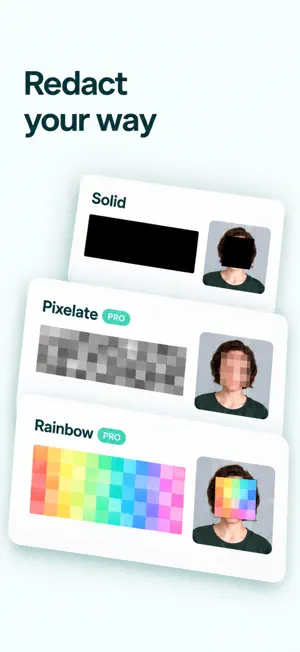
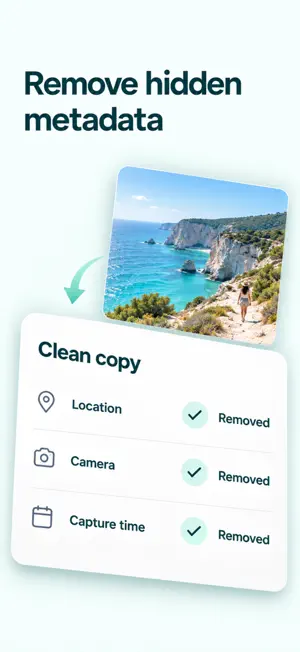
Hide private details before you share. Screenshots, shipping labels, ID photos, and everyday pictures can contain phone numbers, addresses, faces, and QR codes—as well as hidden location and camera information. Redact helps you review sensitive content, cover selected areas, and create a new copy without hidden photo metadata. All photo processing happens on your device. Photos are never uploaded, and no account is required. KEY FEATURES • Detect faces, QR codes, barcodes, and supported sensitive text on-device • Find email addresses, supported phone and ID number formats, bank card numbers, and text containing sensitive labels • Add manual boxes to cover details that automatic detection misses • Choose solid, blur, or pixelated redaction, with an effect preview before applying • Render redactions directly into the exported image pixels • Re-encode a new copy to remove metadata such as GPS location, device information, and capture time • Scan the cleaned image again and review the redaction and metadata checks before saving • Save or share a new copy without modifying or deleting the original PRIVACY BY DESIGN • All photo detection and processing happens on-device • No ads or third-party analytics • Only photos you explicitly choose with the system photo picker are accessed • Saving requests permission only to add a new photo to your library FREE FEATURES AND LIFETIME MEMBERSHIP Solid black redaction, metadata removal, saving, and sharing are free. Lifetime Membership is a one-time purchase with no automatic renewal: • Unlock blur and pixelated redaction • Use white, gray, and custom solid redaction colors • Save and share without support prompts Existing Lifetime Members receive these benefits without purchasing again. Your last applied style and color are remembered on this device. Final pricing is shown on the App Store purchase sheet. Restore Purchases is available. BEFORE YOU SHARE Automatic detection can miss handwriting, complex backgrounds, and information that requires context. A second scan cannot guarantee that every sensitive detail has been found. Zoom in and review all areas you want to hide before saving or sharing. Automatic phone and ID number detection currently focuses on Chinese formats, and sensitive-label detection uses Chinese keywords. Use manual boxes to cover other details. Privacy Policy: https://dayrune.com/legal/redact/privacy/ Terms of Service: https://dayrune.com/legal/redact/terms/ Membership Service Agreement: https://dayrune.com/legal/redact/membership/
What’s new
Version 1.1.1 · Updated October 21, 2026
Show off your new purchase. Not your home address. We’ve improved text detection in long screenshots and added a zoomable preview after editing. Less squinting. Fewer “wait, did I cover that?” moments. Same house rules: photos stay on your device, originals stay untouched.
App privacy
The developer, Changsha Xiangling Technology Co., Ltd, reported these privacy practices to Apple.
Data Not Collected
The developer does not collect any data from this app.
Alternatives to Blur Faces & Remove EXIF: Veil
Looking for apps like Blur Faces & Remove EXIF: Veil? Here are 6 similar apps on the App Store. The highest rated is Presets & Filters - LightPro (5.0/5), and all 6 are free to download.
-
 Jange: Photo & File Vault
-
 Redact — Censor & Blur Photos
3.0
Redact — Censor & Blur Photos
3.0
-
 Presets & Filters - LightPro
5.0
Presets & Filters - LightPro
5.0
-
 Redact: Remove Sensitive Info
-
 EXIF Editor & AI Label Remover
5.0
EXIF Editor & AI Label Remover
5.0
-
 Black Highlighter: Redact Text
4.4
Black Highlighter: Redact Text
4.4
| App | Rating | Price | Last updated | Compare |
|---|---|---|---|---|
| Blur Faces & Remove EXIF: Veil | – | Free | October 21, 2026 | |
| Jange: Photo & File Vault | – | Free | Oct 24, 2026 | Compare |
| Redact — Censor & Blur Photos | 3.0 / 5 (2) | Free | Sep 29, 2026 | Compare |
| Presets & Filters - LightPro | 5.0 / 5 (7) | Free | Jul 22, 2024 | Compare |
| Redact: Remove Sensitive Info | – | Free | Jun 17, 2025 | Compare |
| EXIF Editor & AI Label Remover | 5.0 / 5 (6) | Free | Oct 19, 2026 | Compare |
| Black Highlighter: Redact Text | 4.4 / 5 (92) | Free | Sep 22, 2025 | Compare |