

FROGO-Bingo|Task|Heatmap|ADHD
舒涵 范 Productivity iPhoneiPadiPod touch
FROGO-Bingo|Task|Heatmap|ADHD is a free Productivity app for iPhone and iPad by 舒涵 范. Requires iOS 17.0. Updated October 5, 2026.
- Price
- Free
- on the App Store
- Size
- 4 MB
- Age 4+
- Updated
- Oct 5
- 2026 · v1.2.1
Screenshots


About FROGO-Bingo|Task|Heatmap|ADHD
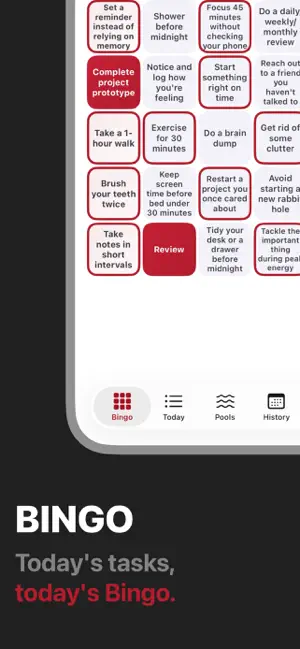
FROGO is an ADHD-friendly, lightweight planning app that combines daily priorities with a simple Bingo system. The name FROGO comes from FROG and Bingo. The FROG part is inspired by the time management idea often known as the “frog theory”: start with the most important and worthwhile task of the day, handle it first, and you can use the rest of your day with a little more ease. FROGO does not emphasize efficiency, strict planning, or habit building. We know that, for some people, those ideas can simply add more pressure. What we hope is that the things you truly have to do, along with some things you wish you could do to make the day feel more complete, can enter your life in a gentler and more playful form. Start by choosing 1 to 3 things that really matter today, then generate a random Bingo board to make space for smaller actions. At the beginning of each day, you write down 1 to 3 big tasks as your core goals. FROGO then draws terms from your event pools and generates a daily Bingo board, giving a little attention to things that may not be absolutely necessary, but are still worth doing. And, who knows, maybe you will actually do them. FROGO can be used for everyday tasks, habits, reading, watchlists, games, workouts, or anything you want to keep moving with a softer kind of momentum, without turning it into a to-do list. Main features: [1 to 3 daily big tasks] decide the most important goals of the day, so your sense of achievement comes from things you find meaningful. [Random daily Bingo] draw terms from your event pools and generate a Bingo card for the day. [Reroll] before completing any term, you can reroll today’s Bingo as many times as you like. Not in the mood for certain terms today? That is fine. Just refresh. [Second chance] you can even choose today’s big tasks again. You only get one second chance per day, but you do get one every day. [Editable default pool] modify, remove, or add default terms so FROGO fits your life better. [Custom event pools] create themed pools for books, films, shows, games, workouts, chores, hobbies, and more. You can also set how many terms are drawn from each pool. When you are not sure how to spend the day, these pools can offer a little direction. [Term weights] set different weights for terms so FROGO can generate a more balanced Bingo board and avoid overly easy routes. We do not want to add pressure, but we also do not want shortcuts. Every path is worth a try. [Exclusive groups] similar events, such as exercising for 30 minutes and exercising for 1 hour, can be placed in the same exclusive group so they do not appear on the same card. [Heatmap and streaks] record daily completion and see your progress build up over time. [Custom day reset time] if your schedule does not quite match your time zone, you can set when your day actually ends. As long as you are still awake, Bingo is still here. FROGO will not help you pack every day full, and it will not give you a strict to-do list. Our motto is: stay loose, use whatever works. Do what you can. Then rest. --------------------------------- Feedback and Support: If you encounter an issue while using FROGO or would like to share feedback, you can contact us through the support link in the app settings. Your feedback helps FROGO keep improving. Privacy and Data: The current version of FROGO does not provide an account system and does not operate a custom server. Your app data is mainly stored on your device and in your own iCloud account. FROGO does not use third-party advertising SDKs, cross-app or cross-site tracking, or third-party analytics services. You can find more details in the privacy policy linked from the app settings.
What’s new
Version 1.2.1 · Updated October 5, 2026
FROGO 1.2: More personalization, more ways to make it yours. 【1.2.1 Added】 Added 3x3 layout. 【1.2 Added】 1. Added Cell Notes: Add timeline-based text, photos, or videos to Bingo cells and Big Tasks. Notes save automatically and can be revisited in History. 2. Added Custom Color Settings: Save and switch theme colors, dark backgrounds, heatmap palettes, and difficulty palettes. Import and export your saved palettes. 3. Added Motivation Messages: Receive a random encouragement when you complete a regular cell, make a Bingo, or finish a Big Task. Create your own messages and use them across multiple occasions. 【Improved】 4. Improved History Cards: Bingo cells and Big Tasks with notes now display a note indicator. Expand notes directly beneath the related item. 5. Refined portrait and landscape layouts, editing interactions, and haptic feedback.
App privacy
The developer, 舒涵 范, reported these privacy practices to Apple.
Data Not Collected
The developer does not collect any data from this app.
Alternatives to FROGO-Bingo|Task|Heatmap|ADHD
Looking for apps like FROGO-Bingo|Task|Heatmap|ADHD? Here are 6 similar apps on the App Store.


| App | Rating | Price | Last updated | Compare |
|---|---|---|---|---|
| FROGO-Bingo|Task|Heatmap|ADHD | – | Free | October 5, 2026 | |
| Abox Mark · Micro Journal | – | Free | Sep 14, 2026 | Compare |
| 愿望卡 - 心愿清单专注任务|角色陪伴|愿望之神|愿神|番茄 | – | Free | Jun 6, 2026 | Compare |
| 模板日记 | – | Free | Jul 16, 2026 | Compare |
| D-Quest | – | Free | Aug 10, 2026 | Compare |
| 油耗助手 - 计算油耗,计算价格 | – | Free | Jul 26, 2026 | Compare |
| DeepFocus | – | Free | Aug 26, 2026 | Compare |