

NetProbeX - Network Scanner
AH SEN TEW Utilities iPhoneiPadiPod touch
NetProbeX - Network Scanner is a free Utilities app for iPhone and iPad by AH SEN TEW. Requires iOS 16.0. Updated July 10, 2026.
- Price
- Free
- on the App Store
- Size
- 4 MB
- Age 4+
- Updated
- Jul 10
- 2026 · v1.0
Screenshots

About NetProbeX - Network Scanner
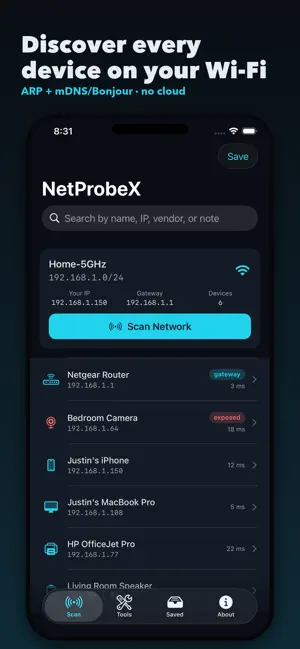
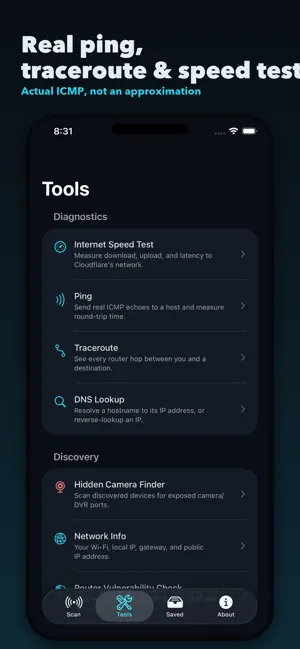
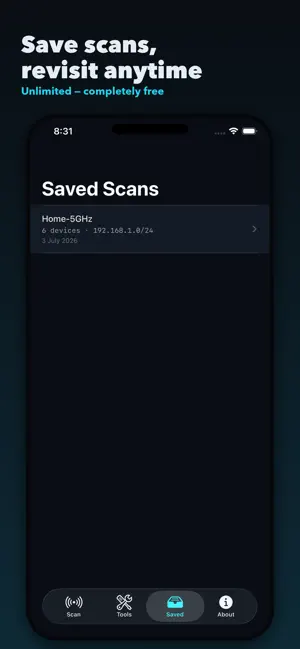
NetProbeX shows you what's actually on your network — not just that a device exists, but what it's running and what it's exposing. WHY NETPROBEX Most network scanners tell you "a device is here" and stop. NetProbeX goes further: tap any open port and see the exact raw data the service sends back, in hex and ASCII, just like a professional network tool. No other consumer scanner shows you this. Everything runs on your device. There's no account to create, no cloud backend, and nothing about your network is ever sent anywhere except the one optional, manual public-IP check you can trigger yourself. WHAT YOU CAN DO • Discover every device on your Wi-Fi — routers, phones, laptops, printers, smart speakers, cameras — with real names via mDNS/Bonjour, not just IP addresses. • Raw Response Inspector — tap an open port and see the exact bytes the service returns. Copy it, export it, or send your own custom probe. • Hidden Camera Finder — scan for exposed RTSP/DVR camera ports, the kind hidden cameras and unsecured IP cameras commonly leave open. • Router Vulnerability Check — a read-only look at whether your router has UPnP, NAT-PMP, or Telnet left open, the three most common home-router misconfigurations. • Real diagnostics — actual ICMP ping and traceroute (not an approximation), DNS lookup, and an internet speed test. • Wake on LAN — save a device's MAC once and wake a sleeping PC or NAS on demand. • Rename, label, and hide devices — keep notes on a busy network so you can identify the culprit fast if something causes a slowdown or an IP conflict. • Save scans and revisit them anytime. HONEST ABOUT WHAT IT CAN'T DO Apple restricts what any app — including NetProbeX — can see about other devices' real hardware (MAC) addresses, as a privacy protection. NetProbeX respects this rather than trying to work around it: device identification relies on network behavior, hostnames, and mDNS names, which is what makes NetProbeX reliable where other scanners overpromise. Built for anyone who's ever wondered "what is that device on my network?" — from home users curious about their smart devices to IT-minded people managing a busy office Wi-Fi.
App privacy
The developer, AH SEN TEW, reported these privacy practices to Apple.
Data Used to Track You
The following data may be used to track you across apps and websites owned by other companies:
- Location: Coarse Location
- Identifiers: Device ID
- Usage Data: Product Interaction, Advertising Data
Data Not Linked to You
The following data, which may be collected but is not linked to your identity, may be used for the following purposes:
- Location: Coarse Location
- Identifiers: Device ID
- Usage Data: Product Interaction, Advertising Data
- Diagnostics: Crash Data
Used for: Third-Party Advertising, App Functionality
Alternatives to NetProbeX - Network Scanner
Looking for apps like NetProbeX - Network Scanner? Here are 6 similar apps on the App Store.
-
 Network Scan: Wi-Fi & SSH
-
 Coddiq - Network Scanner
-
 OniNetwork: Network Analyzer
-
 Network Intrusion Detection
-
 Network Scanner & IP,PORT,WİFİ
-
 Network Tools/Toolkit
| App | Rating | Price | Last updated | Compare |
|---|---|---|---|---|
| NetProbeX - Network Scanner | – | Free | July 10, 2026 | |
| Network Scan: Wi-Fi & SSH | – | Free | Aug 24, 2026 | Compare |
| Coddiq - Network Scanner | – | Free | Jun 26, 2026 | Compare |
| OniNetwork: Network Analyzer | – | Free | Sep 8, 2026 | Compare |
| Network Intrusion Detection | – | Free | Mar 17, 2026 | Compare |
| Network Scanner & IP,PORT,WİFİ | – | Free | Sep 20, 2026 | Compare |
| Network Tools/Toolkit | – | Free | May 31, 2026 | Compare |