

Search Me! Word Search Creator
DigitalSandbox Games iPhoneiPadiPod touch
Search Me! Word Search Creator is a free Games app for iPhone and iPad by DigitalSandbox. Requires iOS 26.0. Updated September 27, 2026.
- Price
- Free
- on the App Store
- Size
- 3 MB
- Age 4+
- Updated
- Sep 27
- 2026 · v1.1.0
Screenshots


About Search Me! Word Search Creator
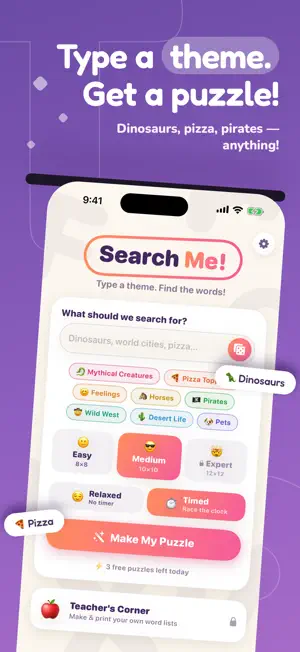
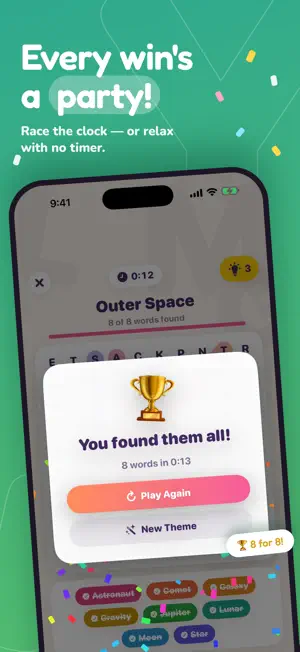
Type any theme — "world cities," "ocean animals," "things in space" — and Search Me! instantly invents a word list and hides it in a puzzle grid. Drag your finger across the letters to circle each word. Word lists are created right on your device by Apple Intelligence — no accounts, no internet needed, and nothing you type ever leaves your iPhone or iPad. On devices without Apple Intelligence, eight built-in themes keep the game fully playable. FEATURES • Endless AI puzzles: type any theme and get a fresh puzzle in seconds • Three difficulty levels: Easy 8×8, Medium 10×10, Expert 12×12 with backwards words • Drag-to-circle gameplay with satisfying highlights and a confetti celebration • Hints when you're stuck, plus riddle-style clues on devices with Apple Intelligence • Siri and Shortcuts: say “Make a word search in Search Me” or “Surprise me in Search Me” • Seven calm, kid-friendly color themes • Works completely offline with built-in themes • Private by design: no ads, and nothing you type or scan ever leaves your device PUZZLE PASS (one-time purchase) • Unlimited puzzles every day (free tier includes 3) • Expert 12×12 grids • 5 hints per game TEACHER'S CORNER — CLASSROOM PACK (one-time purchase) • Type your own word lists — spelling words, vocabulary, science terms • Scan a printed word list with the camera, or pick a photo, and turn it into a puzzle • Print a two-page PDF worksheet with answer key Both are one-time purchases — no subscriptions — and support Family Sharing. Purchases sit behind a parental gate.
What’s new
Version 1.1.0 · Updated September 27, 2026
Big update for curious kids and busy teachers: • Scan a word list: In Teacher's Corner (Classroom Pack), snap a photo of a printed spelling or vocabulary list, or pick one from Photos, and turn it into a puzzle in seconds. The photo is read right on your device and never uploaded. • Hint clues: Stuck? Tap the hint bulb for a riddle-style clue about the hidden word (on devices with Apple Intelligence). • Siri and Shortcuts: Say "Make a word search in Search Me" or "Surprise me in Search Me," or put it on your Action button. • Kid-friendly themes: a new on-device check keeps puzzle topics appropriate for kids. • Easier to read: Search Me keeps its calm, light look even when your device is in Dark Mode. • Fuller puzzles: if a theme comes up short on words, Search Me fills in from a matching built-in theme.
App privacy
The developer, DigitalSandbox, reported these privacy practices to Apple.
Data Not Linked to You
The following data, which may be collected but is not linked to your identity, may be used for the following purposes:
- Identifiers: Device ID
- Usage Data: Product Interaction
Used for: Analytics
Alternatives to Search Me! Word Search Creator
Looking for apps like Search Me! Word Search Creator? Here are 6 similar apps on the App Store. The highest rated is Wordgrove: Word Search Puzzles (5.0/5), and all 6 are free to download.
-
 Wordgrove: Word Search Puzzles
5.0
Wordgrove: Word Search Puzzles
5.0
-
 WordSearch by GDubs Games
-
 Follow Suit Solitaire
5.0
Follow Suit Solitaire
5.0
-
 Word Search Jam - Word Puzzle
-
 Word Hunt Daily
-
 Wordy! Word Search Puzzle
| App | Rating | Price | Last updated | Compare |
|---|---|---|---|---|
| Search Me! Word Search Creator | – | Free | September 27, 2026 | |
| Wordgrove: Word Search Puzzles | 5.0 / 5 (1) | Free | Aug 7, 2026 | Compare |
| WordSearch by GDubs Games | – | Free | Jan 12, 2026 | Compare |
| Follow Suit Solitaire | 5.0 / 5 (5) | Free | Oct 12, 2026 | Compare |
| Word Search Jam - Word Puzzle | – | Free | Feb 19, 2026 | Compare |
| Word Hunt Daily | – | Free | Jul 3, 2026 | Compare |
| Wordy! Word Search Puzzle | – | Free | Apr 21, 2026 | Compare |