

Photo To Calendar Events-Pluck
Kyrylo Shadrintsev Productivity iPhoneiPadiPod touch
Photo To Calendar Events-Pluck is a free Productivity app for iPhone and iPad by Kyrylo Shadrintsev. Rated 5.0/5 from 1 ratings. Requires iOS 17.0.
- Rating
- 5.0
- 1 ratings
- Price
- Free
- on the App Store
- Size
- 51 MB
- Age 4+
- Updated
- Aug 9
- 2026 · v1.0.2
Screenshots



About Photo To Calendar Events-Pluck
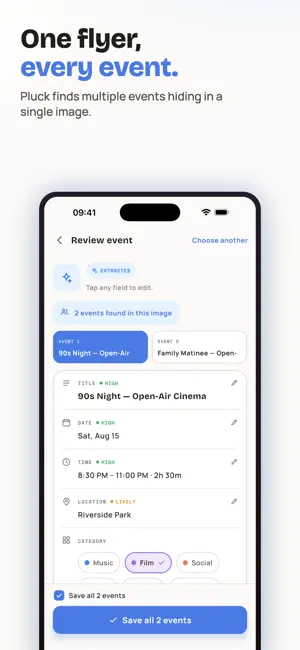
Pluck turns the paper and pixels around you into calendar events. Snap a flyer, poster, ticket or invitation — or paste a screenshot or typed note — and Pluck's AI reads the title, date, time and location for you. Review and edit every event before it's saved, then sync it to your iPhone calendar in one tap. WHAT PLUCK DOES • Snap a photo of a flyer, poster, ticket or invitation and get a calendar event • Paste screenshots or type text — Pluck finds the events inside • AI extracts the title, date, time and location • Review and edit everything before saving • Saved events sync to your iPhone calendar • Works great with class schedules and syllabi No more retyping dates from school flyers, gig posters or party invites. Pluck reads them so you don't have to. Pluck Pro — subscription Pluck Pro is an auto-renewing subscription that lifts the free tier's limit of 3 scans per day and gives you unlimited AI event scans. Weekly ($4.99/week), or yearly ($39.99/year) with a 7-day free trial. Payment is charged to your Apple Account when you confirm the purchase. The subscription renews automatically unless it is cancelled at least 24 hours before the end of the current period. Manage or cancel any time in Settings > Apple Account > Subscriptions. Deleting the app does not cancel a subscription. Terms of Use (EULA): https://www.apple.com/legal/internet-services/itunes/dev/stdeula/ Privacy Policy: https://pluck-d8bcc.web.app/privacy
What’s new
Version 1.0.2 · Updated August 9, 2026
Pluck is now available in many more countries. Plus small under-the-hood improvements that keep your scans fast and reliable.
App privacy
The developer, Kyrylo Shadrintsev, reported these privacy practices to Apple.
Data Not Linked to You
The following data, which may be collected but is not linked to your identity, may be used for the following purposes:
- Identifiers: Device ID, User ID
- Usage Data: Product Interaction
- Purchases: Purchase History
- User Content: Photos or Videos
- Diagnostics: Crash Data, Other Diagnostic Data
Used for: Analytics, App Functionality