

AlignerLog
MIKI CHINEN Medical iPhoneiPadiPod touch
AlignerLog is a free Medical app for iPhone and iPad by MIKI CHINEN. Requires iOS 16.4. Updated October 19, 2026.
- Price
- Free
- on the App Store
- Size
- 38 MB
- Age 4+
- Updated
- Oct 19
- 2026 · v1.5.3
Screenshots



About AlignerLog
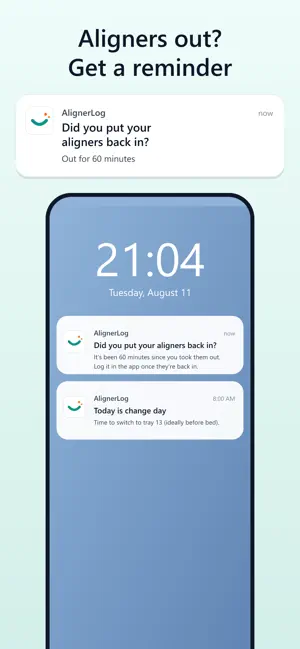
Clear aligner treatment. Sound familiar? • You only have a rough feeling for how long you've worn them today • You took them out for a meal, forgot, and noticed hours later • You lost track of the change day and wore the same tray too long AlignerLog is a wear-time tracker built just for clear aligners. Every feature, including the home screen widgets, is free, and no account is needed. ■ One tap to log, today's wear time at a glance Tap once when you take your aligners out and once when you put them back in. A 24-hour dial fills up with today's IN and OUT time and shows how close you are to your goal (for example 22 hours). Switch to the timeline view to see which hours of the day you were wearing them, laid out like a clock face. ■ Home screen widgets Check today's wear time without opening the app. Small and medium widgets show your wear dial and days until your next tray change, and you can switch IN/OUT right from the widget (widgets require iOS 17 or later). ■ Show your time the way you like On the home screen and widgets, choose what to show (total or count-up), the text size, and whether to show the IN/OUT icon. ■ Forgot to tap? Fix it afterwards If you notice you forgot to tap, pick the time you actually took them out (or put them in) and the log is corrected. One missed tap no longer ruins a whole day. ■ Reminders when they're still out After the time you set, AlignerLog asks "Did you put your aligners back in?" With repeat reminders on, it keeps nudging you at the same interval until you log IN, so a forgotten tray doesn't stay out until bedtime. ■ Change-day tracking Set your change interval (7, 10, 14 days, and more) to count down to the next tray and get a reminder on the day. The reminder includes how long you wore the current tray. You can shift the change day by 1 to 3 days from the app. ■ A history that keeps you going The calendar shows each day's result and your change days. Look back at daily details and timelines any time. Your goal streak and overall treatment progress are always visible, so motivation stays up. ■ Retainer phase too Switch to retainer mode after treatment to track retainer hours with a separate daily goal. ■ Private and simple • No account. Open the app and start • Your data stays on your device • Export and restore a backup when you change phones • Every feature is free Made for: • Anyone in clear aligner treatment, or about to start • People who want to keep a daily goal such as 22 hours • Anyone worried about forgetting to put aligners back in, or forgetting to tap • People tracking retainer wear time Seeing your wear time every day makes treatment far easier to stick with. AlignerLog is here for the whole journey. * AlignerLog helps you record wear time. Always follow your orthodontist's or dentist's instructions on treatment, wear time, and when to change trays.
What’s new
Version 1.5.3 · Updated October 19, 2026
• New setup on first launch: set your current tray, change date and goal. • The small widget now shows days until your next tray change (you can hide it in Customize). • Added an English support page.
App privacy
The developer, MIKI CHINEN, reported these privacy practices to Apple.
Data Not Collected
The developer does not collect any data from this app.
Alternatives to AlignerLog
Looking for apps like AlignerLog? Here are 6 similar apps on the App Store. The highest rated is Fixu - Aligner Tracker (3.0/5), and all 6 are free to download.
-
 TrayHabit: Aligner Tracker
1.0
TrayHabit: Aligner Tracker
1.0
-
 Traybook: Aligner Tracker
-
 TrayWise: Aligner Tracker
1.0
TrayWise: Aligner Tracker
1.0
-
 Fixu - Aligner Tracker
3.0
Fixu - Aligner Tracker
3.0
-
 Retainly: Retainer Tracker
1.0
Retainly: Retainer Tracker
1.0
-
 Aliner: Aligner Tracker
| App | Rating | Price | Last updated | Compare |
|---|---|---|---|---|
| AlignerLog | – | Free | October 19, 2026 | |
| TrayHabit: Aligner Tracker | 1.0 / 5 (1) | Free | Aug 31, 2026 | Compare |
| Traybook: Aligner Tracker | – | Free | Oct 19, 2026 | Compare |
| TrayWise: Aligner Tracker | 1.0 / 5 (1) | Free | Oct 5, 2026 | Compare |
| Fixu - Aligner Tracker | 3.0 / 5 (2) | Free | Oct 15, 2026 | Compare |
| Retainly: Retainer Tracker | 1.0 / 5 (1) | Free | Oct 5, 2026 | Compare |
| Aliner: Aligner Tracker | – | Free | Oct 19, 2026 | Compare |
Compare AlignerLog with the top alternatives: ratings, updates, ASO score and keyword gaps →