

Exframe
Jawon Koo Photo & Video iPhoneiPadiPod touch
Exframe is a free Photo & Video app for iPhone and iPad by Jawon Koo. Rated 1.0/5 from 1 ratings. Requires iOS 15.0. Updated October 15, 2026.
- Rating
- 1.0
- 1 ratings
- Price
- Free
- on the App Store
- Size
- 49 MB
- Age 4+
- Updated
- Oct 15
- 2026 · v1.2.7
Screenshots

About Exframe
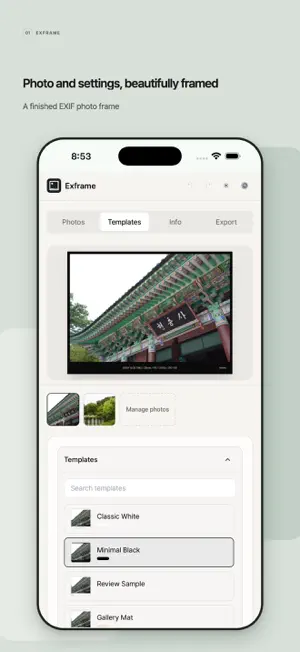
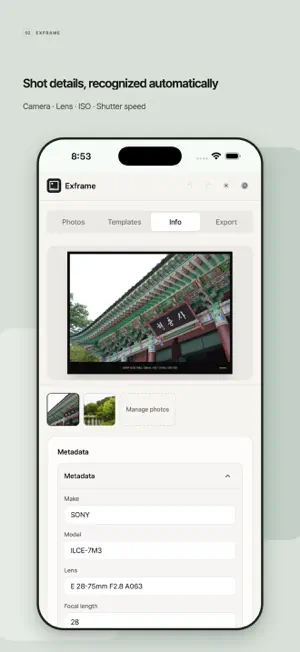
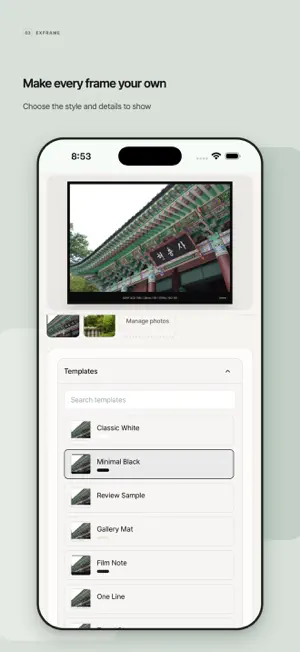
Give every photo a frame that shows how it was made. Exframe reads the EXIF metadata in your photos and turns it into clean, shareable frames. Import photos, choose a template, decide which details to show, and export finished images without rewriting camera settings for every post. Built for photographers, camera enthusiasts, manual-lens users, bloggers, and creators who share work on social media, photography communities, or portfolios. Metadata and manual lenses - Read camera, lens, focal length, aperture, shutter speed, ISO, exposure compensation, date, location, and copyright details. - Review and edit every displayed value before export. - Save manual or vintage lens profiles and apply a different profile to each photo. - Photos from lenses without electronic contacts can be exported even when EXIF aperture is missing. - Reorder fields, choose separators, and restore original values at any time. Location names - Automatically load place names when importing photos that contain GPS data. - Choose country, city, or neighborhood detail and the display language. - Look up one photo or several GPS photos together. Frames and export - Process and export up to 20 photos in one project. - Choose templates, maker display, Exframe marks, date style, frame margins, and visible fields. - Use presets for blogs, square posts, 4:5 portraits, stories, or high-quality archives. - Select aspect ratio, quality, and output size without cropping the photo. - Export JPEG or WebP, save to Photos, or open the system share sheet. - JPEG exports retain original GPS metadata; WebP exports do not include EXIF. Privacy Photos are processed on your device and are not uploaded to the developer's server. When you enable place-name lookup, only the coordinates and display language required for the lookup are sent to an external reverse-geocoding service.
What’s new
Version 1.2.7 · Updated October 15, 2026
- Added the new 'Ambient Blur' template, featuring an immersive blurred backdrop and floating drop shadow. - Reordered templates by popularity and placed Ambient Blur near the top for easier access.
App privacy
The developer, Jawon Koo, reported these privacy practices to Apple.
Data Used to Track You
The following data may be used to track you across apps and websites owned by other companies:
- Identifiers: Device ID
- Usage Data: Advertising Data
Data Not Linked to You
The following data, which may be collected but is not linked to your identity, may be used for the following purposes:
- Identifiers: Device ID
- Usage Data: Product Interaction, Advertising Data
- Diagnostics: Crash Data
Used for: Third-Party Advertising, Analytics
Alternatives to Exframe
Looking for apps like Exframe? Here are 6 similar apps on the App Store.
-
 Exifmark - EXIF Photo Frame
-
 mado frame
-
 EXIF Frame: Photo Watermark
-
 MetaCam: EXIF Frame Watermark
-
 Paddie: Frame Daily Moments
-
 여백 | EXIF Frame
| App | Rating | Price | Last updated | Compare |
|---|---|---|---|---|
| Exframe | 1.0 / 5 (1 rating) | Free | October 15, 2026 | |
| Exifmark - EXIF Photo Frame | – | Free | Aug 7, 2026 | Compare |
| mado frame | – | Free | Jul 17, 2026 | Compare |
| EXIF Frame: Photo Watermark | – | Free | Oct 20, 2026 | Compare |
| MetaCam: EXIF Frame Watermark | – | Free | Oct 11, 2026 | Compare |
| Paddie: Frame Daily Moments | – | Free | Oct 17, 2026 | Compare |
| 여백 | EXIF Frame | – | Free | Oct 9, 2026 | Compare |
Compare Exframe with the top alternatives: ratings, updates, ASO score and keyword gaps →