

SQLSSH: Database Client/SSH/S3
Trendcas Developer Tools iPhoneiPadiPod touch
SQLSSH: Database Client/SSH/S3 is a free Developer Tools app for iPhone and iPad by Trendcas. Requires iOS 15.0. Updated October 27, 2026.
- Price
- Free
- on the App Store
- Size
- 47 MB
- Age 4+
- Updated
- Oct 27
- 2026 · v1.0.12
Screenshots



About SQLSSH: Database Client/SSH/S3
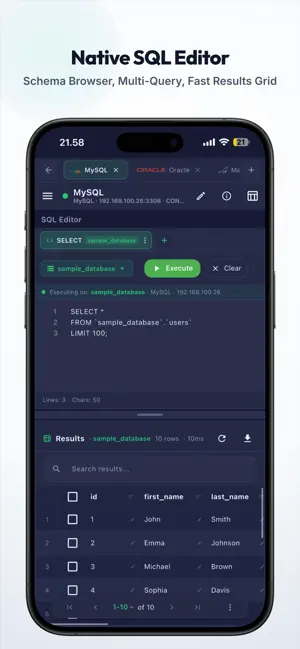
SQLSSH — Developer Tools, One Beautiful App. In Your Pocket, On Your Desk. Stop switching between a database IDE, a terminal, and an SFTP/S3 app. SQLSSH unifies PostgreSQL, MySQL, MSSQL, Oracle, SQLite, SSH, SFTP, FTP & S3 in one local-first workspace — built for developers who ship from phone, tablet, and desktop. WHY SQLSSH • One client for databases, servers, and files • Native performance (compiled - no WebViews): fast launch, low RAM, battery-friendly • Local-first by default: credentials & private keys stay on your device • Zero-knowledge end-to-end encrypted sync across devices • Direct connections — your data is never proxied through our servers SUPPORTED DATABASES 11+ engines: PostgreSQL, MySQL, MariaDB, SQLite, MSSQL, Oracle Database, CockroachDB, YugabyteDB, Amazon Aurora & Amazon Redshift. FAST & NATIVE SQL EDITOR Write, run, and debug SQL where you work: • Syntax highlighting & database-specific helpers • Live schema navigator (tables, columns, PKs, indexes) • Multi-query execution with transactions (commit / rollback) • High-performance results grid for keyboard and touch • Query history & reusable SQL snippets • Import/export SQL scripts, CSV • Visual Schema Browser, interactive ERD diagrams, Generate DDL • Dialect wizards (UUID/SYS_GUID, sequences, date helpers) SSH TERMINAL & SECURE ACCESS Keep the shell next to your queries: • Built-in interactive SSH terminal • On-device SSH key manager (passphrase-protected keys, never stored as plaintext) • SSH bastion / jump-host tunneling for private VPC databases • SOCKS5 proxy support for restricted networks • Port forwarding without leaving the app CLOUD & NETWORK STORAGE Browse and transfer files in the same workspace: • SFTP, FTP/FTPS, Amazon S3 & S3-compatible storage • Directory breadcrumbs, search, and background transfer queues MULTI-SESSION WORKSPACE • Open multiple concurrent connections in tabs • Switch instantly between SQL sessions, terminals, and storage • Isolated query history & schema state per session • Split layouts to compare results or monitor servers side-by-side SECURITY & PRIVACY • AES-256 encryption for on-device secrets • Biometric lock (fingerprint / Face ID) + PIN, with auto-lock • We do not access your database content, query results, SSH I/O, or private keys • Optional Master Password–protected E2EE sync FREE TIER & PRO SUBSCRIPTION DETAILS SQLSSH is free to download and use with standard features (Free Tier). You can experience all premium features by starting a 7-day free trial of the Pro subscription. Free Tier Limitations: • Databases: MySQL, PostgreSQL, and SQLite only. • Connections: Up to 2 database connections and 1 SSH terminal. • Storage: Up to 1 remote storage host (SFTP/FTP/S3) with 1 concurrent transfer. • Saved Queries: Up to 10 SQL snippets. • Session Tabs: Single active session tab at a time. • Themes: Standard themes only. SQLSSH Pro Subscription (7-Day Free Trial Available): Unlock the ultimate developer workspace. Upgrading to Pro removes all limits and adds: • End-to-End Encrypted Sync: Access your connections, credentials, and query history securely across all devices with client-side zero-knowledge encryption. • All 11+ Database Engines: Full support for MSSQL, Oracle, MariaDB, CockroachDB, YugabyteDB, Amazon Aurora, and Redshift. • Unlimited Workspace: Add unlimited connections, SSH terminals, and storage hosts. • Multi-Tab/Multi-Session Productivity: Unlimited concurrent sessions or file transfers side-by-side. • High-Speed Storage: Queue up to 10 concurrent file transfers. • Advanced Editor: Save up to 500 query snippets and up to 120-second execution timeouts. • Premium Themes: Customize your editor with 8 premium theme presets. Subscription Details: Standard subscriptions start with a 7-day free trial. Cancel anytime during the trial period at no cost. Terms of Use (EULA): https://sqlssh.com/terms/ Privacy Policy: https://sqlssh.com/privacy/
What’s new
Version 1.0.12 · Updated October 27, 2026
- Improved SSH Terminal Cursor: Smooth, uninterrupted cursor visibility while navigating with arrow keys or typing. - 10 SSH Terminal Color Themes: Customize your terminal with curated themes including Cyberpunk Neon, Tokyo Night, Dracula, Monokai Pro, and more. - Bug fixes and performance improvements.
App privacy
The developer, Trendcas, reported these privacy practices to Apple.
Data Linked to You
The following data, which may be collected and linked to your identity, may be used for the following purposes:
- Contact Info: Email Address, Name
- Identifiers: Device ID
- Usage Data: Other Usage Data
Used for: Analytics, App Functionality
Data Not Linked to You
The following data, which may be collected but is not linked to your identity, may be used for the following purposes:
- Diagnostics: Crash Data, Performance Data, Other Diagnostic Data
Used for: Analytics, App Functionality
Alternatives to SQLSSH: Database Client/SSH/S3
Looking for apps like SQLSSH: Database Client/SSH/S3? Here are 6 similar apps on the App Store. The highest rated is MagicSQL - SQL Client & Editor (5.0/5), and all 6 are free to download.
-
 MagicSQL - SQL Client & Editor
5.0
MagicSQL - SQL Client & Editor
5.0
-
 AI Remote Vibe
-
 Caliope — SQL Client
-
 InMobi Exchange Test App
-
 Master SQL - Database Manager
-
 Datark
| App | Rating | Price | Last updated | Compare |
|---|---|---|---|---|
| SQLSSH: Database Client/SSH/S3 | – | Free | October 27, 2026 | |
| MagicSQL - SQL Client & Editor | 5.0 / 5 (1) | Free | Jun 25, 2026 | Compare |
| AI Remote Vibe | – | Free | Jun 27, 2026 | Compare |
| Caliope — SQL Client | – | Free | Oct 22, 2026 | Compare |
| InMobi Exchange Test App | – | Free | Oct 12, 2026 | Compare |
| Master SQL - Database Manager | – | Free | Oct 16, 2026 | Compare |
| Datark | – | Free | Oct 29, 2026 | Compare |