

Muse — Composition Camera
亚 张 Photo & Video iPhoneiPadiPod touch
Muse — Composition Camera is a free Photo & Video app for iPhone and iPad by 亚 张. Rated 5.0/5 from 2 ratings. Requires iOS 17.0. Updated October 15, 2026.
- Rating
- 5.0
- 2 ratings
- Price
- Free
- on the App Store
- Size
- 96 MB
- Age 4+
- Updated
- Oct 15
- 2026 · v2.3.0
Screenshots


About Muse — Composition Camera
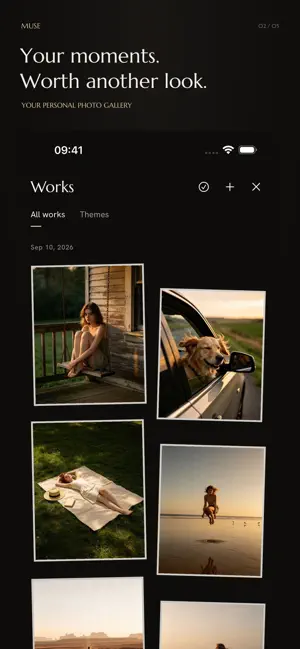
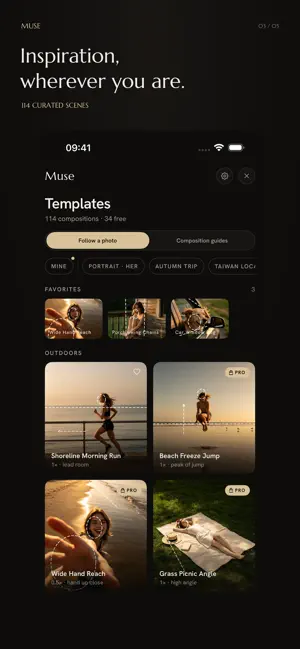
YOUR MOMENTS, READY TO REVISIT Capture photos and videos without leaving the camera. Muse keeps originals, reference examples and editing drafts in your Works gallery. Organize photos into themes, return to your edits, and create cards with adjustable photo corners. **She asks for one photo. Muse makes sure it's a good one.** Muse draws elegant dashed guidelines right on your camera — where she should stand, where the horizon belongs, where her face fits. Move until the lines rest on her, wait for the dashes to turn green, and shoot. **HOW IT WORKS** • Pick a composition — portraits, travel in Taiwan, Japan, Korea, Hong Kong and Europe, shots of him, home, night and outfit looks, couples, fur babies, and family • Align the dashes — they turn green as your subject locks in • All green? Shoot. One tap, done. **WHAT'S INSIDE** • 24 free, scene-independent guides for portraits, close-ups, back views, food, scenery and architecture • Guided 9:16 video with sound; trim the ends, apply a film tone or mute before saving • Live guides that recognize people, cats and dogs — fully on-device • Hand-curated composition templates, each paired with an exemplar photo • An exemplar photo behind every template — tap Compare to overlay it on your viewfinder • Three short tips per template: where to stand, how high to hold, when to zoom • Film-tone filters (Dawn, Fog, Cine, Butter, Noir) — muted, warm, never loud • Rule-of-thirds grid, level indicator with a soft haptic, 4:3 / 1:1 / 16:9 • Import any reference photo — Muse reads its composition and turns it into guides you can save as your own template • Photo cards — frames, background colors, a line of your words and the date, right after the shot **QUIET BY DESIGN** • No account. No subscription. No data collected. • One-time purchase unlocks every curated scene example and Pro filter — future scene packs included. Made for anyone who's ever heard "you press it, I'll pose" — and panicked.
What’s new
Version 2.3.0 · Updated October 15, 2026
Muse 2.3 gives your photos and videos more room for your own style. - More control over your photos: adjust exposure, warmth, highlights and shadows. Crop, rotate and straighten, zoom in on details, hold to compare with the original, and undo or redo your edits. - Keep a moment from your video: improved previews, timeline controls and selection looping help you find the frame you want. Save it as a full-resolution photo to keep editing or turn into a card. - Save a look you love: keep filters and color adjustments as a recipe, then apply it to selected photos and videos. Each work keeps its own crop and card details. We also fixed the editor layout after importing media, improved transitions in first-launch onboarding, and refined card editing, Pro unlock screens and video export feedback.
App privacy
The developer, 亚 张, reported these privacy practices to Apple.
Data Not Collected
The developer does not collect any data from this app.
Alternatives to Muse — Composition Camera
Looking for apps like Muse — Composition Camera? Here are 6 similar apps on the App Store. The highest rated is GridCam: Cinematic Composition (5.0/5), and all 6 are free to download.
-
 GridCam: Cinematic Composition
5.0
GridCam: Cinematic Composition
5.0
-
 Muse - AI Trending Photo
4.2
Muse - AI Trending Photo
4.2
-
 Muse: Your AI Art Partner
5.0
Muse: Your AI Art Partner
5.0
-
 Hackshot - Pose Camera
-
 Fovi Camera: AI Composition
-
 GudoCam: AI Composition Camera
| App | Rating | Price | Last updated | Compare |
|---|---|---|---|---|
| Muse — Composition Camera | 5.0 / 5 (2 ratings) | Free | October 15, 2026 | |
| GridCam: Cinematic Composition | 5.0 / 5 (1) | Free | Oct 3, 2026 | Compare |
| Muse - AI Trending Photo | 4.3 / 5 (8) | Free | Dec 19, 2025 | Compare |
| Muse: Your AI Art Partner | 5.0 / 5 (1) | Free | Oct 11, 2026 | Compare |
| Hackshot - Pose Camera | – | Free | Jul 4, 2026 | Compare |
| Fovi Camera: AI Composition | – | Free | Aug 1, 2026 | Compare |
| GudoCam: AI Composition Camera | – | Free | Oct 12, 2026 | Compare |