

PicColor AI: Coloring Page
Ha Do Thi Thu Graphics & Design iPhoneiPadiPod touch
PicColor AI: Coloring Page is a free Graphics & Design app for iPhone and iPad by Ha Do Thi Thu. Requires iOS 17. Updated July 9, 2026.
- Price
- Free
- on the App Store
- Size
- 44 MB
- Age 4+
- Updated
- Jul 9
- 2026 · v1.0
Screenshots

About PicColor AI: Coloring Page
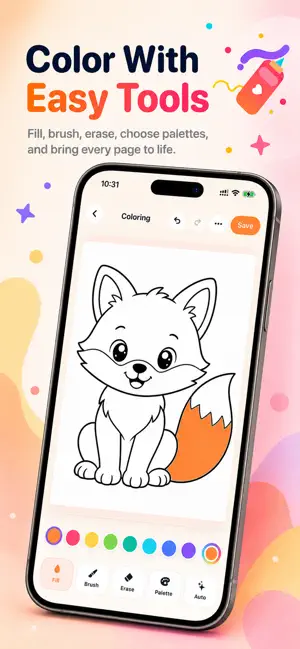
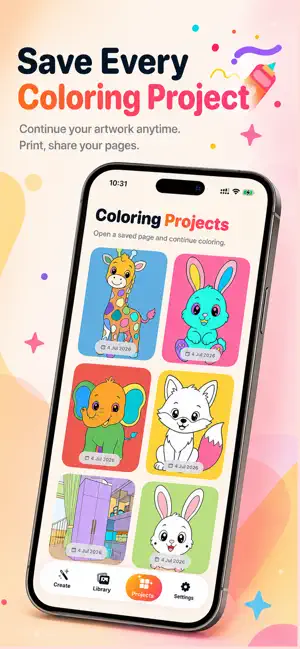
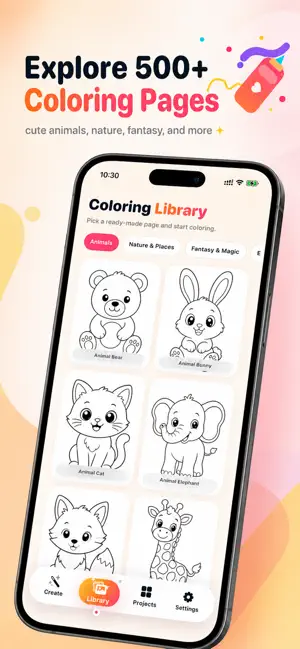
PicColor turns your favorite photos into beautiful coloring pages in seconds. Create printable line art from your own photos, color pages inside the app, or start instantly from a ready-made library of fun coloring pages. Perfect for kids, families, classrooms, creative breaks, and relaxing offline activities. Main features: - Turn photos into clean AI coloring pages - Import from your photo library or take a new photo with the camera - Crop, rotate, and adjust aspect ratio before creating - Choose from multiple coloring styles, including simple, clean, detailed, cute cartoon, comic, sticker, and mandala-inspired looks - Color inside the app with fill, brush, eraser, palettes, custom colors, undo, redo, and auto-color tools - Browse hundreds of ready-made coloring pages - Explore categories like Animals, Nature & Places, Fantasy & Magic, Everyday Life, Vehicles, Letters & Numbers, Patterns, and Seasonal & Holiday - Save projects and continue coloring later - Print, share, or export your pages as PDF or PNG - Manage saved projects, duplicate pages, and delete pages you no longer need Premium options include: - Monthly subscription - Lifetime purchase Premium features may include: - Premium coloring styles - HD and PDF export - Full coloring page library access - Remove Ads Credit packs include: - 10 Credits - 50 Credits - 120 Credits - 300 Credits Credit details: - 1 credit = 1 AI coloring page - Credits never expire - If generation fails, the app automatically refunds the credit - Credits are used for creating AI coloring pages - Pro access and credits are sold separately Subscription details: - Payment will be charged to your Apple ID account at confirmation of purchase. - Auto-renewable subscriptions renew automatically unless canceled at least 24 hours before the end of the current period. - Your account will be charged for renewal within 24 hours before the end of the current period. - You can manage or cancel your subscription anytime in your App Store account settings. - Any unused portion of a free trial, if offered, may be forfeited when you purchase a subscription. - Restore Purchases is available inside the app. PicColor makes it easy to turn memories into creative pages you can color, print, and share again and again. Privacy Policy: https://hosting-7ba9c.web.app/privacy.html Terms of Use: https://hosting-7ba9c.web.app/terms.html
App privacy
The developer, Ha Do Thi Thu, reported these privacy practices to Apple.
Data Not Collected
The developer does not collect any data from this app.
Alternatives to PicColor AI: Coloring Page
Looking for apps like PicColor AI: Coloring Page? Here are 6 similar apps on the App Store. The highest rated is Paint Aloha (5.0/5), and all 6 are free to download.
-
 AI Coloring Pages Book
-
 MagicPrint AI
-
 Paint Aloha
5.0
Paint Aloha
5.0
-
 AI KDP Coloring Book Maker Pro
-
 ColorCrafter: Paint by Numbers
3.3
ColorCrafter: Paint by Numbers
3.3
-
 InkMagic Photo Coloring Pages
4.5
InkMagic Photo Coloring Pages
4.5
| App | Rating | Price | Last updated | Compare |
|---|---|---|---|---|
| PicColor AI: Coloring Page | – | Free | July 9, 2026 | |
| AI Coloring Pages Book | – | Free | Jun 15, 2026 | Compare |
| MagicPrint AI | – | Free | Nov 25, 2025 | Compare |
| Paint Aloha | 5.0 / 5 (1) | Free | Aug 11, 2026 | Compare |
| AI KDP Coloring Book Maker Pro | – | Free | Jun 24, 2026 | Compare |
| ColorCrafter: Paint by Numbers | 3.3 / 5 (3) | Free | Sep 14, 2026 | Compare |
| InkMagic Photo Coloring Pages | 4.5 / 5 (4) | Free | Dec 30, 2025 | Compare |