

Skyline: Peak Finder & Namer
SEDX LLC Navigation iPhoneiPadiPod touch
Skyline: Peak Finder & Namer is a free Navigation app for iPhone and iPad by SEDX LLC. Requires iOS 17.0. Updated September 30, 2026.
- Price
- Free
- on the App Store
- Size
- 83 MB
- Age 4+
- Updated
- Sep 30
- 2026 · v1.16.27
Screenshots

About Skyline: Peak Finder & Namer
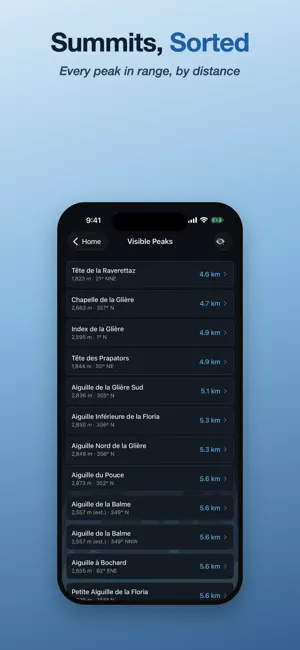
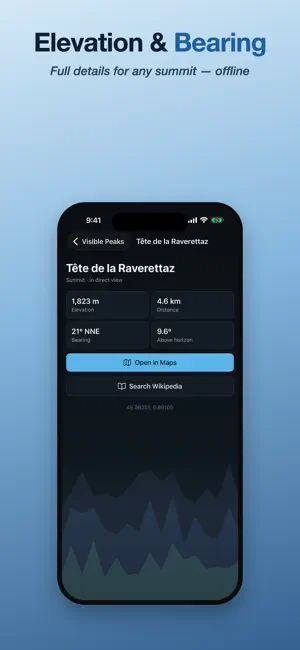
Ever stood at a viewpoint and wondered "what's that peak?" Skyline answers instantly. Point your phone at the mountains and their names float over the ridgeline in real time — no signs, no guessing, no guidebook. Skyline reads your GPS position and your phone's compass and tilt sensors, then calculates the bearing and apparent height of every named summit around you and labels each one on the view. It accounts for Earth's curvature and uses terrain data to hide peaks blocked by closer ridges — so you only see the summits you can actually see. IDENTIFY THE PEAKS AROUND YOU (FREE) - Live AR view: hold up your phone and peak names track the mountains as you pan. - Identify a photo: shoot a picture, or import a geotagged photo and Skyline labels the peaks from exactly where that shot was taken — anywhere in the world, not just where you are now. - Smart auto-aim: if a photo has a compass-direction tag the labels aim themselves; if not, Skyline matches the shape of the skyline, or you just drag to align. - Pinch to match a photo's zoom, tap a peak you recognise to anchor the alignment, and remove any summit that isn't really visible. - Tap any label for elevation, distance and bearing, or browse nearby summits sorted by distance. Identifying and naming peaks — live or in any photo — is completely free and always will be. SAVE, SHARE & EDIT (ONE-TIME PRO UNLOCK) Turn a labelled view into something you can keep and send: - Save the annotated photo straight to your camera roll. - Share it to messages, social apps, or anywhere else. - Lock the layout and fine-tune it: move, resize and re-anchor each label so the finished image looks exactly right. These export tools unlock with a single one-time purchase — no subscription, ever. Buy Pro once and it's yours on all your devices. Restore purchases anytime. WHY SKYLINE - Works worldwide, powered by an open global database of named peaks. - No account, no sign-up. Your location stays on your device. - Built for hikers, climbers, trail runners, road-trippers and anyone who loves a good view. - A clean, dark interface that disappears so the mountains take centre stage. GOOD TO KNOW Compass accuracy varies by device — a quick figure-8 motion calibrates it, and Settings lets you trim the compass, field of view and eye height until labels sit perfectly on the summits. Peak names and elevations come from OpenStreetMap (© OpenStreetMap contributors, ODbL); terrain data from the Copernicus GLO-90 elevation model via Open-Meteo. Head outside, hold up your phone, and finally put a name to every mountain on the horizon.
What’s new
Version 1.16.27 · Updated September 30, 2026
Some photos that could not be lined up because of cloud or haze now line up, thanks to a sky model that runs on your phone. Photos imported just after the terrain loads now line up without importing them again. The About & Credits screen lists the data the sky model was trained on.
App privacy
The developer, SEDX LLC, reported these privacy practices to Apple.
Data Not Linked to You
The following data, which may be collected but is not linked to your identity, may be used for the following purposes:
- Purchases: Purchase History
Used for: App Functionality
Alternatives to Skyline: Peak Finder & Namer
Looking for apps like Skyline: Peak Finder & Namer? Here are 6 similar apps on the App Store.
-
 Altika: Peaks & Hiking
-
 Mountain ID
-
 Altimeter & Peak Finder: VERT
-
 Hill Explorer: Hiking & Peaks
-
 CitySpotter AR
-
 Mountain & Peak Finder
| App | Rating | Price | Last updated | Compare |
|---|---|---|---|---|
| Skyline: Peak Finder & Namer | – | Free | September 30, 2026 | |
| Altika: Peaks & Hiking | – | Free | Sep 25, 2026 | Compare |
| Mountain ID | – | Free | May 19, 2026 | Compare |
| Altimeter & Peak Finder: VERT | – | Free | Oct 21, 2026 | Compare |
| Hill Explorer: Hiking & Peaks | – | Free | Oct 31, 2026 | Compare |
| CitySpotter AR | – | Free | Jul 31, 2026 | Compare |
| Mountain & Peak Finder | – | Free | Aug 9, 2026 | Compare |