

CastUp: Cast Phone to TV
GENERATIONZTECH LIMITED Developer Tools iPhoneiPadiPod touch
CastUp: Cast Phone to TV is a free Developer Tools app for iPhone and iPad by GENERATIONZTECH LIMITED. Requires iOS 17.6. Updated September 4, 2026.
- Price
- Free
- on the App Store
- Size
- 43 MB
- Age 17+
- Updated
- Sep 4
- 2026 · v1.0.1
Screenshots


About CastUp: Cast Phone to TV
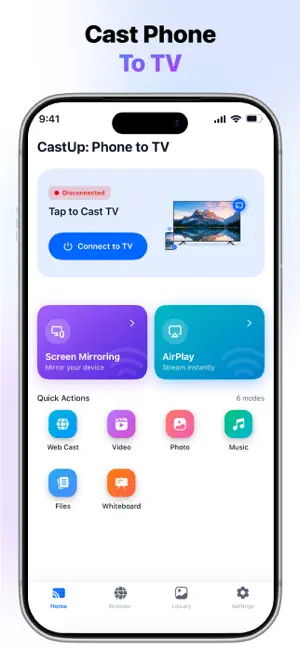
CastUp: Big Screen View Enjoy your favorite photos, videos and music on the big screen with CastUp: Big Screen View. Connect your Phone to smart TV over the same Wi-Fi network and share your content with ease. Whether you're watching family videos or viewing vacation photos, CastUp makes screen sharing simple and convenient. The cast phone to tv app is designed with an easy to use interface, allowing you to browse your media, select compatible devices, and start casting in just a few steps. Experience Your Content on a Bigger Screen Turn everyday moments into a more enjoyable viewing experience by sharing your favorite photos, personal videos, and music on compatible smart TVs. Whether you're relaxing at home or spending time with family, everything looks better on a larger display. Screen Mirroring Made Simple Display your phone screen on a larger display for browsing, presentations, photo sharing, app demonstrations and everyday viewing. Share Personal Videos Play videos stored on your phone on a compatible TV or supported device. Enjoy your own recordings, family clips, and saved videos on a bigger screen. Display Your Photos View photos from your phone on a larger display. Share albums, travel pictures, family memories, and special moments with everyone around you. Play Music on Big Screen Enjoy music and audio files available on your phone through compatible devices. Control playback directly from your phone. Cast Your Personal Media Browse your available photos, videos, and audio files, select what you want to share, and display it on a compatible screen. Find Compatible Devices Automatically Connect your phone and compatible TV or device to the same Wi-Fi network and discover available devices for casting. Clean, User Friendly Design Enjoy an intuitive interface designed to make casting easy for everyone. Navigate your media, connect to supported devices, and start sharing content with just a few taps. Perfect for Everyday Entertainment CastUp makes it easy to mirror your phone and enjoy your personal photos, videos, music, and screen content on a larger display. Disclaimer: CastUp is an independent application and is not affiliated with, endorsed by, or sponsored by any television manufacturer, device manufacturer, or trademark owner. Contact us: For feedback and queries, contact us at [email protected] Privacy Policy: http://generationztech.com/castupcastphonetotv Terms of Use: http://generationztech.com/castupcastphonetotv/termsofuse.html
What’s new
Version 1.0.1 · Updated September 4, 2026
* Firebase & Ads Implemented
App privacy
The developer, GENERATIONZTECH LIMITED, reported these privacy practices to Apple.
Data Used to Track You
The following data may be used to track you across apps and websites owned by other companies:
- Usage Data: Advertising Data
Data Not Linked to You
The following data, which may be collected but is not linked to your identity, may be used for the following purposes:
- Usage Data: Advertising Data
- Diagnostics: Crash Data
- User Content: Photos or Videos, Audio Data
Used for: Third-Party Advertising, Analytics, App Functionality
Alternatives to CastUp: Cast Phone to TV
Looking for apps like CastUp: Cast Phone to TV? Here are 6 similar apps on the App Store. The highest rated is AI Content Detector, Humanizer (3.0/5), and all 6 are free to download.
-
 AI Content Detector, Humanizer
3.0
-
 HMD Studio AI
-
 Meka: AI App Builder & Maker
-
 OpenAPI Viewer
-
 Ads Revenue for AdMob
-
 HerdrChat
| App | Rating | Price | Last updated | Compare |
|---|---|---|---|---|
| CastUp: Cast Phone to TV | – | Free | September 4, 2026 | |
| AI Content Detector, Humanizer | 3.0 / 5 (1) | Free | Aug 10, 2026 | Compare |
| HMD Studio AI | – | Free | Sep 18, 2026 | Compare |
| Meka: AI App Builder & Maker | – | Free | Oct 22, 2026 | Compare |
| OpenAPI Viewer | – | Free | Oct 17, 2026 | Compare |
| Ads Revenue for AdMob | – | Free | Sep 28, 2026 | Compare |
| HerdrChat | – | Free | Oct 21, 2026 | Compare |