
Lumora: Video Maker
GORDES ZEOLIT MADENCILIK SANAYI VE TICARET ANONIM SIRKETI Photo & Video iPhoneiPadiPod touch
Lumora: Video Maker is a free Photo & Video app for iPhone and iPad by GORDES ZEOLIT MADENCILIK SANAYI VE TICARET ANONIM SIRKETI. Rated 3.0/5 from 2 ratings.
- Rating
- 3.0
- 2 ratings
- Price
- Free
- on the App Store
- Size
- 115 MB
- Age 4+
- Updated
- Sep 23
- 2026 · v1.0.2
Screenshots



About Lumora: Video Maker
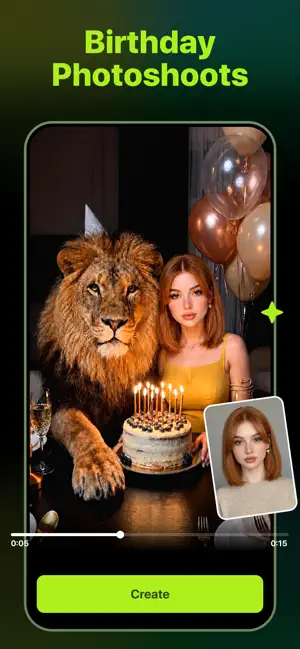
Turn your ideas, photos, and moments into stunning AI videos with Lumora — your pocket-sized creative studio for cinematic clips, social posts, profile videos, and visual stories. Whether you want to animate a selfie, create a dreamy scene from text, transform a photo into a moving clip, or make scroll-stopping content for TikTok, Instagram, YouTube Shorts, or Reels, Lumora helps you bring your imagination to life in just a few taps. No cameras. No editing experience. No complicated timelines. Just choose a style, upload a photo or enter a prompt, and let Lumora turn it into a polished AI-generated video. Create AI Videos from Text Describe what you want to see, and Lumora will transform your words into a dynamic video. From cinematic landscapes and fantasy scenes to fashion moments, romantic clips, surreal portraits, and viral social content — your prompt becomes a moving visual story. Try ideas like: A woman walking through a glowing cyberpunk city A couple dancing under moonlight A fashion model posing in a desert editorial shoot A dreamy birthday memory with floating lights A cinematic travel scene at sunset Your imagination becomes your video canvas. Animate Your Photos Give life to still images with AI-powered motion Start Creating with Lumora Your next video can begin with a sentence, a selfie, or a single idea. Download Lumora: Video Maker today and turn your imagination into motion. Unlimited Access Membership Subscription: — Unlock unlimited access to all features with a weekly, monthly, or annual subscription. — Payment is charged to your iTunes account upon purchase confirmation. — Manage subscriptions and disable auto-renewal anytime in your Account Settings. — Subscriptions auto-renew unless canceled at least 24 hours before the period ends, with renewal charged 24 hours prior. — Canceled subscriptions remain active until the period ends, with no refunds for the current period. Terms of Service: https://lumivra.netlify.app/terms Privacy Policy: https://lumivra.netlify.app/privacy
What’s new
Version 1.0.2 · Updated September 23, 2026
For a Better Hello What's New: - Smoother, warmer details Thank you for staying Update now. Our story continues.
App privacy
The developer, GORDES ZEOLIT MADENCILIK SANAYI VE TICARET ANONIM SIRKETI, reported these privacy practices to Apple.
Data Used to Track You
The following data may be used to track you across apps and websites owned by other companies:
- Identifiers: User ID, Device ID
- Usage Data: Product Interaction, Advertising Data
- Diagnostics: Performance Data
Data Not Linked to You
The following data, which may be collected but is not linked to your identity, may be used for the following purposes:
- Identifiers: User ID, Device ID
- Usage Data: Product Interaction, Advertising Data
- Diagnostics: Performance Data
- User Content: Photos or Videos, Other User Content
- Sensitive Info: Sensitive Info
Used for: Third-Party Advertising, App Functionality
Alternatives to Lumora: Video Maker
Looking for apps like Lumora: Video Maker? Here are 6 similar apps on the App Store. The highest rated is IMAGINEX — AI Image Video (5.0/5), and all 6 are free to download.
-
 AI Video Generator - MagicVids
3.0
AI Video Generator - MagicVids
3.0
-
 IMAGINEX — AI Image Video
5.0
IMAGINEX — AI Image Video
5.0
-
 VideoGen
3.7
VideoGen
3.7
-
 Ai Video Generator : Fun Video
-
 Vireel – AI Video Maker
5.0
Vireel – AI Video Maker
5.0
-
 Hootz - AI Video Generator
4.4
Hootz - AI Video Generator
4.4
| App | Rating | Price | Last updated | Compare |
|---|---|---|---|---|
| Lumora: Video Maker | 3.0 / 5 (2 ratings) | Free | September 23, 2026 | |
| AI Video Generator - MagicVids | 3.0 / 5 (2) | Free | Sep 23, 2026 | Compare |
| IMAGINEX — AI Image Video | 5.0 / 5 (2) | Free | Sep 2, 2026 | Compare |
| VideoGen | 3.7 / 5 (3) | Free | Sep 14, 2026 | Compare |
| Ai Video Generator : Fun Video | – | Free | Sep 1, 2026 | Compare |
| Vireel – AI Video Maker | 5.0 / 5 (1) | Free | Sep 3, 2026 | Compare |
| Hootz - AI Video Generator | 4.4 / 5 (87) | Free | Aug 31, 2026 | Compare |