

FX Trade Journal: Forex Log
DAIKI IKEBATA Finance iPhoneiPadiPod touch
FX Trade Journal: Forex Log is a free Finance app for iPhone and iPad by DAIKI IKEBATA. Requires iOS 15.1. Updated October 14, 2026.
- Price
- Free
- on the App Store
- Size
- 43 MB
- Age 4+
- Updated
- Oct 14
- 2026 · v1.3.6
Screenshots

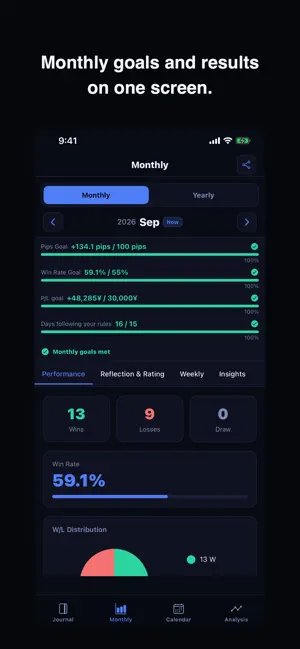
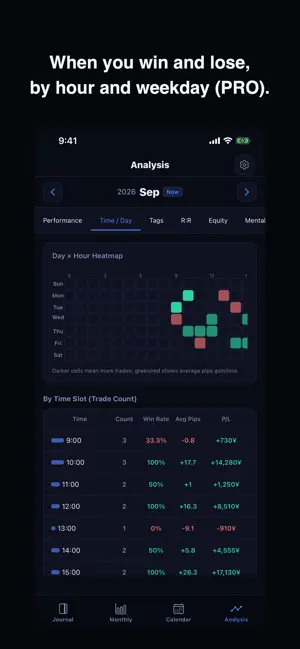

About FX Trade Journal: Forex Log
FX Trade Journal is a forex trading journal for iPhone and iPad. Enter your entry and exit prices, and pips, P/L, win rate and profit factor are tallied automatically. Review your trades on a calendar and in monthly reports, and turn your stats into a shareable card. Import your history from MT4/MT5 CSV files. No account needed: your journal stays on your device in an encrypted database. ■ Log ・Log a trade in three taps with quick entry: currency pair, entry price, lot size, P/L, and pips ・Attach chart screenshots to any trade ・Add notes and tags for easy review later ・Bulk-import your MT4 / MT5 trade history CSV ■ Analyze ・Monthly dashboard auto-calculates win rate, pips, profit factor, and P/L ・Breakdowns by currency pair and trading style ・Daily streak tracking to keep your recording habit alive ・33 achievement badges and a position size calculator, free for everyone ■ Share ・Turn your monthly results into a clean, shareable stats card (X, Instagram, and more) ・PRO removes the watermark for a fully clean design ■ Home Screen widgets ・See today, this week and this month together ・A progress ring shows how close you are to the goals you set ・The small and Lock Screen widgets let you pick the period ・Tap any widget to jump straight to the trade entry screen ■ Who it's for ・Traders just starting out who want to build a recording habit ・MT4/MT5 users tired of manual spreadsheet tracking ・Anyone who wants a monthly view of their win rate and pips ・Traders who like sharing their results on social media ・Anyone who wants a trading journal that lives entirely on their phone ■ FX Trade Journal PRO A monthly or annual subscription unlocks the PRO tier: ・All analysis tabs: time of day and weekday, tags, risk-reward and equity curve ・Weekly view, monthly insights and the yearly tab ・Daily, weekly and yearly goals with calendar achievement marks ・Up to 3 chart images per trade ・Mental-state tracking and multi-timeframe notes ・Bookmark list and watermark-free share cards Pricing is shown on the purchase confirmation screen. Subscriptions can be cancelled anytime from your device's Settings app. Subscriptions renew automatically. Both the monthly and annual plans include a 7-day free trial (one trial per person, on either plan). ■ About your data ・Trades, charts and settings stay on your device ・No cloud sync. Logging and analysis work offline (the app connects only to purchase or restore PRO, check for updates and send crash and usage reports with a random device ID; your trade records are never sent) ・Built with a privacy-first design ・Biometric app lock and an encrypted on-device database ■ Supported brokers / platforms Any broker that lets you export MT4/MT5-format trade history CSV works with the app. Manual entry is fully supported too, for any broker or platform. ■ Feedback & Support Reach us anytime via Settings → Contact Us in the app. We'd love to hear what features you want next. Note: P/L is tracked in your account currency (choose from 15 currencies in Settings, e.g. USD, EUR, JPY). For pairs quoted in your account currency (the right-hand side of the pair), P/L is calculated automatically from pips and lot size. Other pairs (e.g. USD/JPY on a USD account) can't be calculated automatically: enter the P/L from your broker's trade history to include them in monthly, calendar and analysis totals. If you leave it blank, that trade's P/L is not counted. MT4/MT5 imports warn you when the file's account currency differs from the app's. Terms of Use: https://kainan0880jwr.github.io/fx-trade-journal/terms-en.html
What’s new
Version 1.3.6 · Updated October 14, 2026
• Choose your account currency in Settings (USD, EUR, JPY and 12 more). P/L is calculated automatically for pairs quoted in your account currency. • Your logging streak now counts trading days, so weekends don't break it. • Reminders now come on weekdays only, and skip days you've already logged. • The entry screen opens with your last pair, direction and lot. Swipe a trade left in the list to delete it, with instant undo. • A shorter, one-screen welcome. • Share your stats as an image card (you can also save it to Photos). • Redeem offer codes from Settings or the purchase screen. • Pick the trade date (today, yesterday or any date) right on the entry screen. • The home screen shows your progress toward your first 5 trades, and reminds you to back up once you have 20 trades. • Backups can now be encrypted with a password. • Free users can now see one monthly insight. The purchase screen shows the free period, the billing date and how to cancel. • Restore Purchases is now always available. • Fixed issues with App Lock and data protection. • Added "Report a bug" in Settings. It opens an email with your app version and other details filled in. • Improved MT4/MT5 import: re-importing the same file no longer creates duplicates, open positions are skipped, trade times are kept, and Japanese column names are supported. You can undo the last import. • You can now convert imported times from your broker's server time to your local time (Settings). • You can now change the date of a quick entry when editing it. • Fixed issues with the calendar and stats display, and with P/L when editing a trade.
App privacy
The developer, DAIKI IKEBATA, reported these privacy practices to Apple.
Data Not Linked to You
The following data, which may be collected but is not linked to your identity, may be used for the following purposes:
- Purchases: Purchase History
- Identifiers: Device ID
- Usage Data: Product Interaction
- Diagnostics: Crash Data, Other Diagnostic Data
Used for: Analytics, App Functionality
Alternatives to FX Trade Journal: Forex Log
Looking for apps like FX Trade Journal: Forex Log? Here are 6 similar apps on the App Store. The highest rated is Trading Journal – Plancana AI (4.7/5), and all 6 are free to download.
-
 FX Trader Journal: MT4 & MT5
-
 TradesViz Trading Journal
3.2
TradesViz Trading Journal
3.2
-
 Trading Journal – Plancana AI
4.7
Trading Journal – Plancana AI
4.7
-
 SuperTrader: Trading Journal
4.7
SuperTrader: Trading Journal
4.7
-
 Forex Calendar, Market & News
4.4
Forex Calendar, Market & News
4.4
-
 Tradays Forex Calendar
4.4
Tradays Forex Calendar
4.4
| App | Rating | Price | Last updated | Compare |
|---|---|---|---|---|
| FX Trade Journal: Forex Log | – | Free | October 14, 2026 | |
| FX Trader Journal: MT4 & MT5 | – | Free | Sep 11, 2026 | Compare |
| TradesViz Trading Journal | 3.2 / 5 (5) | Free | Oct 3, 2026 | Compare |
| Trading Journal – Plancana AI | 4.7 / 5 (98) | Free | Oct 1, 2026 | Compare |
| SuperTrader: Trading Journal | 4.7 / 5 (1,202) | Free | Oct 22, 2026 | Compare |
| Forex Calendar, Market & News | 4.4 / 5 (6,480) | Free | Oct 16, 2026 | Compare |
| Tradays Forex Calendar | 4.4 / 5 (436) | Free | Feb 6, 2026 | Compare |