

SCal - Smart Schedule Planner
JongHyun Lee Utilities iPhoneiPadiPod touch
SCal - Smart Schedule Planner is a free Utilities app for iPhone and iPad by JongHyun Lee. Requires iOS 16.6. Updated October 22, 2026.
- Price
- Free
- on the App Store
- Size
- 61 MB
- Age 4+
- Updated
- Oct 22
- 2026 · v1.0.1
Screenshots



About SCal - Smart Schedule Planner
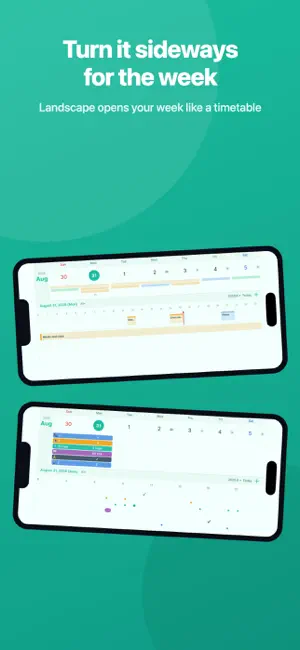
■ Four ways to look at today · Month view — the whole month at a glance, in full or line mode · Landscape week — turn the device and the week opens like a timetable · Timeline — the day split by the hour, so nothing hides behind anything else · Card view — the selected day's events, one card after another ■ The day's photos, right on the calendar · Photos gather themselves on the day you took them, with the count on the date · Tap a day and its photos come back grouped by place · Tap the map to set a center and photos taken nearby are collected for you ■ Life patterns, for the things that repeat · Coffee, workouts, glasses of water — log them with a single tap · Four ways to record: count the times, run a timer, note an amount, or check done / not done · Set a daily goal and the weekly, monthly and yearly statistics show how often you hit it · One tap on the home-screen widget logs it without opening the app ■ Reminders you won't miss · Set a separate reminder time for every event · Choose the sound you want to hear · Daily, weekly, monthly and yearly repeats are supported ■ The weather beside your day, and the way there · See the day's weather right on the calendar and the timeline · Add a place and open directions in your maps app, travel time included · Keep the places you go often as favorites and pick one in a tap ■ Memos, and things to do · Organize them in groups and drag to reorder · Switch a memo to "To-do" and every line becomes checkable · URLs and phone numbers inside a memo turn into links you can tap · Turn a memo into an event without retyping it ■ Scattered plans, one calendar · Give each calendar its own color and keep work and life apart on one screen · Events from the built-in iPhone calendar layer onto the same month · Search by title, notes, place or calendar name · Create your own event types and tell them apart by color ■ With family, with coworkers · Invite by email and look at a calendar together · Decide whether they can only view (subscribe) or also edit events (share) · Give a calendar you received its own color and layer it onto yours ■ On the home screen, and on every device · Three widgets — what's coming up, a life pattern you log in one tap, and a memo you write on the spot · One account, the same calendar on iPhone, iPad and Mac ■ Lock and sign-in · Lock the whole app with Face ID or Touch ID · Sign in with Apple, Google, or an email account ■ Small things that help · Dictate an event, and tap the daily reminder to hear the day read aloud · Fourteen themes to change the mood — the home-screen widget can follow along · Pick the typeface and text size you prefer · Show lunar calendar dates alongside ■ SCal Premium · No ads · Unlimited upcoming events (15 on the free plan; past events are never counted) · Unlimited calendars, event types and life patterns (free plan: 3, 2 and 3) · Twelve premium themes and premium fonts SCal stays free without it. Sharing, photos, memos and widgets are all yours on the free plan. Payment will be charged to your Apple ID account at confirmation of purchase. Subscriptions renew automatically unless canceled at least 24 hours before the end of the current period. Manage or cancel in Settings > Apple ID > Subscriptions. Terms of Use: https://4lovingyou.com/IOS/Terms.php?AppName=SCal&Lang=en Privacy Policy: https://4lovingyou.com/IOS/Privacypolicy.php?AppName=SCal&Lang=en
What’s new
Version 1.0.1 · Updated October 22, 2026
• Fixed notes showing only one line in event details, and long titles and locations being cut off. • Today is shown in red on Sundays and holidays, and the landscape week view now tells today and the selected day apart. • Times follow your device's 12/24-hour setting, and dates and times use your language's format. • Fixed language display in widgets and menus. • Various stability improvements.
App privacy
The developer, JongHyun Lee, reported these privacy practices to Apple.
Data Used to Track You
The following data may be used to track you across apps and websites owned by other companies:
- Identifiers: Device ID
- Usage Data: Product Interaction, Advertising Data
Data Linked to You
The following data, which may be collected and linked to your identity, may be used for the following purposes:
- Purchases: Purchase History
- Location: Precise Location
- Contact Info: Email Address, Name
- User Content: Other User Content
- Identifiers: User ID
Used for: App Functionality
Data Not Linked to You
The following data, which may be collected but is not linked to your identity, may be used for the following purposes:
- Location: Coarse Location
- Identifiers: Device ID
- Usage Data: Product Interaction, Advertising Data
Used for: Third-Party Advertising
Alternatives to SCal - Smart Schedule Planner
Looking for apps like SCal - Smart Schedule Planner? Here are 6 similar apps on the App Store. The highest rated is Khadamti: Maid Manager (5.0/5), and 5 of the 6 are free to download.
-
 오리집
오리집
-
 Khadamti: Maid Manager
5.0
Khadamti: Maid Manager
5.0
-
 SecondClock – 秒まで見える時計
-
 Scrap: Screenshot Cleaner
-
 Baduk Timer - AI Auto Score
-
 CHAEVI - EV Charging
2.6
CHAEVI - EV Charging
2.6
| App | Rating | Price | Last updated | Compare |
|---|---|---|---|---|
| SCal - Smart Schedule Planner | – | Free | October 22, 2026 | |
| 오리집 | – | 1.99 USD | Oct 14, 2026 | Compare |
| Khadamti: Maid Manager | 5.0 / 5 (1) | Free | Jul 2, 2026 | Compare |
| SecondClock – 秒まで見える時計 | – | Free | Oct 5, 2026 | Compare |
| Scrap: Screenshot Cleaner | – | Free | Oct 25, 2026 | Compare |
| Baduk Timer - AI Auto Score | – | Free | Mar 22, 2026 | Compare |
| CHAEVI - EV Charging | 2.6 / 5 (7) | Free | Aug 18, 2025 | Compare |