

hYYa Encrypted Folder
Hassaan Abdeen Utilities iPhoneiPadiPod touchMac
hYYa Encrypted Folder is a free Utilities app for iPhone and iPad by Hassaan Abdeen. Rated 5.0/5 from 1 ratings. Requires iOS 17.0. Updated October 24, 2026.
- Rating
- 5.0
- 1 ratings
- Price
- Free
- on the App Store
- Size
- 7 MB
- Age 4+
- Updated
- Oct 24
- 2026 · v2.3.1
Screenshots


About hYYa Encrypted Folder
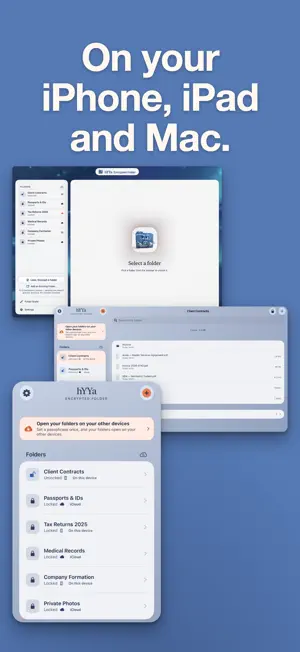
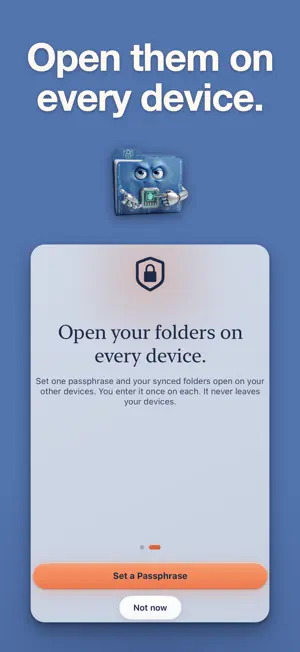
Encrypted by default. Beautiful by design. hYYa Encrypted Folder keeps your files in private, AES-256 encrypted folders that unlock with Face ID or Touch ID. No hYYa account. No hYYa server. Nothing of yours ever passes through us. REAL ENCRYPTION, NOT A DISGUISE • AES-256, using Apple's own encryption — not a hidden folder, not a passcode over plain files. The contents are genuinely encrypted on your device. • Your key is stored in your Keychain, and hYYa asks for Face ID, Touch ID or your passcode before it will use it. Only you can read it: not us, not Apple. • Files are encrypted the moment they go in. Add them in a few taps. • File names inside are encrypted too. The only name left visible is the folder's own. SYNC AND RECOVERY • Google Drive sync (Pro) — keep an encrypted folder in your own Google Drive and open it on your other devices. hYYa encrypts the folder on this device. Only encrypted files are uploaded. Google can see the folder's name, not what is inside. Entirely optional. • Recently Deleted for folders — a folder you delete can be recovered for 30 days. • One recovery key covers all your folders. PEACE OF MIND, BUILT IN • Recovery Key — opens your folders if you forget your passphrase. We cannot reset it for you; this can. • Share to hYYa — send files straight into an encrypted folder from Photos, Files, Mail, or anywhere that shares. • Add from Photos — pick photos and videos with no re-compression, then remove the originals if you want to. • Scan Document — scan paper straight into an encrypted folder. • Recently Deleted — files you delete inside a folder can be recovered for 30 days. • Verify — checks that every file in a folder still opens. • Shortcuts and Siri — "Lock All Folders", ready for the Action button and your automations. • Family Sharing — one purchase covers your household. UNLOCK WITH FACE ID OR TOUCH ID • Open every folder with a single Face ID or Touch ID check. Your device passcode is always there as a fallback. • The app locks itself the moment you switch away, and hides your files from the app switcher. • Auto-Lock (Pro) locks everything again after a period of inactivity. SYNC PRIVATELY — iCLOUD OR GOOGLE DRIVE (PRO) • Keep a folder in iCloud and it syncs across your iPhone, iPad and Mac. The files inside stay encrypted the whole way. • Or keep it in your own Google Drive. Either way, hYYa encrypts the folder on this device. Only encrypted files are uploaded. • Enter your passphrase once on each device, then unlock with Face ID or Touch ID. • Works offline. Syncing is optional. No sign-up, no email, no tracking, ever. FREE, WITH A ONE-TIME UPGRADE • Free: up to two encrypted folders in total, kept on this device, plus Face ID / Touch ID unlock. Opening folders you already have is always free, wherever they are. • hYYa Encrypted Folder Pro (one payment, no subscription): new folders in iCloud or Google Drive, unlimited folders and Auto-Lock. • Try Pro free for 7 days. Nothing is charged automatically. ALSO ON MAC The Mac version adds Folder Styler — give any everyday Finder folder a custom color and emblem. PRIVACY YOU CAN VERIFY We collect nothing. No analytics, no account system, and hYYa runs no server of its own. The encryption is Apple's own and standard. Your files, your key, your device. hYYa Encrypted Folder is part of the hYYa family — a small studio building beautiful, private tools you can actually trust.
What’s new
Version 2.3.1 · Updated October 24, 2026
Made for iPhone Duo: open it to see your folders on one side and what's inside on the other, even next to another app in Split View. This release contains general bug fixes and stability improvements.
App privacy
The developer, Hassaan Abdeen, reported these privacy practices to Apple.
Data Not Collected
The developer does not collect any data from this app.
Alternatives to hYYa Encrypted Folder
Looking for apps like hYYa Encrypted Folder? Here are 6 similar apps on the App Store.
-
 QuietVault: File & Photo Lock
-
 App Hidden:Secret Photo Vaul
-
 Picasort
-
 Image Cropcutter
-
 Encrypto Secure
-
 Protect PDF: Password Lock
| App | Rating | Price | Last updated | Compare |
|---|---|---|---|---|
| hYYa Encrypted Folder | 5.0 / 5 (1 rating) | Free | October 24, 2026 | |
| QuietVault: File & Photo Lock | – | Free | Aug 16, 2026 | Compare |
| App Hidden:Secret Photo Vaul | – | Free | Sep 28, 2026 | Compare |
| Picasort | – | Free | Jun 13, 2026 | Compare |
| Image Cropcutter | – | Free | Apr 18, 2026 | Compare |
| Encrypto Secure | – | Free | May 11, 2026 | Compare |
| Protect PDF: Password Lock | – | Free | May 21, 2026 | Compare |