

JT File Viewer
Shanghai Fuwei Information Technology Co., Ltd. Graphics & Design iPhoneiPadiPod touchMac
JT File Viewer is a free Graphics & Design app for iPhone and iPad by Shanghai Fuwei Information Technology Co., Ltd. Requires iOS 26.0.
- Price
- Free
- on the App Store
- Size
- 9 MB
- Age 4+
- Updated
- Oct 12
- 2026 · v26.10.13
Screenshots


About JT File Viewer
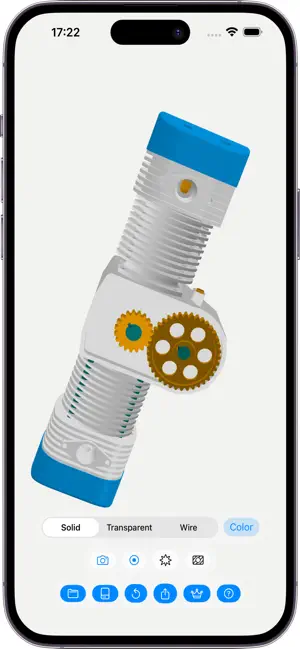
JT File Viewer is a native Apple app for opening and reviewing JT (.jt) files, built with Swift for engineering, manufacturing, supplier, and product review. Open .jt files on macOS, iPhone, iPad, and Apple Vision Pro. Inspect tessellated 3D geometry, browse product structure, review model statistics, and use focused viewer tools without uploading files. Key features: - Open JT files locally - View tessellated engineering models in a native 3D viewport - Browse product structure and select parts - Switch between solid, transparent, and wire display modes - Use Exploded View to separate assembly components - Use Cross Section View to inspect internal model areas, with Flip Kept Side to view from the other side - Export tessellated models as binary STL, binary glTF GLB, and USDZ, USDC, or USDA - Capture screenshots with pre-save annotations, editing, and watermarks - Record 3D viewport review videos with optional synced microphone narration and watermarks - Review models in a spatial visionOS experience - No ads, tracking, or data collection. Common questions: - Is JT File Viewer a CAD editor? No. JT File Viewer is built for read-only JT review, not CAD authoring. It does not edit CAD models, replace PLM systems, or import STEP, IGES, STL, OBJ, or native CAD formats. STL, GLB, and USD-family export use tessellated JT viewer geometry. - What JT versions does JT File Viewer target? JT is standardized internationally as ISO 14306 for lightweight 3D visualization and product data exchange. JT File Viewer targets JT V8, V9, and V10 files for tessellated geometry review. Compatibility can vary by exporter, model content, compression, metadata, and proprietary extensions. - Are files uploaded to a server? No. Files are opened on device. JT File Viewer does not require cloud conversion, account sign-in, or network upload to view your JT model. File access follows Apple sandbox rules. Who it is for: - Engineers reviewing JT visualization files - Manufacturing and quality teams checking shared model data - Sales, procurement, and supplier-facing teams that need quick model visibility - Apple-platform teams that want a native macOS, iOS, and visionOS JT viewer Pricing & Access - Free: Open and view JT files locally, browse model structure, inspect model statistics, and use the core viewer workflow. - Subscription: Unlock all current JT Pro tools while active. One subscription covers supported Apple platforms, including macOS, iPhone, iPad, and Apple Vision Pro. - Individual Unlocks: Choose one-time purchases for specific Pro tools if you only need selected features. - Payment is charged to your App Store account. - Subscriptions renew unless auto-renew is turned off at least 24 hours before the current period ends. - You can manage or cancel subscriptions in your App Store account settings. Privacy & Purchase Terms - Files are opened on device. JT File Viewer does not upload JT files to a cloud conversion service for viewing. - JT File Viewer does not require account sign-in to open local JT files. - App Store purchases, subscriptions, refunds, and restores are handled by Apple through StoreKit and your App Store account. - Privacy Policy: https://apps.h53d.xyz/apps/jt-file-viewer/policy.html - Terms of Use (EULA): https://www.apple.com/legal/internet-services/itunes/dev/stdeula/ - JT and related marks are the property of Siemens Industry Software Inc. or its affiliates. JT File Viewer is an independent app and is not affiliated with, endorsed by, or sponsored by Siemens. JT File Viewer gives Apple users a focused way to open, inspect, communicate, and export JT model data while keeping the workflow local and viewer-oriented. Need help or have feedback? Reach out to [email protected]. Or visit https://apps.h53d.xyz/apps/jt-file-viewer/support.html.
What’s new
Version 26.10.13 · Updated October 12, 2026
- Improved JT file compatibility and fixed issues that caused some models to appear incomplete. - Optimized memory use for large models and multi-part assemblies for more reliable loading on iPhone and iPad. - Improved handling of problematic files to reduce crashes when opening them.
App privacy
The developer, Shanghai Fuwei Information Technology Co., Ltd., reported these privacy practices to Apple.
Data Not Collected
The developer does not collect any data from this app.
Alternatives to JT File Viewer
Looking for apps like JT File Viewer? Here are 6 similar apps on the App Store. The highest rated is Morrow: Daily Art Wallpapers (5.0/5), and all 6 are free to download.
-
 CoverForge: Thumbnail Maker
-
 Morrow: Daily Art Wallpapers
5.0
Morrow: Daily Art Wallpapers
5.0
-
 GridQuilt: Collage & Split
5.0
GridQuilt: Collage & Split
5.0
-
 AR Builder: Pixel Art 3D Voxel
5.0
AR Builder: Pixel Art 3D Voxel
5.0
-
 SmartClean: AI Photo & Storage
3.7
SmartClean: AI Photo & Storage
3.7
-
 Mandelbrot Metal
4.8
Mandelbrot Metal
4.8
| App | Rating | Price | Last updated | Compare |
|---|---|---|---|---|
| JT File Viewer | – | Free | October 12, 2026 | |
| CoverForge: Thumbnail Maker | – | Free | Sep 17, 2026 | Compare |
| Morrow: Daily Art Wallpapers | 5.0 / 5 (14) | Free | Oct 27, 2026 | Compare |
| GridQuilt: Collage & Split | 5.0 / 5 (3) | Free | Oct 5, 2026 | Compare |
| AR Builder: Pixel Art 3D Voxel | 5.0 / 5 (3) | Free | Sep 24, 2026 | Compare |
| SmartClean: AI Photo & Storage | 3.7 / 5 (6) | Free | Oct 23, 2026 | Compare |
| Mandelbrot Metal | 4.8 / 5 (30) | Free | Oct 21, 2026 | Compare |
Compare JT File Viewer with the top alternatives: ratings, updates, ASO score and keyword gaps →