

LoopCall: Scam Call Blocker
Glowhome Cleaning Corp Utilities iPhoneiPadiPod touch
LoopCall: Scam Call Blocker is a free Utilities app for iPhone and iPad by Glowhome Cleaning Corp. Rated 3.7/5 from 3 ratings. Requires iOS 15.0.
- Rating
- 3.7
- 3 ratings
- Price
- Free
- on the App Store
- Size
- 80 MB
- Age 4+
- Updated
- Oct 23
- 2026 · v1.0.26
Screenshots


About LoopCall: Scam Call Blocker
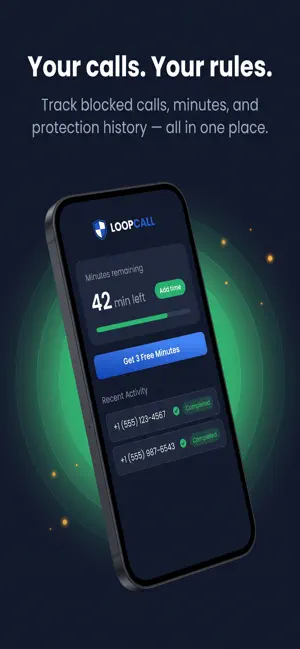
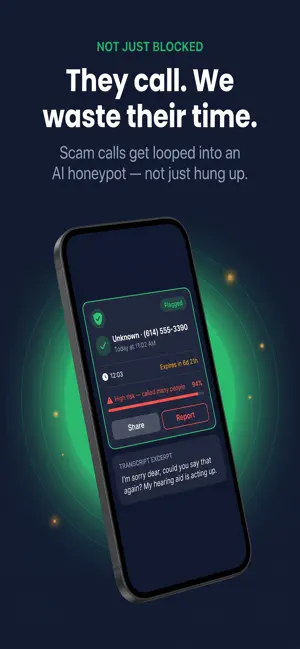
LoopCall — Your Calls, Your Rules Tired of scam calls interrupting your day? LoopCall puts an AI screener between you and every unknown number — so you only pick up the calls that matter. HOW IT WORKS When you decline or ignore a call from an unrecognized number, your carrier forwards it to LoopCall's AI screener. It answers, records the conversation, and instantly analyzes it for scam patterns. You get a notification with the transcript and risk assessment — without ever picking up the phone. WHY LOOPCALL • Automatic protection — works through your carrier's built-in call forwarding, no extra hardware or SIM swap needed • AI-powered transcription — read exactly what the caller said before deciding to call back • Risk scoring — spot robocalls, spoofed numbers, and social engineering attempts at a glance • Your time, your rules — never waste another minute on a scammer GETTING STARTED Setup takes under a minute: LoopCall walks you through enabling Conditional Call Forwarding on your carrier, and you're protected immediately. FLEXIBLE SCREENING TIME Every account starts with free screening minutes. Earn more for free by watching the occasional ad, or purchase additional screening time whenever you need it — no subscription required. Take back control of your phone. Download LoopCall today.
What’s new
Version 1.0.26 · Updated October 23, 2026
What's New in LoopCall Faster, simpler setup — built for iOS 27 • Your number and verification code now live on one screen, and your iPhone fills in the code from Messages for you. • iOS 27 no longer lets apps dial call forwarding codes, so LoopCall now shows your code, copies it with one tap and plays a short step-by-step animation of exactly where to paste it. • Each iPhone setting LoopCall needs comes with a quick animated walkthrough and a plain explanation of why it matters. If a setting is already on, we skip it. • One test call checks everything at once: scam blocking, Live Voicemail and call forwarding. Your phone shouldn't even ring. • If your carrier needs a few extra seconds, LoopCall double-checks on its own before asking you to do anything. 60 free minutes to start • New accounts now get 60 free minutes (up from 10) to screen calls, valid for 30 days. Know exactly what called you • Every call now shows a clear risk level (Scam, High Risk, Caution, Looks Safe) and the real reason, like "Detected by LoopCall AI · Loan offers". • Listening to recordings and reading transcripts is now unlimited for everyone. • Transcripts show only what the caller said, and callers who speak another language are now transcribed too. • Notifications tell you who called and why, and tapping one opens that call directly. A smarter Protection tab • A cleaner, more compact protection card, with "Test Scam Call Blocking" right where you need it. • See live totals of scam calls stopped for all LoopCall users and for you. • New Scam Radar and Scam Trends show which scams are active right now, what's rising, and how to stay safe. Protection status you can trust • "You're protected" appears only after LoopCall confirms that calls really reach us. • If something isn't working, the app tells you exactly what and how to fix it. • Deleting your account walks you through turning off call forwarding first. Other improvements • Recordings play smoothly on iPhone, with an accurate timeline. • Earn free minutes faster: watch ads back to back with one tap. • Bug fixes and performance improvements. Thanks for protecting yourself — and everyone else — from scam calls with LoopCall.
App privacy
The developer, Glowhome Cleaning Corp, reported these privacy practices to Apple.
Data Linked to You
The following data, which may be collected and linked to your identity, may be used for the following purposes:
- Purchases: Purchase History
- Contact Info: Email Address, Phone Number
- User Content: Audio Data
- Identifiers: User ID
- Diagnostics: Crash Data
Used for: App Functionality
Data Not Linked to You
The following data, which may be collected but is not linked to your identity, may be used for the following purposes:
- Identifiers: Device ID
- Usage Data: Product Interaction
Used for: Third-Party Advertising, Analytics
Alternatives to LoopCall: Scam Call Blocker
Looking for apps like LoopCall: Scam Call Blocker? Here are 6 similar apps on the App Store. The highest rated is SeniorSafe (5.0/5), and all 6 are free to download.
-
 SeniorSafe
5.0
SeniorSafe
5.0
-
 MailShield Guardian
5.0
MailShield Guardian
5.0
-
 Network Scanner Toolkit
5.0
Network Scanner Toolkit
5.0
-
 My CashFlow Manager
-
 SpamShield - Spam Blocker
-
 Stop Spam: Call Blocker
| App | Rating | Price | Last updated | Compare |
|---|---|---|---|---|
| LoopCall: Scam Call Blocker | 3.7 / 5 (3 ratings) | Free | October 23, 2026 | |
| SeniorSafe | 5.0 / 5 (1) | Free | Oct 21, 2026 | Compare |
| MailShield Guardian | 5.0 / 5 (2) | Free | Jul 10, 2026 | Compare |
| Network Scanner Toolkit | 5.0 / 5 (1) | Free | Oct 23, 2026 | Compare |
| My CashFlow Manager | – | Free | Oct 7, 2025 | Compare |
| SpamShield - Spam Blocker | – | Free | Oct 17, 2026 | Compare |
| Stop Spam: Call Blocker | – | Free | Oct 21, 2026 | Compare |