

ReceiptHQ
Mobile Innovations LLC Finance iPhoneiPadiPod touch
ReceiptHQ is a free Finance app for iPhone and iPad by Mobile Innovations LLC. Rated 5.0/5 from 1 ratings. Requires iOS 26.0. Updated October 14, 2026.
- Rating
- 5.0
- 1 ratings
- Price
- Free
- on the App Store
- Size
- 6 MB
- Age 4+
- Updated
- Oct 14
- 2026 · v2.5
Screenshots

About ReceiptHQ
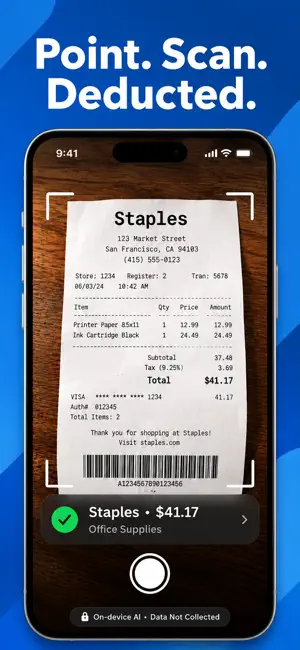
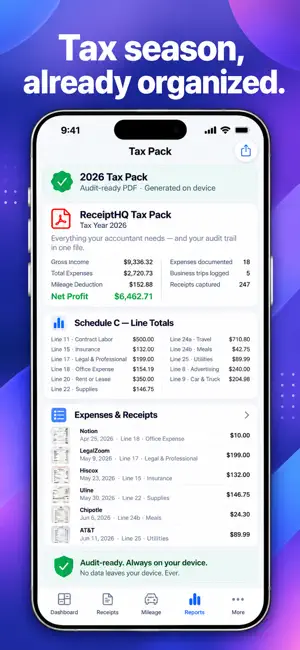
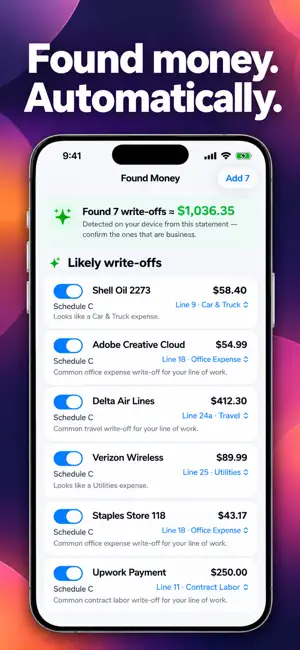
Every receipt you lose is money you gave away. ReceiptHQ makes sure that never happens again. Snap a receipt and watch it land on the right Schedule C tax line — automatically, with your estimated tax savings shown on the spot. Drive for work? Your miles log themselves. Already spent the money? Import a bank statement and ReceiptHQ finds the write-offs you missed. At tax time, everything your accountant needs is one tap away. Built for freelancers, 1099 contractors, gig workers, and anyone with self-employment income. No account required, either. WHY RECEIPTHQ IS DIFFERENT Most receipt apps read the text and stop there — you still do the tax thinking. ReceiptHQ's on-device AI predicts the correct Schedule C category for every expense, learns your vendors, and shows what each deduction is worth: "≈ $14 estimated tax savings." You watch your savings grow all year instead of guessing in April. And it all runs ON YOUR IPHONE — no servers, no account, no tracking. Our privacy label says it plainly: Data Not Collected. SCAN. CATEGORIZED. DONE. Snap with your camera, import from Photos, or share from any app Amounts, dates, and vendors extracted automatically AI suggests the right Schedule C line — confirm with one tap Anything uncertain is flagged for review, never guessed FOUND MONEY — WRITE-OFFS HIDING IN YOUR STATEMENTS Import a bank or card statement (PDF, CSV, or QFX/OFX) and ReceiptHQ scans it on your device for missed deductions See the total instantly: "Found 7 write-offs ≈ $1,036 in deductions" Each arrives pre-sorted to its Schedule C line — confirm with a tap No bank connection, no login — ever VERIFIED DEDUCTIONS — NEVER COUNT A PURCHASE TWICE Scanned a receipt AND imported the matching bank charge? ReceiptHQ sees it's the same purchase, links them, and marks the deduction "Verified" — no double-counting, with your receipt kept as proof GET PAID Create professional invoice PDFs with your logo and clean templates Add your own payment links — clients pay by tappable link or QR code Mark an invoice paid and it flows into your income and tax totals We're never in the money flow — you keep 100% MAXIMIZE EVERY DEDUCTION The Deduction Optimizer shows which method saves more: home office (simplified vs. actual) and vehicle (standard mileage vs. actual expenses) — private math on your iPhone MILEAGE THAT TRACKS ITSELF Start a drive with one tap, or let automatic detection catch it Classify business or personal with a swipe; a Live Activity shows your deduction adding up as you drive IRS-compliant log, always export-ready KNOW WHERE YOU STAND, ALL YEAR A dashboard with net profit, deductions, and estimated savings at a glance Deduction Finder surfaces write-offs you missed Quarterly tax estimate tells you what to set aside — with reminders before each IRS deadline and a one-tap link to pay at IRS Direct Pay ASK RECEIPTHQ, IN PLAIN ENGLISH Chat with your finances: "What did I spend on supplies this quarter?" Answers come from your own numbers, computed privately on your iPhone. TAX TIME IN ONE TAP Audit-Ready Tax Pack: Schedule C totals, every receipt image, and your full mileage log in one PDF Accountant Pack: a full Schedule C CSV for your accountant or tax software Hand it over. You're done. PRIVATE BY DESIGN All AI runs on your iPhone — nothing is uploaded, ever Optional iCloud sync to your own private iCloud, only if you turn it on Face ID lock built in FREE TO START Scan and store receipts, send invoices, log miles and income, and see what the AI can do — free Your deductions are already happening. Start keeping them. — Tax savings shown are estimates based on your inputs and are not tax advice. Subscriptions auto-renew unless canceled at least 24 hours before the period ends; manage in Settings. Terms of Use: https://www.apple.com/legal/internet-services/itunes/dev/stdeula/ Privacy Policy: https://www.mobileinnov.com/PrivacyPolicy.html
What’s new
Version 2.5 · Updated October 14, 2026
MULTIPLE BUSINESSES (Pro) Run more than one side hustle? Give each business its own books. • Add, rename and manage businesses in Settings › Businesses. • Assign receipts, trips, income, 1099s, invoices and imported statements to a business. New entries default to the last one you used. • Dashboard and Reports can show one business or all of them. Your quarterly tax set-aside still uses your combined profit. • Get one Schedule C per business: CSV export, TurboTax (TXF) export and the Tax Pack are all split by business. • Ask ReceiptHQ can answer questions about a single business. Already have data? It stays in your main business, so you don't have to set anything up. BUILT FOR IPHONE DUO AND BIGGER WINDOWS ReceiptHQ now makes use of the extra room when the screen is unfolded: • A sidebar for moving between sections. • Dashboard stats and cards in multiple columns. • Receipts shows your list and the receipt you're editing side by side, with the photo next to its fields. • Reports, Cash Flow, Mileage, Income, Warranties and statement review use two columns to show more at once. • Lists, forms and chat keep a comfortable reading width instead of stretching edge to edge. IMPROVEMENTS • Receipt photos stay rounded and correctly framed at any size in the full-screen viewer. • Layout polish and bug fixes throughout. As always, everything stays on your device. No bank logins, and no data collected.
App privacy
The developer, Mobile Innovations LLC, reported these privacy practices to Apple.
Data Not Collected
The developer does not collect any data from this app.
Alternatives to ReceiptHQ
Looking for apps like ReceiptHQ? Here are 6 similar apps on the App Store. The highest rated is Checkbook Register - ReconLog (4.9/5), and all 6 are free to download.
-
 Checkbook Register - ReconLog
4.9
Checkbook Register - ReconLog
4.9
-
 Pocket Register
4.4
Pocket Register
4.4
-
 Easy Check Book Register
4.1
Easy Check Book Register
4.1
-
 Accounts 3 Lite - Checkbook
4.7
Accounts 3 Lite - Checkbook
4.7
-
 Balance My Checkbook
4.7
Balance My Checkbook
4.7
-
 Quick Checkbook
4.3
Quick Checkbook
4.3
| App | Rating | Price | Last updated | Compare |
|---|---|---|---|---|
| ReceiptHQ | 5.0 / 5 (1 rating) | Free | October 14, 2026 | |
| Checkbook Register - ReconLog | 4.9 / 5 (8) | Free | Apr 10, 2026 | Compare |
| Pocket Register | 4.4 / 5 (26) | Free | Oct 20, 2026 | Compare |
| Easy Check Book Register | 4.1 / 5 (14) | Free | Jan 25, 2026 | Compare |
| Accounts 3 Lite - Checkbook | 4.7 / 5 (225) | Free | Oct 13, 2026 | Compare |
| Balance My Checkbook | 4.7 / 5 (5,112) | Free | Aug 30, 2026 | Compare |
| Quick Checkbook | 4.3 / 5 (1,410) | Free | Nov 7, 2025 | Compare |
Compare ReceiptHQ with the top alternatives: ratings, updates, ASO score and keyword gaps →