

Plook Alarm
Thitinan Ratarsa Health & Fitness iPhoneiPadiPod touch
Plook Alarm is a free Health & Fitness app for iPhone and iPad by Thitinan Ratarsa. Requires iOS 17.0. Updated July 2, 2026.
- Price
- Free
- on the App Store
- Size
- 20 MB
- Age 4+
- Updated
- Jul 2
- 2026 · v1.0
Screenshots
About Plook Alarm
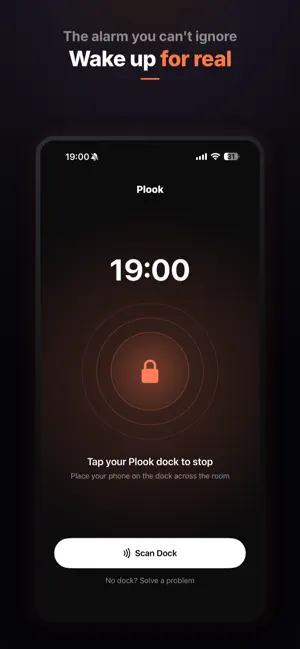
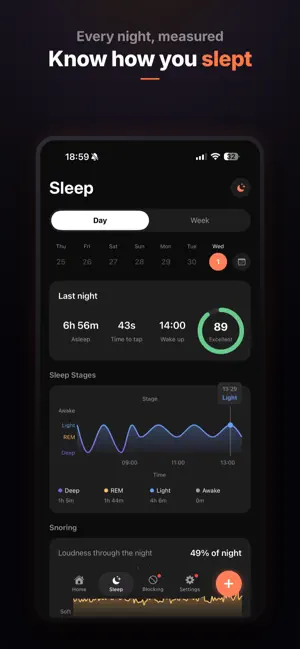
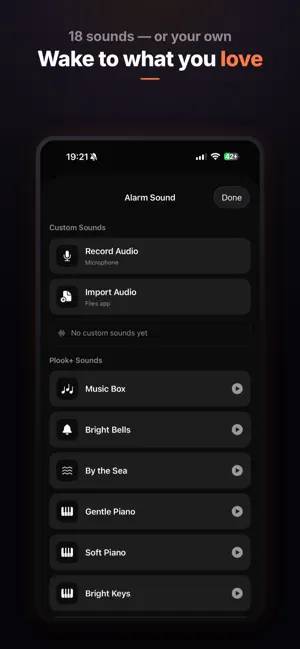
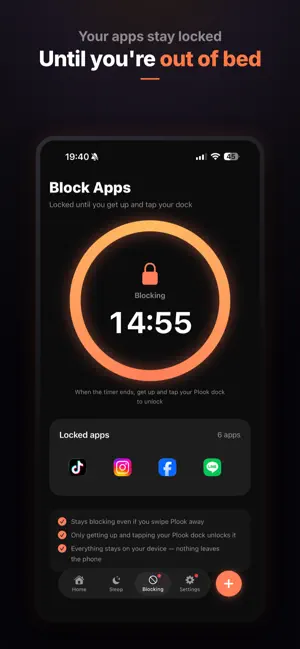
Still hit snooze five times and oversleep? Plook Alarm makes that impossible. Plook is the alarm clock for people who genuinely struggle to get out of bed. You can't silence it from under the covers. To turn the alarm off, you have to actually wake up — by getting out of bed and tapping the Plook Dock you placed across the room, or by completing a quick wake-up mission. By the time you've done that, you're up. That's the whole idea. WHY PLOOK WORKS • No lazy snooze — the alarm keeps going until you complete your chosen task • Tap the Plook Dock across the room to stop it — forces you out of bed • Or pick a mission: solve math, shake the phone, take steps, snap a photo, shout to wake up, and more • Rings through Silent and Focus / Do Not Disturb on iOS 26, so a muted phone won't make you late • Keeps ringing even if you force-quit the app BLOCK THE APPS THAT KEEP YOU IN BED Set Plook to block your most distracting apps the moment the alarm rings — so you can't roll over and scroll instead of getting up. The block lifts once you're truly awake. KNOW HOW YOU SLEEP Track your time in bed automatically. With Plook+, see sleep insights and detect snoring, coughing, and sleep-talking through the night — all processed privately on your device. MAKE IT YOURS • Custom alarm sounds — choose from built-in tones or use your own • Recurring alarms, labels, and volume that ramps up • A bedtime reminder so you actually go to sleep on time • Thai and English PRIVATE BY DESIGN Plook keeps your data on your device. Your alarms, sleep history, and sound analysis never leave your phone — there's no Plook account server collecting them. PLOOK+ Plook+ unlocks the full mission set, custom sounds, sleep insights, and more. • Monthly or annual, with a free trial • Auto-renews; cancel anytime in Settings THE PLOOK DOCK For the strongest wake-up, pair a Plook Dock — a small tag you place across the room or in the bathroom, so turning off the alarm means physically getting up. The app works without it too (use a mission), so you can start today. Wake up for real. Download Plook. — Terms: https://plookalarmclock.com/?page_id=10 Privacy: https://plookalarmclock.com/?page_id=3
App privacy
The developer, Thitinan Ratarsa, reported these privacy practices to Apple.
Data Not Collected
The developer does not collect any data from this app.
Alternatives to Plook Alarm
Looking for apps like Plook Alarm? Here are 6 similar apps on the App Store. The highest rated is Rampit - No Snooze Alarm Clock (4.8/5), and all 6 are free to download.
-
 Repwake: No Snooze Alarm Clock
-
 Motivation Alarm: ZenSpark
-
 Sunrise Alarm Clock: Wake Up
-
 Wayk: Alarm & Smart Wake
3.0
Wayk: Alarm & Smart Wake
3.0
-
 RiseReps: Pushup Alarm Clock
4.4
RiseReps: Pushup Alarm Clock
4.4
-
 Rampit - No Snooze Alarm Clock
4.8
Rampit - No Snooze Alarm Clock
4.8
| App | Rating | Price | Last updated | Compare |
|---|---|---|---|---|
| Plook Alarm | – | Free | July 2, 2026 | |
| Repwake: No Snooze Alarm Clock | – | Free | Aug 24, 2026 | Compare |
| Motivation Alarm: ZenSpark | – | Free | Sep 18, 2026 | Compare |
| Sunrise Alarm Clock: Wake Up | – | Free | Oct 2, 2026 | Compare |
| Wayk: Alarm & Smart Wake | 3.0 / 5 (4) | Free | Jul 16, 2026 | Compare |
| RiseReps: Pushup Alarm Clock | 4.4 / 5 (5) | Free | Sep 9, 2026 | Compare |
| Rampit - No Snooze Alarm Clock | 4.8 / 5 (12) | Free | May 26, 2026 | Compare |
Compare Plook Alarm with the top alternatives: ratings, updates, ASO score and keyword gaps →