

DocHarbor: Document Vault
Mark Opanasiuk Productivity iPhoneiPadiPod touch
DocHarbor: Document Vault is a free Productivity app for iPhone and iPad by Mark Opanasiuk. Requires iOS 17.0. Updated July 14, 2026.
- Price
- Free
- on the App Store
- Size
- 13 MB
- Age 4+
- Updated
- Jul 14
- 2026 · v1.0
Screenshots

About DocHarbor: Document Vault
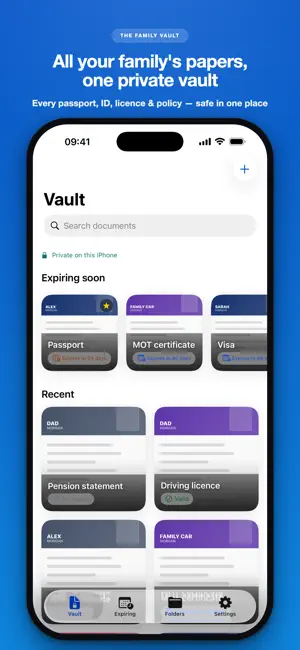
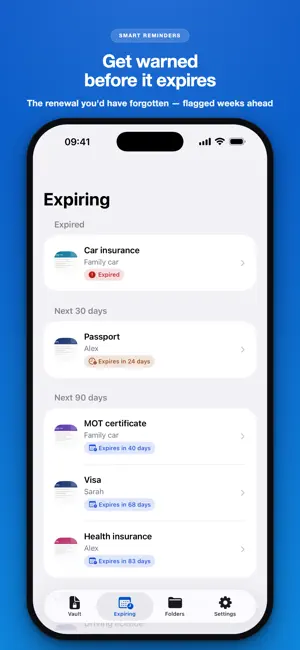
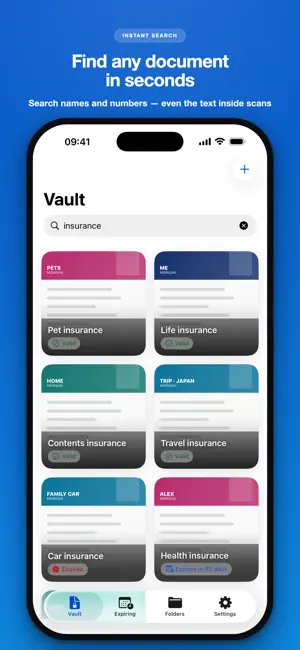
Know your passport is still valid before you book the trip. DocHarbor is a private, on-device vault for your family's passports, IDs, licenses, insurance, and home and car papers, with reminders that warn you well before anything expires. If you carry the mental load for everyone's paperwork, or you're an expat or frequent traveler juggling visas and permits, this is for you. Scan or import a document, and on-device Apple Vision suggests a title, category, owner, and dates. You review and confirm every field before it saves, so nothing is filed behind your back. Everything is then filed by person or object and by category, searchable in seconds, and quietly watched for renewals, so a lapsed passport never derails a trip again. CAPTURE - Scan multi-page documents with the built-in scanner, take a photo, or import from Photos or Files (PDF or image) - Retake, reorder, or delete pages; each document is kept as both an image and a PDF - Apple Vision suggests the title, category, owner, and dates, marked "Suggested" or "Check," never as a mystery percentage - Manual entry is always there; recognition is assistive and English-first, and you confirm everything ORGANIZE - File into folders by person or object: Me, a partner, a child, or a parent, and Home, Car, Trip, or Insurance - Ready-made categories from Identity and Passport & Visa to Home & Property, Medical, School & Kids, Finance & Tax, Work & Legal, and Warranties & Receipts - Add custom categories and fields with Pro, and star the ones you reach for most as Favorites FIND - Search across title, recognized text, folder, category, document number, issuer, and notes - Narrow with filter chips and sorting to land on the right paper fast - Add or search documents hands-free with Siri, Shortcuts, and Spotlight REMIND - Add an expiry date and get cascading reminders sensible for that document, like a passport at six months, three months, one month, and one week ahead - An Expiring dashboard groups everything into Expired, Next 30 days, Next 90 days, Later, and No date - We ask for notification permission only after you save a document with an expiry date, and lock-screen alerts stay redacted, so sensitive numbers are never shown ON YOUR HOME SCREEN - Quick Add widget (free): scan or add a document in one tap, straight from your Home Screen - Expiring Soon widget (Pro): see the documents closest to expiring at a glance, in small or medium size; titles stay hidden until you unlock the app PRIVATE BY DESIGN - No DocHarbor account and no company servers. Your documents are never sent to us or any third party - Local-first: stored on your device, protected by iOS Data Protection at rest - Face ID, Touch ID, or passcode app lock, always free and never behind a paywall - Share any document, or export your whole vault as a .zip (with a summary index) — free and fully offline - Light and dark mode, Dynamic Type, VoiceOver, and localization throughout. No ads, and we never track your document contents. FREE & PRO The free vault is small but genuinely useful: 1 profile, up to 5 documents, expiry reminders on up to 2 of them, OCR search, manual fields, the Face ID lock, full vault export, and the Quick Add widget. The Expiring Soon widget is Pro. Pro unlocks unlimited documents and profiles, expiry reminders on everything, custom categories and fields, advanced search, and the Expiring Soon Home Screen widget. PRICING DocHarbor Pro comes as an Annual plan at $24.99 (best value), a one-time Lifetime purchase at $49.99, or Monthly at $3.99 (USD; prices may vary by region). There is no free trial. The Annual and Monthly plans auto-renew until cancelled; Lifetime is a single one-time purchase. Manage or cancel subscriptions anytime in Apple Settings. Restore Purchases is on the paywall and in Settings. Your documents stay on your iPhone, protected behind your Face ID. That's the whole point. Privacy Policy: https://marbyte.dev/privacy Terms of Use: https://marbyte.dev/terms
App privacy
The developer, Mark Opanasiuk, reported these privacy practices to Apple.
Data Not Linked to You
The following data, which may be collected but is not linked to your identity, may be used for the following purposes:
- Usage Data: Product Interaction, Other Usage Data
- Diagnostics: Crash Data, Performance Data, Other Diagnostic Data
Used for: Analytics, App Functionality
Alternatives to DocHarbor: Document Vault
Looking for apps like DocHarbor: Document Vault? Here are 6 similar apps on the App Store.
-
 ShelfKeep
-
 DueGuard
-
 Keepsake: Personal Info Vault
-
 RemindMe - Expiry Tracker
-
 Expry: Pantry & Inventory
-
 Kinfold: Passport & ID Vault
| App | Rating | Price | Last updated | Compare |
|---|---|---|---|---|
| DocHarbor: Document Vault | – | Free | July 14, 2026 | |
| ShelfKeep | – | Free | Jun 3, 2026 | Compare |
| DueGuard | – | Free | Aug 26, 2026 | Compare |
| Keepsake: Personal Info Vault | – | Free | Jul 25, 2026 | Compare |
| RemindMe - Expiry Tracker | – | Free | Aug 30, 2026 | Compare |
| Expry: Pantry & Inventory | – | Free | May 30, 2026 | Compare |
| Kinfold: Passport & ID Vault | – | Free | Jul 26, 2026 | Compare |