

TrueSteps — Step Counter
Jaspal Singh Health & Fitness iPhoneiPadiPod touch
TrueSteps — Step Counter is a free Health & Fitness app for iPhone and iPad by Jaspal Singh. Rated 5.0/5 from 2 ratings. Requires iOS 18.0.
- Rating
- 5.0
- 2 ratings
- Price
- Free
- on the App Store
- Size
- 6 MB
- Age 4+
- Updated
- Aug 17
- 2026 · v1.2.0
Screenshots


About TrueSteps — Step Counter
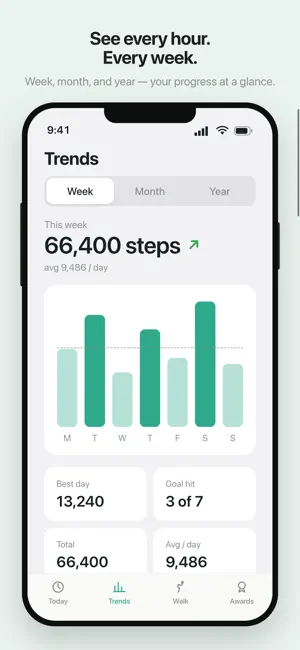
TrueSteps is the step counter that respects you: beautiful, genuinely free, and private by design. No account. No GPS. No tracking. Just your steps, counted honestly — right on your iPhone. Most pedometers are loved for the basics and resented for everything else: paywalls, surprise renewals, ad overload, and counts that lag or can't be corrected. TrueSteps fixes the basics and never gets in your way. WHY YOU'LL LOVE IT • Real-time counting — your steps tick up live, no refreshing. • A beautiful home screen — one calm "Aura" ring shows your progress at a glance, with distance, calories, active time, and floors. • Hour-by-hour view — see exactly when you move most, today. • Trends — clean Week, Month, and Year charts with a simple "you're trending up" read. • Fix any day — tap a day to correct its steps if your phone wasn't with you. (Almost no other app lets you.) • Streaks that forgive — keep your streak alive with a free weekly rest day. A missed day never feels like failure. • Awards & personal bests — milestone badges, longest streak, best day, and more. • Walk Mode — start a walk and watch your live pace and cadence, with zero GPS. A calm summary when you're done. • Home Screen & Lock Screen widgets — your ring, always a glance away. PRIVATE BY DESIGN TrueSteps counts steps using your iPhone's motion sensor only — no GPS, no location permission, and no Apple Health access required. There's no account and no sign-up, and your step history is stored on your device. We have no servers and never see your data. Want proof? The in-app Privacy panel lets you export everything (or erase everything) in one tap. FREE, FOREVER No subscription. No in-app purchases. TrueSteps is supported by polite, non-personalized ads that never cover your steps and never track you across apps. Download TrueSteps and start counting — honestly.
What’s new
Version 1.2.0 · Updated August 17, 2026
Your walk, live on your Lock Screen. • Live Activity — watch your walk's timer and steps in the Dynamic Island • Redesigned widgets — a premium dark look with a gradient progress ring • Share cards — beautiful images of your day, streaks, and badges • Month heatmap — see your goal-hit days at a glance in Trends • Start a walk from your widget or Control Center; ask Siri for your steps Also: a small banner now appears on the Today tab — as always non-personalized, never covering your steps, never tracking you.
App privacy
The developer, Jaspal Singh, reported these privacy practices to Apple.
Data Not Linked to You
The following data, which may be collected but is not linked to your identity, may be used for the following purposes:
- Identifiers: Device ID
- Usage Data: Product Interaction, Advertising Data
- Diagnostics: Performance Data, Crash Data
Used for: Third-Party Advertising, Analytics, App Functionality
Alternatives to TrueSteps — Step Counter
Looking for apps like TrueSteps — Step Counter? Here are 6 similar apps on the App Store. The highest rated is Tally Steps: Step Counter (5.0/5), and all 6 are free to download.
-
 Tally Steps: Step Counter
5.0
Tally Steps: Step Counter
5.0
-
 Pedometer - Health
5.0
Pedometer - Health
5.0
-
 Stark: Step Tracker
5.0
Stark: Step Tracker
5.0
-
 Pedometer: Steps
3.8
Pedometer: Steps
3.8
-
 Pedometer — Step Counter
5.0
Pedometer — Step Counter
5.0
-
 StepLog - Step Counter & Walk
5.0
StepLog - Step Counter & Walk
5.0
| App | Rating | Price | Last updated | Compare |
|---|---|---|---|---|
| TrueSteps — Step Counter | 5.0 / 5 (2 ratings) | Free | August 17, 2026 | |
| Tally Steps: Step Counter | 5.0 / 5 (1) | Free | Aug 21, 2026 | Compare |
| Pedometer - Health | 5.0 / 5 (3) | Free | Oct 22, 2026 | Compare |
| Stark: Step Tracker | 5.0 / 5 (1) | Free | Oct 19, 2026 | Compare |
| Pedometer: Steps | 3.8 / 5 (5) | Free | Sep 13, 2026 | Compare |
| Pedometer — Step Counter | 5.0 / 5 (1) | Free | Jun 19, 2026 | Compare |
| StepLog - Step Counter & Walk | 5.0 / 5 (2) | Free | Mar 20, 2026 | Compare |