

Manim Tutorial
上海百隅信息科技有限公司 Education iPhoneiPadiPod touch
Manim Tutorial is a free Education app for iPhone and iPad by 上海百隅信息科技有限公司. Rated 5.0/5 from 1 ratings. Requires iOS 16.2. Updated October 25, 2026.
- Rating
- 5.0
- 1 ratings
- Price
- Free
- on the App Store
- Size
- 198 MB
- Age 4+
- Updated
- Oct 25
- 2026 · v2.2.2
Screenshots


About Manim Tutorial
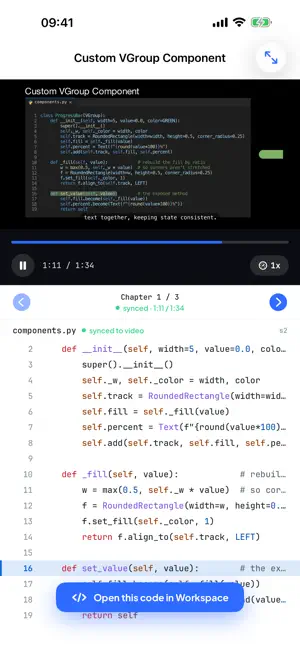
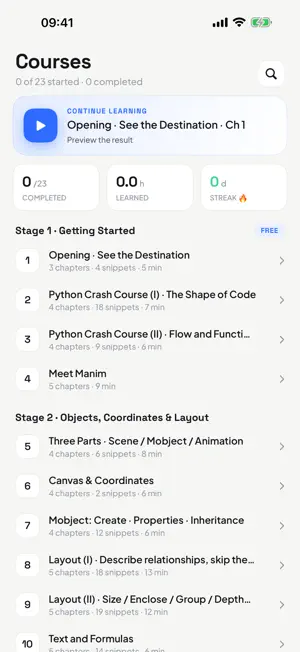
Manim Tutorial teaches you to create the animated math and computer-science explainers you've seen from 3Blue1Brown — by writing Python with Manim, one scene at a time. And now an AI assistant can build scenes with you. WATCH + CODE, IN SYNC • Video lessons paired with the actual, runnable source code • The code highlights line by line as the video plays, so you always know which line drew what • One tap opens any lesson's code in the Workspace to run it and change it A REAL MANIM WORKSPACE ON YOUR DEVICE • Runs Manim (Community Edition) on embedded Python — rendering happens right on your iPhone or iPad • Multi-file projects with your own SVG, image and audio assets • Code editor with syntax highlighting, autocomplete, one-tap formatting, and light and dark themes • Export in the quality you need, landscape or portrait, then save or share the video • On iPad: files, editor, preview and the AI assistant side by side AI ASSISTANT • Describe an animation in your own words, attach a sketch or a photo, or point it at a file with @ • It writes the Manim code into your project, test-renders it on your device, checks the result and fixes what's off • Keeps working while you switch apps; a Live Activity shows its progress and a notification tells you when it's done • Every device starts with 1,000 free credits; more are available in the app A COMPLETE, STRUCTURED PATH • 23 courses that take you from zero to confident, in six stages: 1. Getting Started — Python crash course and your first scenes 2. Objects & Layout — mobjects, the coordinate system, alignment, depth 3. Animation & Timing — animations, rate functions, updaters, custom moves 4. Text, Tex & Color — text, LaTeX/MathTex, color systems, graphs & trees 5. Advanced Topics — moving camera, 3D scenes & surfaces, custom mobjects 6. Build Real Projects — external assets, debugging & rendering, a capstone • Every chapter is short, focused, and comes with runnable code LEARN AT YOUR OWN PACE • Download a course once and watch it offline • Your progress, resume position and daily streak are saved as you go • Available in English, Simplified and Traditional Chinese, Japanese, Korean, Spanish and Brazilian Portuguese YOUR DATA, YOUR CHOICE • No sign-up needed — everything, including the AI assistant, works right away • Optional sign-in with Apple, Google or email keeps your credits and purchases in sync across your devices • No ads and no tracking; your projects stay on your device FAIR, SIMPLE PRICING • The first four courses and the Workspace are free • "All Courses" is a one-time purchase: every advanced course, watermark-free export, and 5,000 AI credits a month for 12 months (your first month is prorated by the days left when you buy; the last month tops up the difference) — no subscription • Just want clean exports? A small one-time Workspace unlock removes the watermark Whether you're a student trying to understand a concept by animating it, a teacher building visual explanations, or a developer who wants gorgeous math visuals, Manim Tutorial gives you the lessons, the code, an AI helper and a place to run it — all in one app.
What’s new
Version 2.2.2 · Updated October 25, 2026
Use your own fonts in scenes: download them from Google Fonts, or add font files to a project. FONTS • manim_fonts now works: with RegisterFont("Poppins") as fonts: downloads the family from Google Fonts, and Text(…, font=fonts[0]) uses it. Downloaded fonts stay on your device, so later runs don't download them again • Put a .ttf or .otf file in your project and register it with register_font("fonts/MyFont.ttf"), the same as in desktop Manim • If the family includes bold and italic styles, weight=BOLD and slant=ITALIC work too • Family names must match Google Fonts exactly, including capitals, for example "Open Sans"
App privacy
The developer, 上海百隅信息科技有限公司, reported these privacy practices to Apple.
Data Linked to You
The following data, which may be collected and linked to your identity, may be used for the following purposes:
- Purchases: Purchase History
- Identifiers: Device ID, User ID
- Usage Data: Product Interaction
- Contact Info: Email Address
- User Content: Photos or Videos, Other User Content
Used for: Analytics, App Functionality
Alternatives to Manim Tutorial
Looking for apps like Manim Tutorial? Here are 6 similar apps on the App Store. The highest rated is Rumina: Visual AI Tutor (5.0/5), and all 6 are free to download.


| App | Rating | Price | Last updated | Compare |
|---|---|---|---|---|
| Manim Tutorial | 5.0 / 5 (1 rating) | Free | October 25, 2026 | |
| 玩梗单词 | – | Free | Oct 22, 2026 | Compare |
| LociVerseAR | – | Free | Mar 18, 2026 | Compare |
| どうぶつ英語クイズ - なきごえで学ぶ | – | Free | Oct 27, 2026 | Compare |
| 法考帮 | – | Free | Oct 23, 2026 | Compare |
| TeXEditor: LaTeX Ai Flashcards | – | Free | May 21, 2026 | Compare |
| Rumina: Visual AI Tutor | 5.0 / 5 (8) | Free | Sep 30, 2026 | Compare |
Compare Manim Tutorial with the top alternatives: ratings, updates, ASO score and keyword gaps →