

PixBatch: Batch Photo Editor
Sompal Arya Photo & Video iPhoneiPadiPod touch
PixBatch: Batch Photo Editor is a free Photo & Video app for iPhone and iPad by Sompal Arya. Requires iOS 16.4. Updated September 9, 2026.
- Price
- Free
- on the App Store
- Size
- 55 MB
- Age 4+
- Updated
- Sep 9
- 2026 · v1.0.1
Screenshots


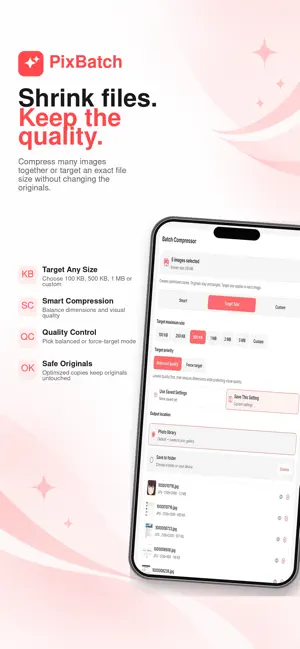
About PixBatch: Batch Photo Editor
PixBatch is an all-in-one image toolkit built for artists, creators, photographers, designers, and anyone who works with many images. Save time by editing, organizing, and exporting images from one simple app. Batch process image files, create reusable actions, add watermarks, rename files, compress images, convert formats, remove metadata, blur sensitive details, and turn image sets into clean PDFs. Key features: Batch Actions Create reusable workflows and apply multiple image tasks in one run. Combine steps like rename, convert, compress, watermark, and metadata cleanup. Batch Rename Rename many images with custom names, numbering, dates, separators, and sorting options. Batch Watermark Add text or image watermarks across many photos. Create and save watermark designs for reuse. Batch Compressor Reduce image file size for sharing, storage, uploads, and portfolio delivery. Batch Converter Convert images between common formats such as JPG, PNG, WebP, and more. Images to PDF Turn image sets, artwork, comics, portfolios, or reference pages into clean PDF files with page ordering. Blur Tool Hide faces, text, private information, and sensitive details using blur, mosaic, frosted effects, or emoji overlays. Metadata Cleanup Remove hidden image metadata such as camera, GPS, and author information before sharing. Collage Maker Arrange photos with customizable layouts, frames, backgrounds, and styles. Adjust individual images and clearly see your selected design. Text and Design Tools Add styled text, stickers, emojis, and visual elements to images. Private by design Image processing happens on your device. Your photos are not uploaded to a server for editing. PixBatch helps you prepare finished, export-ready image copies faster while keeping your original images safe. Terms of Use (EULA): https://www.apple.com/legal/internet-services/itunes/dev/stdeula/
What’s new
Version 1.0.1 · Updated September 9, 2026
Bug fixes and improvements for a smoother PixBatch experience. • Improved date sorting and filename dates in Batch Rename. • Improved page ordering and scrolling in Images to PDF. • Clearer loading progress when adding photos and folders. • More collage layouts and styling options, with clearer selection controls. • Refinements to text, blur, watermark, compression, conversion, and metadata tools. • Clearer Batch Actions guides and improved export feedback.
App privacy
The developer, Sompal Arya, reported these privacy practices to Apple.
Data Linked to You
The following data, which may be collected and linked to your identity, may be used for the following purposes:
- Purchases: Purchase History
- Identifiers: User ID
Used for: App Functionality
Alternatives to PixBatch: Batch Photo Editor
Looking for apps like PixBatch: Batch Photo Editor? Here are 6 similar apps on the App Store.
-
 Pixora: ID Photo & Upscale
-
 Image Converter - convertX
-
 Renamely: Batch Rename
-
 UltraScale
-
 AI Image Upscaler - Offline
-
 Pixmim: camera,editor,gallery
| App | Rating | Price | Last updated | Compare |
|---|---|---|---|---|
| PixBatch: Batch Photo Editor | – | Free | September 9, 2026 | |
| Pixora: ID Photo & Upscale | – | Free | Sep 29, 2026 | Compare |
| Image Converter - convertX | – | Free | Aug 28, 2026 | Compare |
| Renamely: Batch Rename | – | Free | Oct 24, 2026 | Compare |
| UltraScale | – | Free | Jan 8, 2026 | Compare |
| AI Image Upscaler - Offline | – | Free | Oct 2, 2026 | Compare |
| Pixmim: camera,editor,gallery | – | Free | Feb 10, 2026 | Compare |