

8PWD: Password Manager & 2FA
MNV LIMITED Utilities iPhoneiPadiPod touchMac
8PWD: Password Manager & 2FA is a free Utilities app for iPhone and iPad by MNV LIMITED. Requires iOS 18.0. Updated October 17, 2026.
- Price
- Free
- on the App Store
- Size
- 63 MB
- Age 4+
- Updated
- Oct 17
- 2026 · v5.0
Screenshots

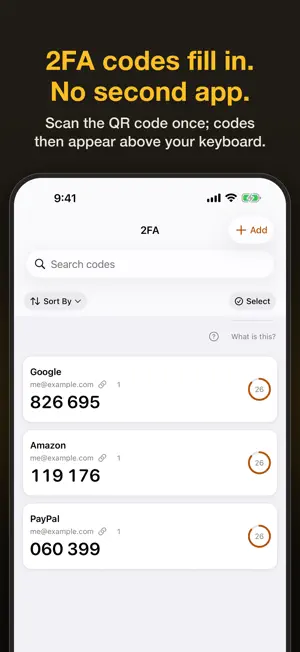


About 8PWD: Password Manager & 2FA
Your passwords, passkeys and 2FA codes stay on your iPhone, iPad and Mac — nowhere else. The App Store label says “Data Not Collected”, there's no account, and it works in Airplane Mode: 8PWD has no networking code and we run no server that could leak. Move in from Apple Passwords, Chrome or another password manager in two minutes; viewing, copying, exporting and deleting always stay available. MOVE IN ON DAY ONE The first launch walks you through importing: one tap from Apple Passwords (no plain-text file), pasted text, a CSV from Chrome, Firefox, Bitwarden, 1Password, LastPass and others, or a Google Authenticator transfer code. Then turn on AutoFill and set 8PWD as your code app, one tap each. WHAT IT DOES FOR YOU • Sign in with a tap: system AutoFill in Safari, apps and on Mac. Signing up or changing a password? 8PWD generates one that follows the site's rules and saves it when you tap Save (iOS 26.2+). • Built-in 2FA: scan a QR code once and the code appears above the keyboard. No second app; recovery codes live with their 2FA code. • Passkeys: create and keep passkeys and sign in with Face ID; sites can upgrade you to a passkey right after 8PWD fills a password. • Link 2FA codes, credit and debit cards and identities to accounts; aliases remember old email addresses and phone numbers. • Next Step on Home walks you through setup in 7 steps, from bringing passwords in to your first backup. • Calm leak alerts: 1,000,000 publicly leaked passwords, checked on your phone with no requests sent. Being on the list doesn't mean you were hacked — it tells you what to do. • Account deletion guide for 2,100+ sites, with a ready-made request; the site guide shows which sites support 2FA and passkeys. • New phone: AirDrop an encrypted backup and import it — smart merge keeps the more recently edited copy of each record. .8pwd is an open format (CC0) and plain CSV export is there too. • View a password large to type it on a computer or TV; share Wi‑Fi as a QR code. • Travel mode hides chosen folders or members everywhere until you turn it off with Face ID. Nothing is deleted. • A section for each family member, and Easy mode on iPhone: big type, fewer steps. • Native on iPhone, iPad and Mac, in twelve languages, with accessibility throughout. HOW IT'S PROTECTED Everything is stored as AES‑256‑GCM ciphertext; the key is created on your device and kept in the system keychain. With a master password (600,000 PBKDF2 rounds) or Face ID / Touch ID the vault opens; a 12-word recovery phrase takes over on a new device. We hold none of these. No analytics, no crash reporting, no third-party SDKs; the only network request is Apple's StoreKit when you buy. TRIAL AND SUBSCRIPTION A 7-day trial with every feature starts the first time you save or import something — no payment details needed. After that, subscribe monthly or yearly (the yearly plan supports Family Sharing). When a trial or subscription ends, nothing is deleted: every record can still be viewed, searched, copied (verification codes included), exported and deleted. If you installed before 5.0, you keep the free plan with 10 passwords; Lifetime purchases stay valid forever. Prices are shown on the store page; one purchase covers iPhone, iPad and Mac on the same Apple Account. READ THIS BEFORE YOU START We hold no copy of your key. Lose the device before setting a master password — or later both the master password and the recovery phrase — and only your own backup can bring the data back. Export one when the app reminds you. Available in twelve languages; English legal texts prevail. Terms of Use: https://www.8pwd.com/terms Privacy Policy: https://www.8pwd.com/privacy
What’s new
Version 5.0 · Updated October 17, 2026
5.0 rebuilds day one, AutoFill and pricing. As always, everything runs only on your device — nothing is uploaded. • Pricing has changed: if you install 8PWD now, a 7-day trial with every feature starts the first time you save or import something — no payment details needed. After that, subscribe monthly or yearly. When a trial or subscription ends, nothing is deleted: every record can still be viewed, searched, copied (verification codes included), exported and deleted. If you installed before 5.0, you keep the free plan with 10 records; Lifetime purchases stay valid forever. • Move in on day one: the first launch walks you through importing — one tap from Apple Passwords, paste a pile of text, a CSV from another password manager, or a Google Authenticator transfer code (scan it or pick a screenshot). On iPad and Mac you can open a .8pwd exported on another device. • Turn on AutoFill with one tap — the system simply asks whether to allow it, no hunting through Settings — and set 8PWD as your verification code app in one tap, so codes appear right above the keyboard when a website asks. • Smarter AutoFill (iOS 26.2 and later): when you sign up or change a password on a website, 8PWD generates one that follows the site's password rules and saves it when you tap Save. Sites where you've just filled a password from 8PWD can also upgrade you to a passkey automatically. • Next Step on Home walks you through setup in 7 steps — bring passwords in → turn on AutoFill → try it once → set the verification code app → add a two-factor code → set a master password → make your first backup — with a progress bar. Backup reminders are now on by default, gently, about every 14 days. • Smart merge: when you import a .8pwd, records that exist on both devices keep the more recently edited copy, and a replaced password goes into its history; afterwards you see how many were added, updated and kept. Records deleted on the other device are not deleted here. The .8pwd format moves to version 8; older versions still read it. • View a password large: one tap on the detail page shows it in big, grouped characters, handy for typing it on a computer or TV. On Mac, the inspector can also share a single record encrypted. • Leak warnings are clearer and calmer: a password on a public leak list doesn't mean your account was broken into, the check runs only on this device, and they tell you what to do. When a website says a passkey no longer works or a password is no longer needed, 8PWD only marks it — you decide whether to delete it. • The app is now called 8PWD. The Hebrew interface is no longer available; if you used it, 8PWD now appears in English. • On Mac, redeem offer codes right in the app. Plus many smaller improvements and fixes.
App privacy
The developer, MNV LIMITED, reported these privacy practices to Apple.
Data Not Collected
The developer does not collect any data from this app.
Alternatives to 8PWD: Password Manager & 2FA
Looking for apps like 8PWD: Password Manager & 2FA? Here are 6 similar apps on the App Store. The highest rated is QRCode ScanStudio: PDF Lab (5.0/5), and all 6 are free to download.
-
 绿芽宝贝 - 好习惯,从一颗种子开始
-
 DocRelay: Mobile Fax
-
 Vault – Password Manager & 2FA
-
 DailyFlow - Schedule Planner
-
 QRCode ScanStudio: PDF Lab
5.0
-
 Lumen — Screen Time & Focus
| App | Rating | Price | Last updated | Compare |
|---|---|---|---|---|
| 8PWD: Password Manager & 2FA | – | Free | October 17, 2026 | |
| 绿芽宝贝 - 好习惯,从一颗种子开始 | – | Free | Sep 4, 2026 | Compare |
| DocRelay: Mobile Fax | – | Free | Sep 12, 2026 | Compare |
| Vault – Password Manager & 2FA | – | Free | Oct 13, 2026 | Compare |
| DailyFlow - Schedule Planner | – | Free | Aug 10, 2026 | Compare |
| QRCode ScanStudio: PDF Lab | 5.0 / 5 (1) | Free | Mar 30, 2026 | Compare |
| Lumen — Screen Time & Focus | – | Free | May 8, 2026 | Compare |