

Moji - Japan Translator
Chen-Nien Chung Travel iPhoneiPadiPod touch
Moji - Japan Translator is a free Travel app for iPhone and iPad by Chen-Nien Chung. Requires iOS 18.0. Updated August 27, 2026.
- Price
- Free
- on the App Store
- Size
- 6 MB
- Age 4+
- Updated
- Aug 27
- 2026 · v1.0.5
Screenshots
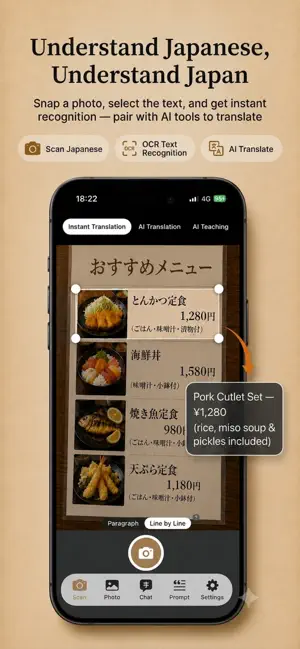
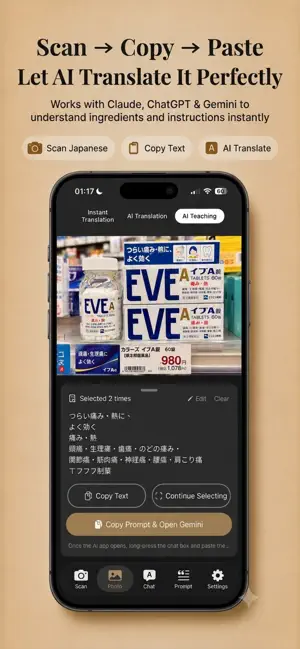


About Moji - Japan Translator
"Moji" comes from the Japanese word "moji" (文字), meaning "text" — so MojiTranslate means "translate text." We believe every piece of Japanese you encounter on your trip shouldn't just be translated — it should be understood. MojiTranslate is built for travel in Japan, combining OCR text recognition, AI translation, and a teaching mode to help you instantly understand menus, signs, and product labels. Every translation becomes a mini Japanese lesson. 【Photo Scan Translation】 Snap a photo of a Japanese menu, sign, or product label, then freely select the area you want translated. Supports multiple accumulated scans. Pinch to zoom for precise selection of small text. 【Photo Library Translation】 Pick a screenshot or photo from your library and run it through the same OCR selection flow — translate saved images anytime. 【Conversation Translation】 Type in your language and instantly generate a Japanese translation — perfect for ordering at restaurants, bargaining while shopping, or asking for directions. 【Share Sheet Translation】 No need to open the app! Screenshot anything and send it straight to MojiTranslate via the Share Sheet — select the text, copy the prompt, and launch AI translation in one tap. Supports accumulating text across multiple screenshots. 【Three Translation Modes】 • Instant Translation: Uses Apple's built-in translation — fast results even offline, with a furigana toggle to show hiragana readings above the original Japanese text • AI Translation: One-tap copy the prompt to your AI app for a more accurate translation • AI Teaching Mode: Word-by-word breakdowns, grammar explanations, context notes, and extended learning — turning every translation into a Japanese lesson 【Works with 3 Leading AI Tools】 Choose Claude, ChatGPT, or Gemini — the prompt is copied automatically and the matching app opens for you. Prompts are fully editable, so you can build a translation workflow that fits your needs. 【Japanese-Inspired Design】 7 beautifully designed color themes — Khaki Earth, Japan Orange, Morandi Blue, Matcha Green, Sakura Pink, Wisteria Purple, and Ink Black. Translation can look great too. 【Custom Prompts】 All 4 built-in prompt templates are fully editable — whether you're a beginner or advanced learner, build the translation experience that works best for you. Great for: ordering at restaurants, shopping at convenience stores, asking for directions at train stations, sightseeing, and reading drugstore product labels.
What’s new
Version 1.0.5 · Updated August 27, 2026
• Instant Translation now has a furigana toggle — switch to see the original text with hiragana readings above the kanji, works offline, and you can save or share it too • Other performance and stability improvements
App privacy
The developer, Chen-Nien Chung, reported these privacy practices to Apple.
Data Not Linked to You
The following data, which may be collected but is not linked to your identity, may be used for the following purposes:
- Identifiers: Device ID
- Usage Data: Product Interaction, Advertising Data
- Diagnostics: Crash Data, Performance Data
Used for: Third-Party Advertising
Alternatives to Moji - Japan Translator
Looking for apps like Moji - Japan Translator? Here are 6 similar apps on the App Store. The highest rated is Arrive Japan: Learn Japanese (5.0/5), and all 6 are free to download.
-
 MenuGenie - AI Menu Translator
-
 Enjoy Japan
-
 Kotomaji: Japan Travel Phrases
-
 Japan Speak: Travel Phrases
-
 AI旅譯 – 日韓旅行神器
-
 Arrive Japan: Learn Japanese
5.0
Arrive Japan: Learn Japanese
5.0
| App | Rating | Price | Last updated | Compare |
|---|---|---|---|---|
| Moji - Japan Translator | – | Free | August 27, 2026 | |
| MenuGenie - AI Menu Translator | – | Free | Apr 15, 2026 | Compare |
| Enjoy Japan | – | Free | May 6, 2026 | Compare |
| Kotomaji: Japan Travel Phrases | – | Free | Sep 16, 2026 | Compare |
| Japan Speak: Travel Phrases | – | Free | Oct 10, 2026 | Compare |
| AI旅譯 – 日韓旅行神器 | – | Free | Jun 9, 2026 | Compare |
| Arrive Japan: Learn Japanese | 5.0 / 5 (2) | Free | Jul 2, 2026 | Compare |