

Moonflower: Dark Mode & Reader
Roman Marchenko Utilities iPhoneiPadiPod touchMac
Moonflower: Dark Mode & Reader is a free Utilities app for iPhone and iPad by Roman Marchenko. Requires iOS 26.0. Updated August 24, 2026.
- Price
- Free
- on the App Store
- Size
- 13 MB
- Age 4+
- Updated
- Aug 24
- 2026 · v1.1
Screenshots

About Moonflower: Dark Mode & Reader
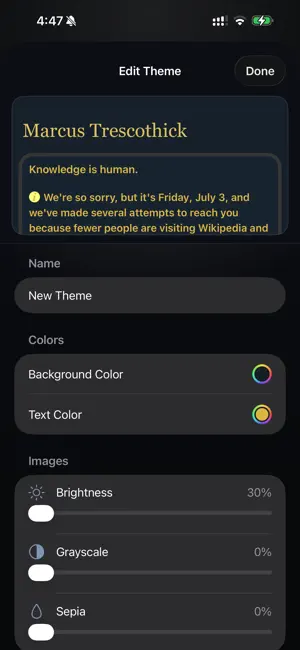
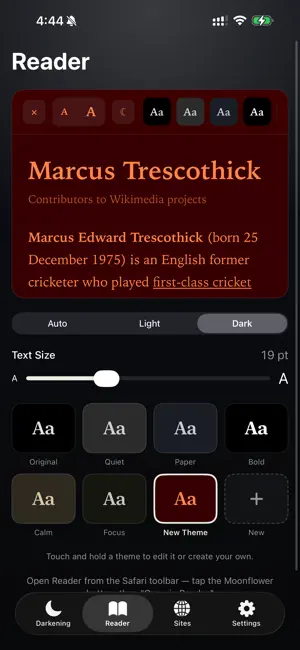
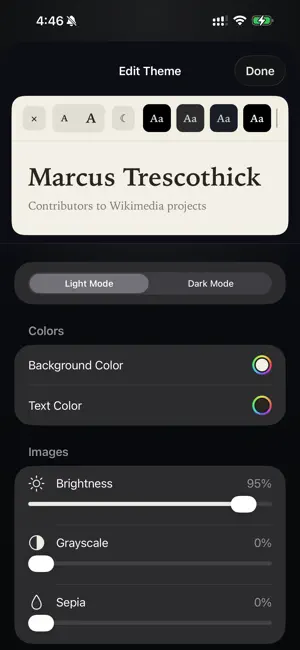
Moonflower gives every website a beautiful dark mode in Safari — designed to feel like it was always meant to be there. Create your own themes with exactly the colors you want, and fine-tune every website individually: its own theme, its own on/off rule, its own exceptions. Most sites still don't offer a dark theme. Moonflower fixes that: its engine reads each page's actual colors and generates a tailor-made dark theme on the fly, so text stays crisp, images stay natural, and nothing looks washed out or inverted. DARK MODE, DONE PROPERLY • Works on every website, automatically • Dynamic colors: a custom dark theme generated per site — not a crude filter • Respects sites that already have a dark mode (or override them if you prefer) • Smart image handling: photos stay untouched, bright diagrams and logos are gently adapted • Flash-free page loads — pages paint dark from the first moment DESIGN YOUR OWN THEMES • Six hand-tuned themes to start: Black, Dark, Gray, Sepia, Paper, Focus • Create unlimited custom themes — pick your exact background and text colors • Fine-tune image brightness, grayscale, and sepia per theme • Edit with a live preview on a real article, so you see every change instantly FINE-TUNE EVERY WEBSITE • Auto, On, or Off — globally or per site • Give each website its own theme • Pause a site until tomorrow with one tap • Ignore a site's built-in dark mode when yours looks better • Keyboard shortcuts for toggling, cycling themes, and pausing A READER BUILT IN • One tap turns any article into a clean, beautiful reading view • Apple Books-style themes — each with a light and dark variant • Adjustable text size, and your custom reader themes come along EVERYWHERE YOU BROWSE • iPhone, iPad, and Mac • iCloud sync keeps your themes and site settings identical on all your devices PRIVATE BY DESIGN Moonflower collects no data. Which sites you visit never leaves your device — all darkening happens locally, with no accounts, no analytics, and no tracking of any kind. FAIR PRICING Free for 3 days, full-featured. Then a single one-time purchase unlocks Moonflower forever, on all your devices. No subscription.
What’s new
Version 1.1 · Updated August 24, 2026
Safari now tells you when your free trial has ended, with a one-tap way to open the unlock screen. Added an Unlock option in Settings, clearer purchase and restore messages, and many darkening and Reader improvements.
App privacy
The developer, Roman Marchenko, reported these privacy practices to Apple.
Data Not Collected
The developer does not collect any data from this app.
Alternatives to Moonflower: Dark Mode & Reader
Looking for apps like Moonflower: Dark Mode & Reader? Here are 6 similar apps on the App Store. The highest rated is Onyx - Dark Mode (5.0/5), and 5 of the 6 are free to download.
-
 Onyx - Dark Mode
5.0
-
 Say Splitwise
-
 QwikDim
-
 Dark Mode Fix for Safari
-
 Earwake: Wake Phrase Tester
-
 Date Calculator: Days Between
| App | Rating | Price | Last updated | Compare |
|---|---|---|---|---|
| Moonflower: Dark Mode & Reader | – | Free | August 24, 2026 | |
| Onyx - Dark Mode | 5.0 / 5 (1) | Free | Sep 24, 2026 | Compare |
| Say Splitwise | – | Free | Jun 17, 2026 | Compare |
| QwikDim | – | Free | Aug 24, 2026 | Compare |
| Dark Mode Fix for Safari | – | Free | Aug 6, 2026 | Compare |
| Earwake: Wake Phrase Tester | – | 0.99 USD | Sep 29, 2026 | Compare |
| Date Calculator: Days Between | – | Free | Aug 29, 2026 | Compare |