

QRScanner App - Scan & Create
Fuzhou Nengge Technology Co.,Ltd. Utilities iPhoneiPadiPod touch
QRScanner App - Scan & Create is a free Utilities app for iPhone and iPad by Fuzhou Nengge Technology Co.,Ltd. Rated 5.0/5 from 3 ratings. Requires iOS 16.6.
- Rating
- 5.0
- 3 ratings
- Price
- Free
- on the App Store
- Size
- 93 MB
- Age 4+
- Updated
- Jul 21
- 2026 · v1.1.0
Screenshots


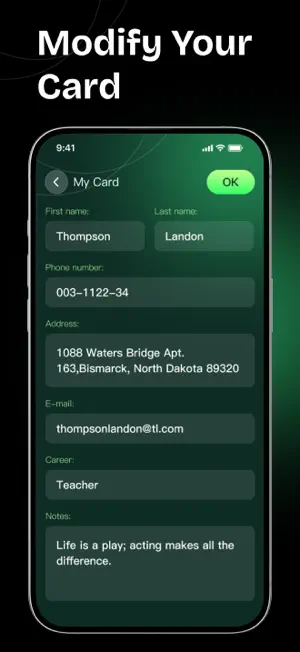

About QRScanner App - Scan & Create
QRScanner App is a simple and practical QR code tool built for everyday use. Whether you need to open a link, read a barcode, create a contact card, share WiFi access, or keep track of previous scan results, QRScanner App helps you handle it quickly in one place. Fast Code Scanning Use your camera to scan QR codes and barcodes instantly, or import an image from your photo library to read codes from screenshots, posters, labels, documents, and saved pictures. QRScanner App supports common QR code and barcode content types, including links, text, contact details, email, SMS, WiFi, location, and more. Create QR Codes for Daily Needs Turn useful information into scannable QR codes in seconds. You can create QR codes for: · Website URLs · Plain text · Contact cards · Phone numbers · Email templates · SMS messages · WiFi network access · Location information · Social profile links It is a convenient way to share information without repeated typing, copying, or manual input. Share Your Contact and Social Profiles Create QR codes for your personal contact details, business information, or social media profiles. Others can scan your code to open your profile, save your contact information, or reach you more efficiently. Supported use cases include personal cards, business cards, online profiles, social links, and quick contact sharing. Link Preview Before Opening When a scanned QR code contains a website link, QRScanner App lets you view the destination before opening it. This gives you an extra moment to check where the code leads before visiting an external website. Scan History for Quick Access Your scan results can be saved in history, so you can return to previous records whenever needed. You can review, copy, open, or manage past results without scanning the same code again. QRScanner App is designed to keep QR code scanning and creation straightforward. No complicated steps, no unnecessary distractions — just the tools you need for quick scanning, easy generation, and efficient sharing.
What’s new
Version 1.1.0 · Updated July 21, 2026
This update includes routine maintenance, general bug fixes, and performance tweaks.
App privacy
The developer, Fuzhou Nengge Technology Co.,Ltd., reported these privacy practices to Apple.
Data Used to Track You
The following data may be used to track you across apps and websites owned by other companies:
- Identifiers: Device ID
Data Not Linked to You
The following data, which may be collected but is not linked to your identity, may be used for the following purposes:
- Identifiers: Device ID
- Diagnostics: Crash Data, Other Diagnostic Data
Used for: Third-Party Advertising, Analytics, Product Personalization, App Functionality
Alternatives to QRScanner App - Scan & Create
Looking for apps like QRScanner App - Scan & Create? Here are 6 similar apps on the App Store. The highest rated is EasyScan QR - QR Scanning (5.0/5), and all 6 are free to download.
-
 PDF Scanner - File Reader
3.6
-
 EasyScan QR - QR Scanning
5.0
-
 QR Scanner - Create, Scan
3.8
-
 QR Atelier
5.0
-
 PDF Reader: Edit & Sign
5.0
-
 PixelQR Scan
3.7
| App | Rating | Price | Last updated | Compare |
|---|---|---|---|---|
| QRScanner App - Scan & Create | 5.0 / 5 (3 ratings) | Free | July 21, 2026 | |
| PDF Scanner - File Reader | 3.6 / 5 (20) | Free | Jun 19, 2026 | Compare |
| EasyScan QR - QR Scanning | 5.0 / 5 (3) | Free | Sep 1, 2026 | Compare |
| QR Scanner - Create, Scan | 3.8 / 5 (6) | Free | Apr 23, 2026 | Compare |
| QR Atelier | 5.0 / 5 (3) | Free | Aug 4, 2026 | Compare |
| PDF Reader: Edit & Sign | 5.0 / 5 (1) | Free | Oct 6, 2026 | Compare |
| PixelQR Scan | 3.7 / 5 (3) | Free | Aug 22, 2026 | Compare |