

MicroTape
Wavefold Labs LLC Utilities iPhoneiPadiPod touch
MicroTape is a free Utilities app for iPhone and iPad by Wavefold Labs LLC. Requires iOS 26.0. Updated August 17, 2026.
- Price
- Free
- on the App Store
- Size
- 23 MB
- Age 4+
- Updated
- Aug 17
- 2026 · v1.0.0
Screenshots


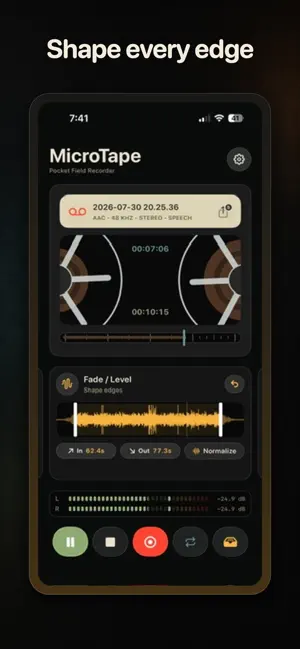

About MicroTape
MicroTape is an audio recorder and tape editor for iPhone. Use it to record voice notes, field audio, music, samples, and other sounds. Press Record to start a new tape. MicroTape saves each tape automatically. You do not have to create a project or enter a file name. RECORD AUDIO • Select AAC, Apple Lossless, or WAV format. • Select a sample rate of 44.1, 48, or 96 kHz. • Record mono or stereo audio. • Set the input gain before you record. • Level meters show the input and playback levels. • MicroTape adds the date and time to each new tape. EDIT AND PLAY TAPES • Use the waveform to select a position or audio range. • Trim the start and end of a tape. • Loop a complete tape or a selected range. • Add a crossfade to the loop point. • Use varispeed to play audio in reverse, at low speed, or at double speed. • Add a fade-in or fade-out. • Normalize the audio and set the output gain. • Adjust the low, middle, and high frequencies with the equalizer. • Add tape drive, wow, and flutter effects. ORGANIZE YOUR TAPES • Rename each tape in the tape library. • Save a location with a tape when you enable this option. • MicroTape can identify sounds and speech topics on your device. • Use sound tags to filter the tape library. • Each rendered tape keeps a link to its source tape. EXPORT AUDIO • Share the original audio file without changes. • Export edits and tape effects as a new audio file. • Select AAC for a small file. • Select WAV for a full-quality file. • Select the sample rate and channel format for each export. Use MicroTape as a voice recorder, field recorder, music recorder, sample recorder, or audio looper. MicroTape is for musicians, sound designers, journalists, podcasters, and other users who record audio. Recording, playback, library controls, input controls, and original-file sharing do not require a subscription. Some edit, loop, effect, and export features require a MicroTape Premium subscription. Terms of Use: https://wavefoldlabs.com/products/micro-tape/terms Privacy Policy: https://wavefoldlabs.com/products/micro-tape/privacy
App privacy
The developer, Wavefold Labs LLC, reported these privacy practices to Apple.
Data Not Linked to You
The following data, which may be collected but is not linked to your identity, may be used for the following purposes:
- Identifiers: User ID, Device ID
- Usage Data: Product Interaction
- Purchases: Purchase History
Used for: Analytics, App Functionality
Alternatives to MicroTape
Looking for apps like MicroTape? Here are 6 similar apps on the App Store. The highest rated is Kasetofon (5.0/5), and 5 of the 6 are free to download.
-
 GPS Audio Recorder
-
 Recwave
-
 Kasetti: Retro Voice Recorder
-
 Exif Remover App
-
 Kasetofon
5.0
Kasetofon
5.0
-
 MudForge
4.0
MudForge
4.0
| App | Rating | Price | Last updated | Compare |
|---|---|---|---|---|
| MicroTape | – | Free | August 17, 2026 | |
| GPS Audio Recorder | – | 1.29 USD | Oct 16, 2026 | Compare |
| Recwave | – | Free | Mar 29, 2026 | Compare |
| Kasetti: Retro Voice Recorder | – | Free | May 27, 2026 | Compare |
| Exif Remover App | – | Free | Jan 14, 2026 | Compare |
| Kasetofon | 5.0 / 5 (1) | Free | Sep 11, 2026 | Compare |
| MudForge | 4.0 / 5 (9) | Free | Oct 20, 2026 | Compare |
Compare MicroTape with the top alternatives: ratings, updates, ASO score and keyword gaps →