

PadMonitor: HDMI Monitor
byteNine AS Photo & Video iPad
PadMonitor: HDMI Monitor is a free Photo & Video app for iPad by byteNine AS. Requires iOS 26.0. Updated September 4, 2026.
- Price
- Free
- on the App Store
- Size
- 27 MB
- Age 4+
- Updated
- Sep 4
- 2026 · v1.0
Screenshots
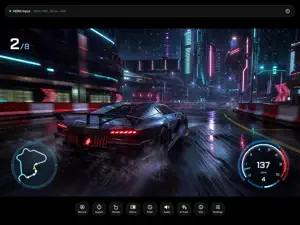


About PadMonitor: HDMI Monitor
Turn your iPad into a sharp, low-latency monitor for anything with an HDMI output — game consoles, cameras, computers, set-top boxes — using a USB-C capture card. Then flip on the thing no other capture app has: a live AI COMMENTATOR. A caster watches your gameplay and reacts out loud in real time — pick from eight personas, from over-the-top esports Hype to a lovingly brutal Roast to a nature-documentary narrator where YOU are the wildlife. Everyone gets a free trial, no purchase needed. Plug a UVC capture card into your iPad's USB-C port, connect your HDMI source, and PadMonitor shows it full screen with audio, recording, and tools no other capture app brings together. THE AI CASTER • Eight personas: Hype, Roast, Coach, Nature Documentary, Retro, Film Night, Focus Coach — or write your own. • Premium on-device neural voice (free download), or any installed Apple voice. • Broadcast-style ducking: the game dips only while the caster is actually talking. • Honest and private: one downscaled snapshot every 30 seconds is analysed, only while you have it switched on. Nothing is stored. WHY PADMONITOR • Honest setup — a built-in checker tells you exactly what you need and warns you when a passive adapter won't work, before you waste time. • Beautiful, fast image — a modern Metal + 120 Hz ProMotion pipeline. Sharp and responsive. • Sound that just works — audio passthrough that locks to your capture card so AirPods can't hijack it mid-session. • Built-in troubleshooter — green screen, no signal, black borders, no sound: each one explained in plain language. FOR GAMERS • Retro filters: CRT, scanlines, and sharp pixel scaling for that authentic console look. • Low-latency render path and a live diagnostics readout (capture rate, refresh, latency). • Record clips with synced audio. FOR CREATORS • Pro monitoring: focus peaking, false-colour exposure, and zebras. • Fit / fill / stretch, rotation, mirror, and independent overscan crop — framed your way, never distorted. • Clean, full-quality recording (not a screen grab that captures the app's own buttons). WHAT YOU NEED • A USB-C iPad (iPad Pro, iPad Air, or iPad mini 6/7) on iPadOS 26 or later. • An active USB-C UVC capture card (e.g. an MS2130-based card or Elgato Game Capture Neo). A passive USB-C-to-HDMI adapter will NOT work. • Note: copy-protected sources (HDCP — Apple TV apps, streaming services) cannot be captured by any capture card and will show a black screen. PRICING PadMonitor is free and fully usable as a monitor. A single one-time PadMonitor Pro unlock adds recording, retro filters, pro scopes, overscan crop — and the AI Commentator with 15 free minutes every day (everyone gets a 5-minute trial). Optional Commentary Hours packs cover marathon sessions. No subscription, ever — and never a paywall over a live signal.
App privacy
The developer, byteNine AS, reported these privacy practices to Apple.
Data Not Linked to You
The following data, which may be collected but is not linked to your identity, may be used for the following purposes:
- Purchases: Purchase History
- Location: Coarse Location
- Identifiers: Device ID
- Usage Data: Product Interaction
- User Content: Photos or Videos
- Diagnostics: Crash Data, Other Diagnostic Data
Used for: Analytics, App Functionality
Alternatives to PadMonitor: HDMI Monitor
Looking for apps like PadMonitor: HDMI Monitor? Here are 6 similar apps on the App Store. The highest rated is Superscenic - 3D Capture (5.0/5), and all 6 are free to download.
-
 Consolation
-
 HDMI Monitor for Tablet
-
 HDMI Monitor - Cine
-
 Superscenic - 3D Capture
5.0
-
 LutRec
-
 CaptureLinker
| App | Rating | Price | Last updated | Compare |
|---|---|---|---|---|
| PadMonitor: HDMI Monitor | – | Free | September 4, 2026 | |
| Consolation | – | Free | May 2, 2026 | Compare |
| HDMI Monitor for Tablet | – | Free | Oct 12, 2026 | Compare |
| HDMI Monitor - Cine | – | Free | Sep 15, 2026 | Compare |
| Superscenic - 3D Capture | 5.0 / 5 (2) | Free | Oct 4, 2026 | Compare |
| LutRec | – | Free | Oct 13, 2026 | Compare |
| CaptureLinker | – | Free | Sep 15, 2025 | Compare |