

ProFocus: Photo Frame & Clock
Tran Trung Hieu Photo & Video iPhoneiPadiPod touchMac
ProFocus: Photo Frame & Clock is a free Photo & Video app for iPhone and iPad by Tran Trung Hieu. Requires iOS 13.0. Updated October 1, 2026.
- Price
- Free
- on the App Store
- Size
- 16 MB
- Age 4+
- Updated
- Oct 1
- 2026 · v1.2.1
Screenshots


About ProFocus: Photo Frame & Clock
Turn any screen you already own into a digital photo frame — an old tablet in a drawer, a desktop, a TV, even a $10 DIY frame. Send photos from your phone; they appear on the frame instantly over your home WiFi. No cloud, no account. Your photos never leave your network. HOME HUB • One home screen for everything: send photos, receive, albums, remote and clock • Pick a role on first launch: main phone (sender) or photo frame (receiver) PHONE → FRAME IN 3 MINUTES • Open "Receive" on the frame — a QR code appears • Scan it with your phone — paired for good • Pick photos and send; they show up instantly ALBUMS & SLIDESHOWS — FREE • Group photos into albums • Slideshow templates: Classic, Ken Burns, Slide, Collage • All clock faces free: flip cards, circle, analog StandBy FRAME BY DAY, CLOCK BY NIGHT • A calm StandBy-style clock for your bedside • Focus timer with Pomodoro presets built in 100% PRIVATE • LAN-only: photos go device-to-device over your WiFi • No account. No ads. No third-party tracking. Works fully offline. DIY & TV • Works on Apple TV as a receiver • Makers: build a $10 ESP32 WiFi frame with our open hardware guide PRO (one-time lifetime purchase, or a monthly / quarterly subscription) • Send whole albums to another device in one tap • Remote-control any frame (next/prev/pause, change clock) SUBSCRIPTION INFO • ProFocus Pro Monthly and ProFocus Pro Quarterly are auto-renewable subscriptions. Payment is charged to your Apple Account when you confirm the purchase. The subscription renews automatically unless cancelled at least 24 hours before the end of the current period. You can manage or cancel it in your App Store account settings. • Terms of Use (EULA): https://www.apple.com/legal/internet-services/itunes/dev/stdeula/ • Privacy Policy: https://profocus.fighttech.vn/privacy Six languages: English, Tiếng Việt, 한국어, 日本語, العربية, 中文. ProFocus is small on purpose — quiet software for a calmer home.
What’s new
Version 1.2.1 · Updated October 1, 2026
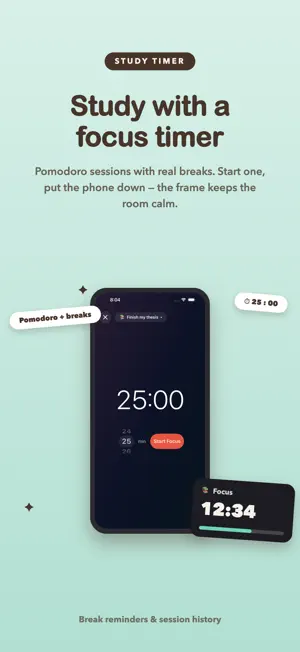
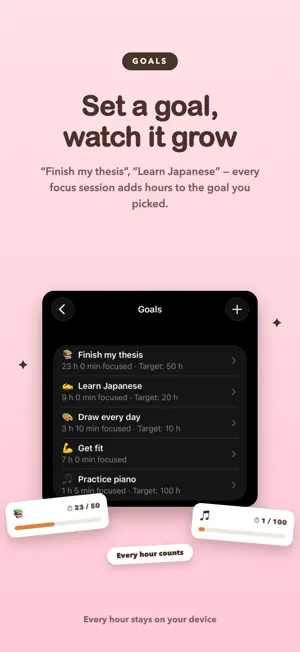
1.2.1 — Focus timer & goals • Set a goal like “Finish my thesis” and give it a time target • Every focus session adds hours to the goal you picked • Write a short note after each session — it stays with the goal • Live Activity & Dynamic Island: the countdown keeps running on your Lock Screen • New “Guides & tips” section on the Home Hub • iPad & Mac: new sidebar layout, Liquid Glass look on iOS 26 • Bug fixes and polish
App privacy
The developer, Tran Trung Hieu, reported these privacy practices to Apple.
Data Not Linked to You
The following data, which may be collected but is not linked to your identity, may be used for the following purposes:
- Identifiers: Device ID
- Usage Data: Product Interaction
Used for: Analytics
Alternatives to ProFocus: Photo Frame & Clock
Looking for apps like ProFocus: Photo Frame & Clock? Here are 6 similar apps on the App Store. The highest rated is PicDock: Digital Photo Frame (4.0/5), and 5 of the 6 are free to download.



| App | Rating | Price | Last updated | Compare |
|---|---|---|---|---|
| ProFocus: Photo Frame & Clock | – | Free | October 1, 2026 | |
| Pad Frame | – | Free | Aug 1, 2026 | Compare |
| Simple-Photo-Frame | – | Free | Oct 8, 2026 | Compare |
| PicDock: Digital Photo Frame | 4.0 / 5 (1) | Free | Oct 28, 2026 | Compare |
| フォトスタンド | – | 4.99 USD | Sep 14, 2026 | Compare |
| Living Photo Frame | – | Free | Oct 3, 2026 | Compare |
| MeFrame | – | Free | Apr 18, 2025 | Compare |