

Film Kitchen
McKenna Fuller Photo & Video iPhoneiPadiPod touch
Film Kitchen is a free Photo & Video app for iPhone and iPad by McKenna Fuller. Rated 5.0/5 from 1 ratings. Requires iOS 17.0. Updated October 12, 2026.
- Rating
- 5.0
- 1 ratings
- Price
- Free
- on the App Store
- Size
- 88 MB
- Age 4+
- Updated
- Oct 12
- 2026 · v3
Screenshots

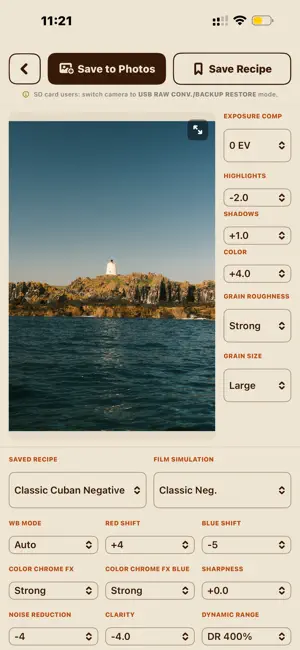
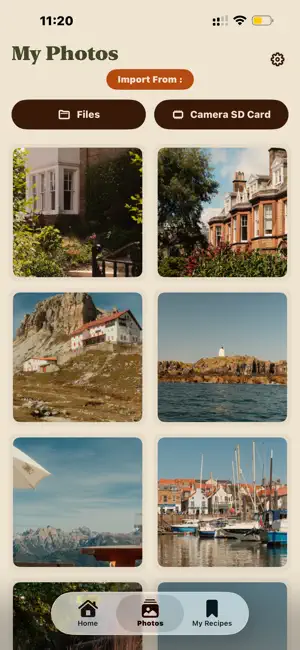

About Film Kitchen
FilmKitchen turns your phone into a recipe lab for Film Simulations, then hands the actual processing back to your camera so you never lose RAW quality. COMPARE RECIPES Browse and compare popular recipes side by side. See how tone curves, grain, white balance shift, and dynamic range settings change the look before you ever touch a photo. BUILD YOUR LIBRARY Save the recipes you like, or build your own from scratch. Organize a personal library so your go-to looks are always one tap away, whether you're shooting street, portrait, or landscape. EDIT WITH YOUR CAMERA'S OWN PROCESSOR This is the core of FilmKitchen: connect your camera over USB-C and apply recipes using your camera's native image processor, not a phone-side approximation. That means the output matches what you'd get shooting the recipe in-camera, because it is being generated in-camera. IMPORT FROM ANYWHERE Pull RAW files directly from your connected camera, or import them from your Files app if you've already offloaded a shoot. Either way, recipes apply the same way: processed on-device, by the camera. EXPORT AND SAVE Once a recipe is applied, export the result and save it straight back to your camera's storage. No round-tripping through a desktop, no re-importing, no quality loss from a phone-based RAW converter. Built for photographers who shoot RAW because they want the option, but still want the character of a good Film Simulation recipe without giving up highlight and shadow latitude. Compatible with Fujifilm cameras supporting USB-C tethered connections. Check compatibility for your specific model before purchase. Film Kitchen is an independent app and is not affiliated with, endorsed by, or sponsored by FUJIFILM Corporation or the FUJIFILM, X-series. Film recipe names are trademarks of their respective owners.
What’s new
Version 3 · Updated October 12, 2026
Better editing - Full white balance control, including Kelvin and all of your camera's white balance modes - Undo and redo your edits, and press and hold the photo to compare with the original - Clearer settings that highlight as you change them Share your recipes - Export a recipe card with your photo and every setting, now sized 9:16 for stories Faster SD card import - Newest photos appear first and show up while the card is still loading - Previews load faster and are remembered for next time - Optional large previews to see the whole frame Organize your photos - Photos grouped by date - Filter by Edited and Not Edited - Select several photos at once to save or remove them Easier camera connection - See at a glance whether your camera is connected - If connecting stalls, step-by-step setup instructions appear automatically Fixes and improvements - Photos saved straight from My Photos now save at the correct resolution - General stability and performance improvements
App privacy
The developer, McKenna Fuller, reported these privacy practices to Apple.
Data Not Collected
The developer does not collect any data from this app.
Alternatives to Film Kitchen
Looking for apps like Film Kitchen? Here are 6 similar apps on the App Store. The highest rated is FujiStyle - Film Recipes Frame (4.8/5), and all 6 are free to download.
-
 Fuji Pic - Film Recipes
-
 Filmsim Recipes
1.7
Filmsim Recipes
1.7
-
 Fuji Recipes - Film simulation
4.7
Fuji Recipes - Film simulation
4.7
-
 FujiStyle - Film Recipes Frame
4.8
FujiStyle - Film Recipes Frame
4.8
-
 Fuji X Weekly — Film Recipes
4.5
Fuji X Weekly — Film Recipes
4.5
-
 FUJIFILM XApp
4.1
FUJIFILM XApp
4.1
| App | Rating | Price | Last updated | Compare |
|---|---|---|---|---|
| Film Kitchen | 5.0 / 5 (1 rating) | Free | October 12, 2026 | |
| Fuji Pic - Film Recipes | – | Free | Sep 30, 2026 | Compare |
| Filmsim Recipes | 1.7 / 5 (6) | Free | Oct 15, 2026 | Compare |
| Fuji Recipes - Film simulation | 4.7 / 5 (53) | Free | Oct 12, 2026 | Compare |
| FujiStyle - Film Recipes Frame | 4.8 / 5 (378) | Free | Sep 18, 2026 | Compare |
| Fuji X Weekly — Film Recipes | 4.5 / 5 (120) | Free | Oct 9, 2026 | Compare |
| FUJIFILM XApp | 4.1 / 5 (3,471) | Free | Jul 6, 2026 | Compare |
Compare Film Kitchen with the top alternatives: ratings, updates, ASO score and keyword gaps →