

Selflane Hub
Selflane, LLC Business iPhoneiPadiPod touch
Selflane Hub is a free Business app for iPhone and iPad by Selflane, LLC. Requires iOS 16.4. Updated October 26, 2026.
- Price
- Free
- on the App Store
- Size
- 97 MB
- Age 12+
- Updated
- Oct 26
- 2026 · v1.3.0
Screenshots


About Selflane Hub
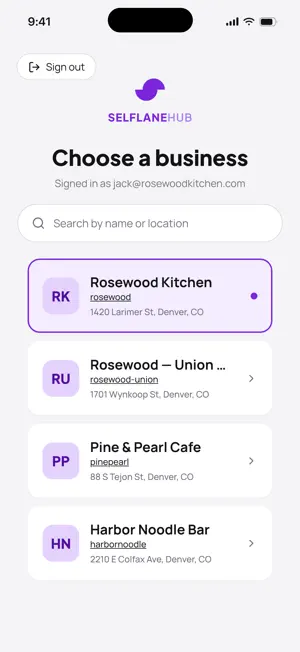
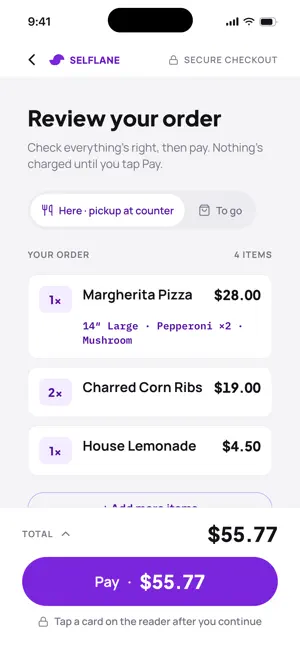
Selflane Hub turns one iPad into a self-order kiosk that your guests operate themselves at the counter. It is customer-facing, not a staff terminal: restaurants run it alongside Selflane POS behind the counter and Selflane Displays in the kitchen, each on its own device, each doing one job. WHAT A GUEST DOES Tap Start Ordering, choose dine-in or takeout, and browse the menu by category with photos and prices, in English or Spanish. Open an item to pick sizes and add-ons. Required choices must be made before the item goes in the cart, so nothing unmakeable reaches the kitchen. The review screen lays out every item, quantity, and total before paying, and guests can add a tip if your business offers one. Prices and availability are verified again the moment before the card is charged, so the number on the screen is the number on the card. After payment the order number appears, the receipt prints, and the screen resets for the next guest. Walk away mid-order and it clears itself. WHAT YOU SET UP ONCE Sign in with your Selflane account and pick your location if you run more than one. Then connect two pieces of hardware: • Card reader: discover and connect a Stripe Terminal Bluetooth reader, and choose the Stripe Location it belongs to. • Receipt printer: find Star or Epson printers on your local network, adjust the receipt layout, and preview it on screen Switch the iPad into kiosk mode a. Setup is not something staff use during service. WHERE THE MONEY GOES Card payments run through Stripe Terminal and settle to your own connected Stripe account. Ino reader is online, the Pay buttote to ask a team member, so aguest never reaches the last step only to find out they can't pay. BEFORE YOU START • Built for Selflane merchants. An active merchant account is required, and self-order must be enabled on it. • Card payments require a supported Stripe Terminal Bluetooth reader. • Receipt printing requires a Sta on the same local network as theiPad. • Account deletion is available i Account. • Works in portrait and landscape. Best on a mounted iPad. Questions, or need self-order turned on? Talk to the Selflane team.
What’s new
Version 1.3.0 · Updated October 26, 2026
- More card terminal options. Accept payments with PAX terminals or Stripe network readers over Wi-Fi or Ethernet, including S700, S710 and WisePOS E, alongside the Bluetooth M2. - Automatic reader reconnect. Hub remembers your reader and reconnects after a disconnect or restart. Reader software updates show progress, with an option to install available updates. - Card program support. Kiosk orders now display and include your configured Dual Pricing, Surcharge or similar adjustment in the payment total. - Interrupted payment recovery. After an app restart, Hub checks unfinished payments and attempts to save the order or cancel the payment. Payments that cannot be confirmed are flagged for staff review, with a message asking guests not to pay again. - Safer PAX payment handling. Improved handling of interrupted connections, declined cards and transactions voided on the terminal. When a recovery lookup finds two approved sales for one order reference, Hub flags them for staff review. - Manager-approved kiosk exit. Leaving kiosk mode now requires a manager or administrator PIN. Previously cached approvers can approve while offline. - Your branding on the kiosk. Display your business logo and name. Sold-out dishes and menus with no available items are hidden, and the kiosk screen stays awake between guests. - More accurate carts. Removed or unavailable dishes block payment until removed. Published dish names and price changes are reflected in the cart and order review. - Better ordering guidance. Missing required options scroll into view, failed menu loads can be retried, and order refusals show the reason supplied by Selflane. - Settings refresh between orders. Tip options, branding and receipt content refresh without restarting the kiosk, while active orders keep their existing settings. - More reliable receipts. Receipts print one at a time per printer, with clearer failure messages. Saved printers can be restored and tested directly from Settings. - Clearer network troubleshooting. Printer, PAX and network reader connection errors include Local Network permission guidance and an Open Settings button. - Settings improvements. Open hardware settings from Home, cancel reader searches, check store and device time zones, and use the updated PIN keypad. - Compatibility and security fixes. Fixed an iOS 27 launch crash in builds made with Xcode 27. Reinstalling Hub clears previous login credentials and saved PINs. Language selection is remembered after restarting. Before updating, make sure a manager or administrator has a PIN configured. Recovery does not automatically print receipts, and flagged payments require staff review.
App privacy
The developer, Selflane, LLC, reported these privacy practices to Apple.
Data Linked to You
The following data, which may be collected and linked to your identity, may be used for the following purposes:
- Financial Info: Payment Info
- Location: Precise Location
- Contact Info: Physical Address, Email Address, Name, Phone Number
- User Content: Other User Content
- Identifiers: User ID, Device ID
Used for: App Functionality
Data Not Linked to You
The following data, which may be collected but is not linked to your identity, may be used for the following purposes:
- Usage Data: Product Interaction
- Diagnostics: Crash Data, Performance Data, Other Diagnostic Data
Used for: Analytics
Alternatives to Selflane Hub
Looking for apps like Selflane Hub? Here are 6 similar apps on the App Store. The highest rated is MagTek Reader Management Syst. (5.0/5), and all 6 are free to download.
-
 TIES - Mini Personal CRM
-
 MTUSDK Omni
-
 3D Model - AI Model Generator
2.3
3D Model - AI Model Generator
2.3
-
 MagTek RMS - V2
-
 GrainBook: AI Content Reader
-
 MagTek Reader Management Syst.
5.0
MagTek Reader Management Syst.
5.0
| App | Rating | Price | Last updated | Compare |
|---|---|---|---|---|
| Selflane Hub | – | Free | October 26, 2026 | |
| TIES - Mini Personal CRM | – | Free | Sep 11, 2026 | Compare |
| MTUSDK Omni | – | Free | Jun 26, 2026 | Compare |
| 3D Model - AI Model Generator | 2.3 / 5 (3) | Free | Aug 31, 2026 | Compare |
| MagTek RMS - V2 | – | Free | Feb 10, 2026 | Compare |
| GrainBook: AI Content Reader | – | Free | Aug 14, 2026 | Compare |
| MagTek Reader Management Syst. | 5.0 / 5 (2) | Free | May 7, 2024 | Compare |
Compare Selflane Hub with the top alternatives: ratings, updates, ASO score and keyword gaps →