

TeachBook: Teacher Gradebook
KEVIN BLAYASSI Productivity iPhoneiPadiPod touch
TeachBook: Teacher Gradebook is a free Productivity app for iPhone and iPad by KEVIN BLAYASSI. Requires iOS 26.0. Updated October 12, 2026.
- Price
- Free
- on the App Store
- Size
- 82 MB
- Age 4+
- Updated
- Oct 12
- 2026 · v2.0
Screenshots
About TeachBook: Teacher Gradebook
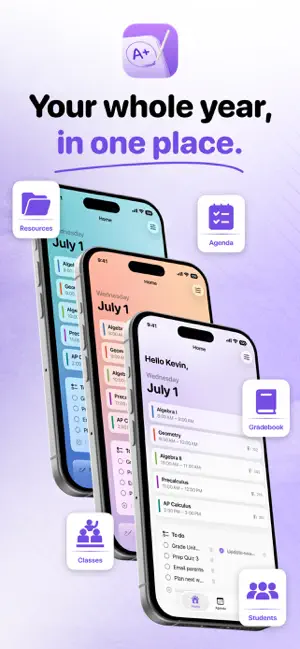
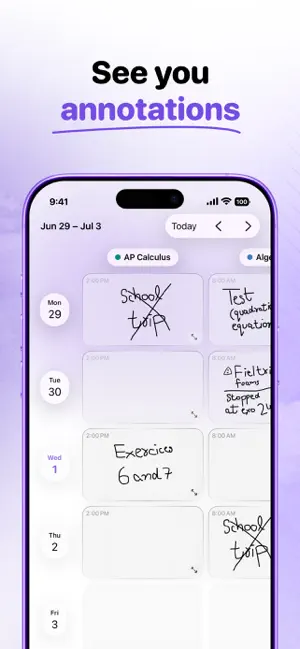
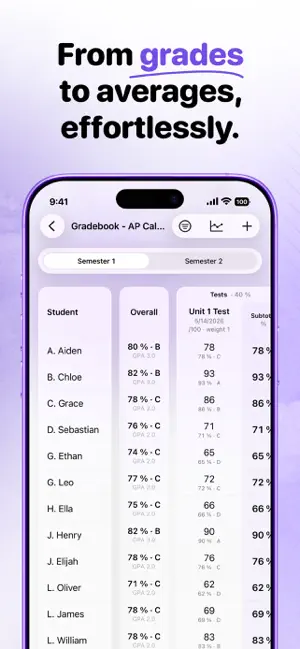
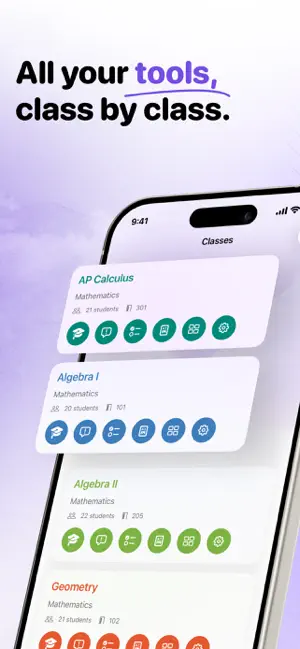
TeachBook brings everything you need to run your school year together in one place — on iPad and iPhone. Built by and for teachers, TeachBook replaces the paper gradebook with a fast, clear and beautiful tool. GRADEBOOK • Quick grade entry, automatic averages to two decimals, per-assessment stats • Grade dictation: say “Lucas 92” and the grade is entered, with on-device speech recognition • Copy a whole column of grades in one tap, ready to paste into your school system or a spreadsheet • French system (/20, coefficients) OR US system (weighted categories, percentage, letter & GPA) • Standards-based grading with color-coded mastery levels • Progress charts per student and per class PLANNER & TIMETABLES • Weekly planner you can annotate with Apple Pencil, or type in full view • Class timetables, time slots, A/B weeks SIRI • “What did I plan for my next class?”: Siri reads your planner notes, even handwritten ones • Log an observation or get a summary for a student or a class, by voice CLASS MANAGEMENT • Import your class list from a photo, a scan, a PDF or an exported file, birth dates included • Interactive seating charts (drag & drop, PDF export) • Track documents to hand in, student by student, with PDF export • Custom observations (work, behavior…) • Student profiles: photo, contacts, guardians, accommodations (flagged right in the gradebook), birthdays ORGANIZATION • Multiple planners (one year, one subject…) • Your classes in the order you choose • Handwritten notepad with multiple pages that turns your notes into tasks with reminders • To-dos, appointments with reminders, quote of the day • Useful links that open your sites — or your apps — directly • Home screen widgets: next class, today, your weekly timetable, and tasks you tick off without opening the app PDF PRINTABLES • Every document for a class in one place: blank class list, photo roster, gradebook, student info and report sheets, submission tracking • Portrait or landscape, laid out automatically across several pages iCLOUD SYNC • Your data synced and backed up privately across all your devices • Nothing leaves a device before it has received what you did elsewhere: your changes don't overwrite each other • Dated backups kept on your device, restorable at any time • Or keep everything on this device, without iCloud — your call • Export your whole database to a file you keep, or load it back on another device Try free for 14 days, no commitment. TeachBook offers an auto-renewable subscription (monthly or yearly) after a 14-day free trial. Your subscription renews automatically unless canceled at least 24 hours before the end of the period. Manage or cancel it in your App Store account settings. Terms of Use and Privacy Policy are available in the app.
What’s new
Version 2.0 · Updated October 12, 2026
TeachBook 2.0 saves you time, in class and after. • Grade dictation: in the gradebook, tap “⋯” below an assessment, then “Dictate grades”, and say “Lucas 92”: TeachBook finds the student and enters the grade. “Absent” and “not graded” work too. Everything is processed on your device. • Siri: ask “What did I plan for my next class in TeachBook?” and Siri reads your planner notes, even handwritten ones. You can also log an observation, or get a summary for a student or a class. • Class list import: photo, scan, PDF, CSV file or an export from your school system. TeachBook creates the students, birth dates included, and you review everything before adding. • Multi-page notepad: “Create Tasks” turns your handwriting into to-dos, with a reminder whenever a date is written. • Below each assessment, the “⋯” button copies the whole column of grades, ready to paste into your software or a spreadsheet, or opens the assessment for editing. • A puzzle piece next to a first name shows which students have accommodations; tap it to see the list. • A faster gradebook, averages to two decimals, weights with two decimals, and averages that animate when a grade changes. • Settings › Tips: what to say to Siri and the easy-to-miss gestures, explained step by step with screenshots.
App privacy
The developer, KEVIN BLAYASSI, reported these privacy practices to Apple.
Data Not Collected
The developer does not collect any data from this app.
Alternatives to TeachBook: Teacher Gradebook
Looking for apps like TeachBook: Teacher Gradebook? Here are 6 similar apps on the App Store. The highest rated is Halo AI - Decision Engine (5.0/5), and 4 of the 6 are free to download.
-
 Prof Planner
-
 CustomSearch 2
2.5
CustomSearch 2
2.5
-
 Context: To Do List & Focus
-
 Halo AI - Decision Engine
5.0
Halo AI - Decision Engine
5.0
-
 Nota: Personal Scribe
-
 Tab Space – Tab Saver
| App | Rating | Price | Last updated | Compare |
|---|---|---|---|---|
| TeachBook: Teacher Gradebook | – | Free | October 12, 2026 | |
| Prof Planner | – | Free | Oct 3, 2025 | Compare |
| CustomSearch 2 | 2.5 / 5 (2) | 1.99 USD | Sep 27, 2026 | Compare |
| Context: To Do List & Focus | – | Free | Jun 30, 2026 | Compare |
| Halo AI - Decision Engine | 5.0 / 5 (2) | Free | Apr 4, 2026 | Compare |
| Nota: Personal Scribe | – | Free | Oct 22, 2026 | Compare |
| Tab Space – Tab Saver | – | 4.99 USD | Oct 26, 2026 | Compare |