

NeatKiosk
WakeSys sarl Utilities iPhoneiPadiPod touch
NeatKiosk is a free Utilities app for iPhone and iPad by WakeSys sarl. Rated 5.0/5 from 2 ratings. Requires iOS 17.0. Updated October 11, 2026.
- Rating
- 5.0
- 2 ratings
- Price
- Free
- on the App Store
- Size
- 1 MB
- Age 17+
- Updated
- Oct 11
- 2026 · v1.2.5
Screenshots

About NeatKiosk
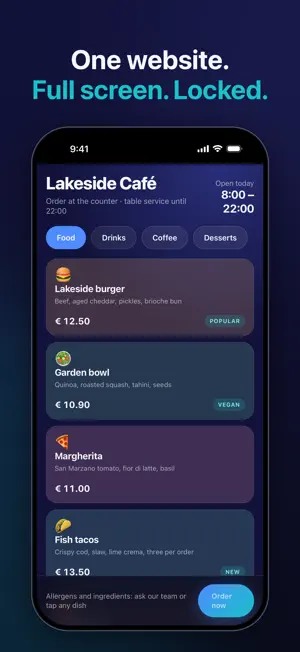
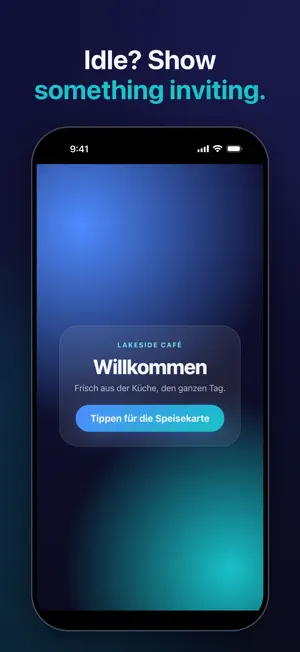
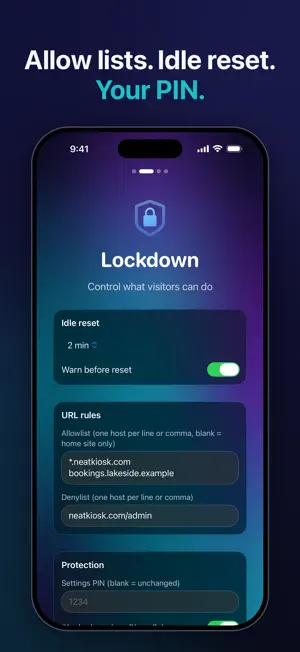
Turn any iPad or iPhone into a locked-down kiosk in under a minute. NeatKiosk shows one website full-screen, keeps visitors on it, and resets to a clean state after inactivity, so a shared device stays on task all day. And it is genuinely free: every feature is included, with no in-app purchases, no subscriptions, no watermark and no upsells. WHY NEATKIOSK • 100% free: all features, no paywalls • Private by design: no accounts, no servers, no analytics, no tracking. App Store privacy: Data Not Collected. • Works offline: what worked yesterday works today, connection or not • A clean, modern interface built natively for iPad and iPhone FEATURES • Lock to one website, full-screen: no address bar, no toolbars, gestures off • URL allow and deny lists: keep visitors on your pages and block everything else • Idle auto-reset: return to the home page and clear cookies, cache, history and local storage between visitors • Attract screen: when nobody has touched the kiosk for a while, show a page of your choice (a slideshow, a video, an announcement) and return the moment someone taps • Scheduled page refresh: keep a menu board or dashboard current without touching the device, with logins and cookies kept • PIN-protected settings and a hidden admin exit: visitors cannot leave; you always can • Force full brightness and keep the screen awake • Night blackout schedule: dim the display during off-hours (for example 22:00 to 08:00) and restore it automatically • A dropped connection keeps your page on screen with a small "Offline, retrying" badge instead of an error • Light and dark interface, in English, German, Spanish, Italian and French FOR FLEETS • Works with Guided Access, MDM Single App Mode and Managed App Configuration • 19 configuration keys, and a re-pushed configuration applies live to a running kiosk: no reinstall, no reset PERFECT FOR • Restaurant and café menus or ordering pages • Museum and exhibit displays • Trade shows and event booths • Front-desk sign-in, registration and waiver pages • Retail catalogues and product finders • Wall-mounted home dashboards HOW IT WORKS 1. Enter the website you want to display 2. Set your idle reset, URL rules and an admin PIN 3. Turn on Guided Access (or MDM Single App Mode) and walk away To get back in while the kiosk is running, press and hold the top-left corner for about 3 seconds and enter your PIN. No account. No cost. No tracking. Just a neat kiosk.
What’s new
Version 1.2.5 · Updated October 11, 2026
Fixed: on some sites, dropdown menus stopped opening once a page zoom below 100 % was set. The zoom took effect a moment after the page had started, so a site's own code had already measured the screen as a phone and set up its menus the phone way while the layout switched to the tablet version. The zoom now applies before the page loads, the way Safari's page zoom does, and a site sees one consistent width from its first line. At 100 % nothing changes.
App privacy
The developer, WakeSys sarl, reported these privacy practices to Apple.
Data Not Collected
The developer does not collect any data from this app.
Alternatives to NeatKiosk
Looking for apps like NeatKiosk? Here are 6 similar apps on the App Store. The highest rated is Kiosk Launcher (5.0/5), and all 6 are free to download.
-
 KioskFrame — Kiosk Browser
-
 dotKiosk Full Screen Browser
-
 Kiosk Web Launcher
-
 Kiosk Launcher
5.0
Kiosk Launcher
5.0
-
 FullFrame Browser
3.7
FullFrame Browser
3.7
-
 Wisp: Full Screen Browser
5.0
Wisp: Full Screen Browser
5.0
| App | Rating | Price | Last updated | Compare |
|---|---|---|---|---|
| NeatKiosk | 5.0 / 5 (2 ratings) | Free | October 11, 2026 | |
| KioskFrame — Kiosk Browser | – | Free | Sep 8, 2026 | Compare |
| dotKiosk Full Screen Browser | – | Free | Sep 3, 2026 | Compare |
| Kiosk Web Launcher | – | Free | May 26, 2026 | Compare |
| Kiosk Launcher | 5.0 / 5 (1) | Free | Oct 20, 2025 | Compare |
| FullFrame Browser | 3.7 / 5 (3) | Free | Apr 13, 2026 | Compare |
| Wisp: Full Screen Browser | 5.0 / 5 (6) | Free | Oct 15, 2026 | Compare |
Compare NeatKiosk with the top alternatives: ratings, updates, ASO score and keyword gaps →