

Inkive: Book Highlight Scanner
Xuanwei Sheng Book iPhoneiPadiPod touch
Inkive: Book Highlight Scanner is a free Book app for iPhone and iPad by Xuanwei Sheng. Rated 5.0/5 from 1 ratings. Requires iOS 17.0.
- Rating
- 5.0
- 1 ratings
- Price
- Free
- on the App Store
- Size
- 225 MB
- Age 4+
- Updated
- Oct 18
- 2026 · v26.10.2
Screenshots


About Inkive: Book Highlight Scanner
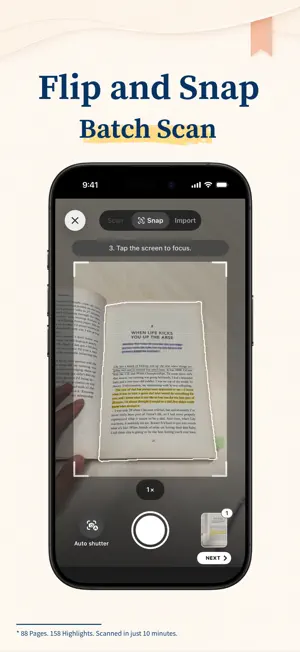
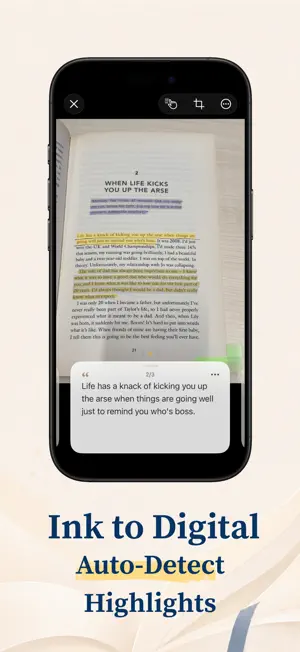
Capture the words you marked in a physical book—without manually selecting them. Inkive uses an on-device AI model to recognize the text corresponding to your underlines, highlighter marks, and circled passages. Take a photo of the page, and Inkive automatically turns your natural reading marks into searchable notes. No manual text selection. No manual cropping. No cloud upload. KEEP READING THE WAY YOU DO When you mark a sentence in a book, you should not have to recreate that action on your phone. Inkive preserves your natural reading flow and removes the extra step of drawing a selection box around the text. CAPTURE WITHOUT SLOWING DOWN • Automatically detects underlines, highlighter marks, and circles • Extracts complete passages instead of isolated lines • Works with common physical-book layouts • Supports continuous batch capture across multiple pages • Imports existing photos from your camera roll • Requires no manual text-area selection • Supports English, Simplified Chinese, and Traditional Chinese, including vertical layouts PRIVATE BY DESIGN • Your photos are never uploaded to the cloud • Recognition runs locally on your device • Your extracted text stays on your device • No account or registration required • No internet connection needed for text recognition ORGANIZE WHAT YOU WANT TO REMEMBER • Organize highlights and quotes by book • Add books manually or scan an ISBN barcode • Edit and proofread extracted passages • Keep the original image snippet with each passage • Add your own notes and insights • Search your library by book or text EXPORT AND SHARE • Export to Markdown, PDF, or HTML • Copy passages to your favorite note-taking apps, Obsidian and Notion supported • Create custom styled Highlight Cards • Share the ideas that stayed with you For everyone who still loves reading with a book in hand. Mark the page. Capture what matters. Keep the ideas worth returning to. Privacy Policy: https://stilive.app/inkive/privacy Terms of Use: https://stilive.app/inkive/terms
What’s new
Version 26.10.2 · Updated October 18, 2026
New Features: - [Camera] Zoom with one finger while taking photos, or use Camera Control to zoom and capture on supported iPhones. - [Camera] Open scanning or photo import from Control Center on iOS 18 and later. - [Recognition] Added One-click Re-recognize to page and Review menus to correct the original page image and extract highlights again. - [Highlights] Highlight details now use a full-page image with a draggable highlight drawer, horizontal paging, a page picker, and controls to switch between Zoom and full-page viewing. - [Settings] See an update notice when a newer version is available on the App Store. - [Appearance] Updated the app icon with Dark Mode support. Bug Fixed: - [Recognition] Fixed an issue that could prevent later edits from being saved after saving Review content more than once. - [Highlights] Improved context cropping for horizontal highlight snippets and made highlight boundaries follow curved text more closely in original images. Fixed highlight positions failing to update after editing Chinese text in merged highlights. - [Batch] Fixed pages assigned to books remaining in the app after discarding a camera batch. - [Bookshelf] Fixed highlight snippets briefly disappearing from book pages after saving edits. - [Settings] Fixed Complete Restore leaving some local data, images, and book covers behind. If Inkive has helped your reading journey, please consider leaving a review on the App Store. It helps others discover the app and keeps us going. Have feedback or ideas? Reach out anytime via Settings. Cherish the ink. Enjoy the read.
App privacy
The developer, Xuanwei Sheng, reported these privacy practices to Apple.
Data Not Collected
The developer does not collect any data from this app.
Alternatives to Inkive: Book Highlight Scanner
Looking for apps like Inkive: Book Highlight Scanner? Here are 6 similar apps on the App Store. The highest rated is BeyondRead (5.0/5), and all 6 are free to download.




| App | Rating | Price | Last updated | Compare |
|---|---|---|---|---|
| Inkive: Book Highlight Scanner | 5.0 / 5 (1 rating) | Free | October 18, 2026 | |
| BookScribe - 读书笔记数字化管理 | – | Free | Jan 18, 2026 | Compare |
| 墨卡 Moka | – | Free | Oct 15, 2026 | Compare |
| 随心读 | – | Free | Oct 11, 2026 | Compare |
| Book Quote Scanner: Keepline | – | Free | Sep 12, 2026 | Compare |
| 读过-记录阅读,发现你的阅读人格 | – | Free | Aug 19, 2026 | Compare |
| BeyondRead | 5.0 / 5 (1) | Free | Oct 15, 2026 | Compare |