

Lifelong Projector
Lifelong Online Retail Private Limited Utilities iPhoneiPadiPod touch
Lifelong Projector is a free Utilities app for iPhone and iPad by Lifelong Online Retail Private Limited. Requires iOS 15.0. Updated August 21, 2026.
- Price
- Free
- on the App Store
- Size
- 22 MB
- Age 4+
- Updated
- Aug 21
- 2026 · v1.0.5
Screenshots

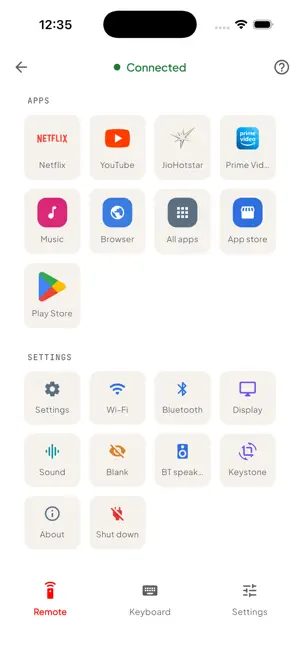


About Lifelong Projector
Lifelong Projector Remote This Lifelong Projector app currently supports the Lightbeam model (LLPJH20) only. Support for other projector models is coming soon. Turns your iPhone into a complete remote for compatible Lifelong projectors. Connect over Bluetooth in seconds — no account, no sign-up, no internet required. CONTROLS • Remote — D-pad with OK, plus Back, Home, Menu, Power, Mute, Source and Cast. • Volume, Zoom and Focus — press and hold to adjust continuously. • Touchpad — glide to move the pointer, tap to click, with dedicated left and right buttons. • Air Mouse — tilt your phone to steer the cursor. • Keyboard — type on the projector using your phone's keyboard. • Voice — speak simple commands to drive playback and navigation.
What’s new
Version 1.0.5 · Updated August 21, 2026
bug fixed
App privacy
The developer, Lifelong Online Retail Private Limited, reported these privacy practices to Apple.
Data Not Collected
The developer does not collect any data from this app.
Alternatives to Lifelong Projector
Looking for apps like Lifelong Projector? Here are 6 similar apps on the App Store. The highest rated is Plugzmart (5.0/5), and all 6 are free to download.
-
 Plugzmart
5.0
-
 Wireless Mirror - Fast Cast
5.0
-
 Projector App & Screen Share
4.4
-
 Projector Remote .
-
 TV Remote: Control & Cast TV
5.0
-
 SmartRemote: TV Controller
3.0
| App | Rating | Price | Last updated | Compare |
|---|---|---|---|---|
| Lifelong Projector | – | Free | August 21, 2026 | |
| Plugzmart | 5.0 / 5 (1) | Free | Oct 7, 2026 | Compare |
| Wireless Mirror - Fast Cast | 5.0 / 5 (1) | Free | Sep 15, 2026 | Compare |
| Projector App & Screen Share | 4.4 / 5 (56) | Free | Oct 3, 2026 | Compare |
| Projector Remote . | – | Free | Oct 2, 2026 | Compare |
| TV Remote: Control & Cast TV | 5.0 / 5 (1) | Free | Jul 8, 2026 | Compare |
| SmartRemote: TV Controller | 3.0 / 5 (2) | Free | Aug 12, 2026 | Compare |
Compare Lifelong Projector with the top alternatives: ratings, updates, ASO score and keyword gaps →