

JianBox - Local Document Tool
涛 刘 Productivity iPhoneiPadiPod touch
JianBox - Local Document Tool is a free Productivity app for iPhone and iPad by 涛 刘. Rated 5.0/5 from 1 ratings. Requires iOS 16.4. Updated October 9, 2026.
- Rating
- 5.0
- 1 ratings
- Price
- Free
- on the App Store
- Size
- 37 MB
- Age 4+
- Updated
- Oct 9
- 2026 · v1.5
Screenshots
About JianBox - Local Document Tool
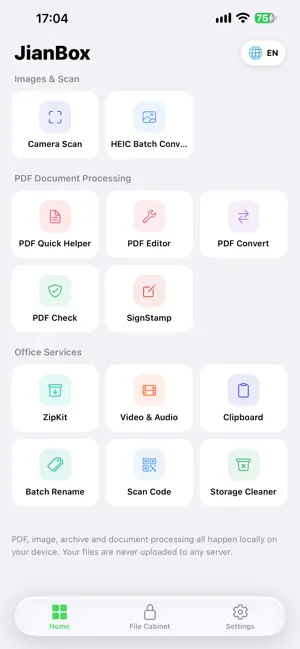
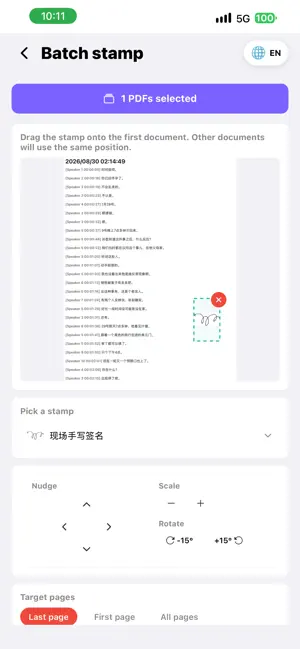
JianBox = Document Scanner + PDF Editor + File Unarchiver + Private Vault, all in one. 100% Local Processing. Your files never leave your device. One app, twelve capabilities, zero cloud uploads, zero account login required. Scan documents, convert formats, edit PDFs, extract archives, free up storage, encrypt files—everything happens offline on your iPhone and iPad. Documents & Scanning 【Camera Scanner】 Snap photos or import from album. Auto edge detection, enhancement, multi-page scanning, export as PDF. Contracts, receipts, notes, IDs—turn them into high-quality PDFs instantly. 【Image to PDF】 Select multiple images and merge them into a single PDF. Custom page sizes (A4/Letter), watermark support. Fully offline. 【PDF Editor】 Reorder, rotate, delete, or extract PDF pages with simple drag-and-drop gestures. 【PDF Verifier】 Professional PDF inspection tool: page consistency check, blank page detection, metadata viewer, SHA-256 hash verification. Auto-generates verification reports for compliance scenarios. 【Signature Tool】 Place personal signatures or company stamps on PDFs. Drag-and-drop positioning, resize, rotate, batch signing across multiple files. Final step for contract approval and formal delivery. Files & Compression 【HEIC Converter】 Batch convert iPhone HEIC/HEIF photos to universal JPG format. Adjustable quality and dimensions, text or image watermark support. Solves the "Windows can't open iPhone photos" problem. 【Unarchiver】 Extract ZIP, RAR, 7Z, TAR, GZIP, BZIP2, XZ. Also create password-protected ZIP archives from multiple files. Open compressed attachments directly without a computer. 【Batch Renamer】 Rename files or photos with prefix, suffix, numbering, find-replace, timestamps. Preview before applying, undo support. 【Storage Cleaner】 Scan large files, duplicate photos, and app caches. Free up space with one tap. Media Processing 【Video & Audio Toolkit】 Convert formats, compress files, trim videos, extract audio tracks. All processing happens locally with zero data usage. Privacy & Security 【Private Vault】 Encrypt and store sensitive files and photos. Face ID / Touch ID locked. Bank-level encryption protects your data even if your phone is lost. Productivity Tools 【Clipboard History】 Automatically saves copied text. Pin important items, search history, categorize. Never lose a copied verification code or address again. 【QR Scanner & Generator】 Scan QR codes and barcodes, or generate custom QR codes. History auto-saved for easy reference. Key Features • 100% Offline — Files stay on your device, never uploaded • 12-in-1 Toolkit — Replace 12 separate apps, save storage • Ad-Free Experience — Clean, distraction-free interface • iPad Optimized — Full-screen support, split-view ready • Multi-Language — English, Chinese, Japanese, Korean Privacy & Security JianBox respects your privacy. All file processing occurs entirely on your device. We do not collect, upload, or store any of your file contents. The Private Vault uses device-level encryption. No account sign-up required. No usage tracking. No marketing notifications. Pro Version One-time purchase. iPhone + iPad universal. Lifetime access to all 12 tools, ad-free experience. No subscription, no recurring fees, no account binding. Future updates included forever. Questions or feedback? Contact us through the in-app support feature.
What’s new
Version 1.5 · Updated October 9, 2026
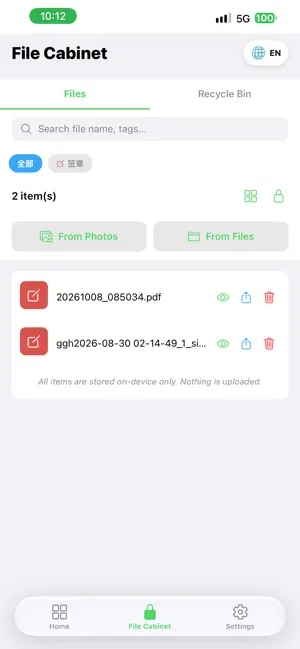
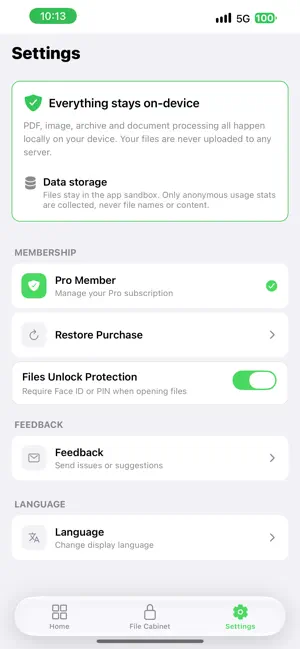
New Features 1. iPad support: JianBox is now a universal app. On iPad it automatically uses the wide-screen layout, and every tool is adapted for the large screen - a consistent experience across iPhone and iPad 2. Signature tool fully rebuilt: a brand-new handwriting editor - the canvas fills the whole screen and supports both a pen and an eraser, so mistakes can be wiped away at any time; handwritten signatures can be re-edited whenever you like 3. Existing stamps are editable too: go back into the editor to rework a handwritten signature; imported stamp images can be erased, touched up or rotated, and saving replaces the original 4. Stamp as many times as you like: every stamp is accumulated into the document - switch stamps, move, resize or adjust strength, then apply again; save with one tap when you are happy 5. Smoother stamping: "Save", "Send to Files" and "Share" are always visible and become usable as soon as a stamped document is generated; the fine-tune panel now has its own section for a clearer layout 6. Files cabinet, upgraded: every file carries a source icon and tag so you can tell which tool produced it at a glance; filter by source with one tap; search matches file names and sources 7. Recycle bin management in the cabinet: deleted files can be restored or permanently removed, and the recycle bin can be emptied with one tap 8. Details while previewing: tap the ⓘ at the top right of a preview to see the file's basic info (name, type, source, size, creation date) without leaving the preview 9. Long-task protection: leaving a tool while it is processing now asks for confirmation first, so progress is never lost by accident Changes 1. A fresh new look: global colors and visuals are upgraded, the bottom tab bar is now a floating glass style, and tool pages share a unified header and button layout 2. Membership is back: core features are free to use, while some advanced capabilities (such as batch processing and higher usage limits) are unlocked with membership; the Settings page restores the membership and "Restore Purchase" entries 3. Generated files are now named by date and time (YYYYMMDD_HHMMSS), which is clear at a glance; the producing tool is identified by the tag and icon in the Files cabinet Fixed 1. Fixed deleting a file in the cabinet requiring two taps - one tap now moves it to the recycle bin, where it can be fully restored 2. Fixed handwritten signatures being saved automatically after a single stroke - you can now keep writing, and saving happens only when you tap "Save as Stamp" 3. Fixed the handwriting canvas occupying only half the screen - it now fills the entire available area 4. Fixed the original stamp not appearing centered when editing - contents are now automatically centered 5. Fixed merged PDFs in PDF Editing showing no result and being impossible to share or send to the cabinet 6. Fixed Batch Rename failing with a directory permission error when saving 7. Fixed buttons in Scan and other tools that needed two taps to work All file processing happens entirely on your device. Files are never uploaded.
App privacy
The developer, 涛 刘, reported these privacy practices to Apple.
Data Not Linked to You
The following data, which may be collected but is not linked to your identity, may be used for the following purposes:
- Diagnostics: Crash Data, Performance Data, Other Diagnostic Data
Used for: Analytics
Alternatives to JianBox - Local Document Tool
Looking for apps like JianBox - Local Document Tool? Here are 6 similar apps on the App Store. The highest rated is PutSpot: Item Finder (4.9/5), and all 6 are free to download.
-
 Handwritten Digital Notes
-
 IEPDesk: IEP & 504 Tracker
-
 HostLog: Damage Records
-
 Dayshift: Team Time Zones
-
 PutSpot: Item Finder
4.9
-
 ServeLog: Service Loan Archive
| App | Rating | Price | Last updated | Compare |
|---|---|---|---|---|
| JianBox - Local Document Tool | 5.0 / 5 (1 rating) | Free | October 9, 2026 | |
| Handwritten Digital Notes | – | Free | Oct 16, 2026 | Compare |
| IEPDesk: IEP & 504 Tracker | – | Free | Sep 14, 2026 | Compare |
| HostLog: Damage Records | – | Free | Sep 14, 2026 | Compare |
| Dayshift: Team Time Zones | – | Free | Oct 7, 2026 | Compare |
| PutSpot: Item Finder | 4.9 / 5 (16) | Free | Sep 28, 2026 | Compare |
| ServeLog: Service Loan Archive | – | Free | Sep 10, 2026 | Compare |