

Nunc: Screen Time Control
KYLE HASTINGS STEPHENS Productivity iPhoneiPadiPod touch
Nunc: Screen Time Control is a free Productivity app for iPhone and iPad by KYLE HASTINGS STEPHENS. Requires iOS 18.0. Updated September 1, 2026.
- Price
- Free
- on the App Store
- Size
- 8 MB
- Age 4+
- Updated
- Sep 1
- 2026 · v2.2
Screenshots



About Nunc: Screen Time Control
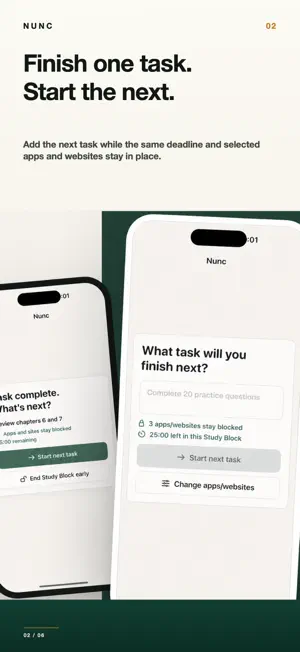
Your assignment is clear. Your phone keeps interrupting. Nunc helps college students protect a Study Block from selected apps, websites, or categories while they focus on one concrete task at a time. HOW A STUDY BLOCK WORKS 1. Name the task in front of you, such as “Finish problem set 4.” 2. Choose one or more apps, websites, or categories with Apple’s Screen Time picker. One to three selections are recommended for a focused setup; Nunc does not enforce a maximum. 3. Start a timed or Until I’m done Study Block. 4. Mark the task done and add the next task while the same deadline and shields continue—or deliberately end the Study Block early. 5. Review your latest private, on-device task summary. WHY NUNC IS DIFFERENT • Your current task stays visible while selected distractions are shielded. • Finishing a task does not automatically reopen distracting apps during a timed Study Block. • Study Modes save repeatable task, distraction, duration, and commitment settings. • Private Progress summarizes the work you declared complete without inspecting what you did inside other apps or websites. FREE AND PRO Manual timed and untimed Study Blocks are free and unlimited. Free includes one saved Study Mode and your latest task summary. Nunc Pro adds unlimited Study Modes, scheduled study reminders, optional No early ending for timed Study Blocks, full private history, and weekly review. No early ending removes Nunc’s in-app early-end action before the displayed deadline; it does not make blocking unbreakable. PRIVATE BY DESIGN No account is required. Task names, Screen Time selection tokens, blocking state, Study Modes, and summaries stay on your device. Nunc cannot read messages, feeds, websites, or schoolwork. HONEST SCREEN TIME CONTROL You decide when a task is done; Nunc does not inspect or verify your work. Website and browser coverage can vary. If Screen Time permission is denied or revoked, or blocking becomes unavailable, Nunc reports that state and provides recovery. Subscription options, trial eligibility, and Restore Purchases are available from the Pro paywall. Purchases and subscriptions are handled by Apple StoreKit. Terms of Use (EULA): https://www.apple.com/legal/internet-services/itunes/dev/stdeula/
What’s new
Version 2.2 · Updated September 1, 2026
Study Block setup is clearer from start to finish. Name your task, review one or more selected apps, websites, or categories, choose a duration, and confirm Screen Time access before blocking. One to three selections are recommended for a focused setup, but Nunc does not enforce a maximum. Active blocking details are also easier to read.
App privacy
The developer, KYLE HASTINGS STEPHENS, reported these privacy practices to Apple.
Data Not Collected
The developer does not collect any data from this app.
Alternatives to Nunc: Screen Time Control
Looking for apps like Nunc: Screen Time Control? Here are 6 similar apps on the App Store. The highest rated is Pomolings - Pomodoro Timer (5.0/5), and all 6 are free to download.
-
 Lazy Invite
-
 Forget: ADHD Focus Timer
3.7
Forget: ADHD Focus Timer
3.7
-
 Pomolings - Pomodoro Timer
5.0
Pomolings - Pomodoro Timer
5.0
-
 Mini journal - Cute diary
4.7
Mini journal - Cute diary
4.7
-
 NeoGen AI
-
 Commit: Everyday Consistency
4.6
Commit: Everyday Consistency
4.6
| App | Rating | Price | Last updated | Compare |
|---|---|---|---|---|
| Nunc: Screen Time Control | – | Free | September 1, 2026 | |
| Lazy Invite | – | Free | Jul 9, 2026 | Compare |
| Forget: ADHD Focus Timer | 3.7 / 5 (3) | Free | Oct 16, 2026 | Compare |
| Pomolings - Pomodoro Timer | 5.0 / 5 (1) | Free | Oct 24, 2026 | Compare |
| Mini journal - Cute diary | 4.7 / 5 (157) | Free | Apr 7, 2025 | Compare |
| NeoGen AI | – | Free | Jun 21, 2026 | Compare |
| Commit: Everyday Consistency | 4.6 / 5 (58) | Free | May 6, 2024 | Compare |