

DaysUp · Count Anything
RYAN MATTHEW CALPIN Utilities iPhoneiPadiPod touch
DaysUp · Count Anything is a free Utilities app for iPhone and iPad by RYAN MATTHEW CALPIN. Requires iOS 26.0. Updated October 20, 2026.
- Price
- Free
- on the App Store
- Size
- 5 MB
- Age 4+
- Updated
- Oct 20
- 2026 · v1.3.1
Screenshots

About DaysUp · Count Anything
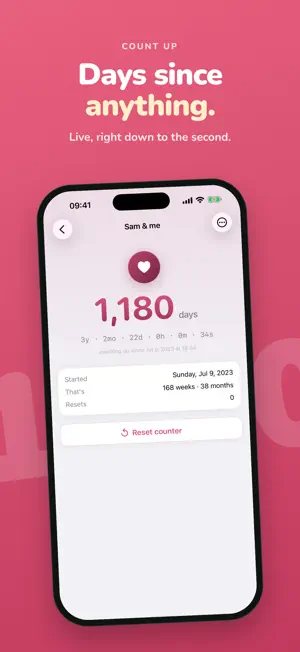
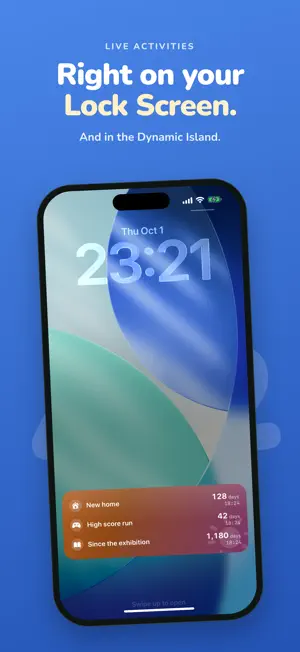
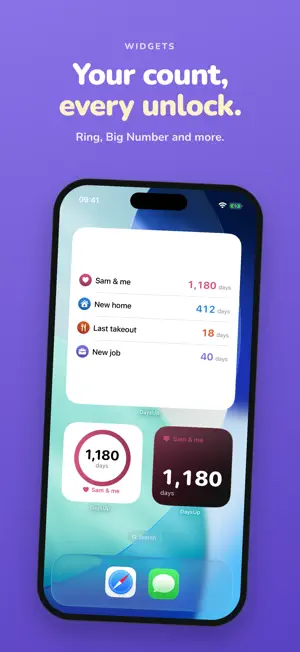
How many days since your new job? Your first date? The day you moved in? DaysUp counts up from any moment, live to the second. See it at a glance on your Home Screen, Lock Screen, and Dynamic Island. Pick a starting point and DaysUp keeps a running count from then on. The big number is days; tap in for years, months, days, hours, minutes, and seconds, ticking in real time. WHAT PEOPLE TRACK • Days together, and anniversaries • Since a new job, or a new home • A new pet's age • A daily habit or practice • "Since I last ate out" • Anything you want to watch grow WHAT'S NEW • Made for iPhone Duo: half-fold it and your trackers spread across both screens • No ads, anywhere in the app • Design with AI: describe a feeling and get a card design. A badge shows whether it was made on your iPhone or with Apple's Private Cloud Compute • Customize: icon, style, colors and background glyph in one sheet • Your design follows your tracker to its widgets, Live Activity, Dynamic Island and StandBy • Today: all your counts in one quick daily check-in, with an optional reminder WIDGETS EVERYWHERE • Small and medium Home Screen widgets for any tracker • The Board widget shows all your trackers at once, in medium or large • Ring and Big Number widget styles • Lock Screen widgets • Live Activities on the Lock Screen and in the Dynamic Island, with a live ring toward your next milestone, also in your Apple Watch Smart Stack (Pro) MILESTONES & GOALS, ONLY IF YOU WANT THEM • Optional milestones celebrate a week, a month, a year, and beyond, with confetti • Optional goals show progress toward a target date or number of days • Keep it as simple as one number, or as rich as you like MAKE IT YOURS • Four card styles: minimal, bold, playful, and vivid • Color themes that look right in light and dark mode • A big library of symbols, and a background glyph that can match your icon or be its own • The AI card designer builds a look from a few words (Pro, needs Apple Intelligence) SHARE THE MOMENT • Turn any tracker into a shareable image, in four designs RESET WITHOUT JUDGMENT • For recurring "since last…" things, reset any time • DaysUp keeps a plain log of past counts: just dates and durations PRIVATE BY DESIGN • No ads and no tracking. DaysUp only counts anonymous app events (like "a tracker was added") to help improve the app, never your tracker names or dates • Your trackers sync across your devices with iCloud • Your tracker names and dates live in your own private iCloud account, not on our servers • The AI card designer runs on your iPhone, or on Apple's Private Cloud Compute DAYSUP PRO • Unlimited trackers • Live Activities on the Lock Screen, Dynamic Island, and Apple Watch Smart Stack • The AI card designer • Premium color and icon packs • Custom colors The free version covers 3 trackers and has no ads. Choose monthly, yearly (with a one-week free trial), or a one-time lifetime purchase. Start counting up today. — DaysUp Pro monthly and yearly plans are auto-renewing subscriptions. Payment is charged to your Apple Account at confirmation of purchase, or when a free trial ends. Your subscription renews automatically unless canceled at least 24 hours before the end of the current period. Any unused part of a free trial ends when you subscribe. Manage or cancel anytime in your Apple Account settings. Terms of Use: https://calpinlabs.com/daysup/terms Privacy Policy: https://calpinlabs.com/daysup/privacy
What’s new
Version 1.3.1 · Updated October 20, 2026
Made for iPhone Duo, plus a few fixes. • iPhone Duo: half-fold your phone and your trackers spread across both screens, with Today on the left. Nothing important sits on the fold, including the Pro purchase buttons. • Live Activities now turn on and off right in Settings. • Simpler Dynamic Island: we removed the glow effect so your design and milestone ring stand out. • Small fixes and polish.
App privacy
The developer, RYAN MATTHEW CALPIN, reported these privacy practices to Apple.
Data Not Linked to You
The following data, which may be collected but is not linked to your identity, may be used for the following purposes:
- Identifiers: Device ID
- Usage Data: Product Interaction
Used for: Analytics
Alternatives to DaysUp · Count Anything
Looking for apps like DaysUp · Count Anything? Here are 6 similar apps on the App Store. The highest rated is SinceUntil - Event Countdown (5.0/5), and all 6 are free to download.
-
 SinceUntil - Event Countdown
5.0
SinceUntil - Event Countdown
5.0
-
 Day Counter. Count Every Event
-
 Countdown Calendar: TimeFeel
-
 Tilly: Christmas Countdown
-
 Ever Since | Track Milestones
-
 MIRI Alarm
| App | Rating | Price | Last updated | Compare |
|---|---|---|---|---|
| DaysUp · Count Anything | – | Free | October 20, 2026 | |
| SinceUntil - Event Countdown | 5.0 / 5 (2) | Free | Aug 1, 2026 | Compare |
| Day Counter. Count Every Event | – | Free | Jul 16, 2026 | Compare |
| Countdown Calendar: TimeFeel | – | Free | Oct 14, 2026 | Compare |
| Tilly: Christmas Countdown | – | Free | Sep 24, 2026 | Compare |
| Ever Since | Track Milestones | – | Free | Apr 30, 2026 | Compare |
| MIRI Alarm | – | Free | Oct 14, 2026 | Compare |