

Metis: Markdown Notes
Burlac Mihail Productivity iPhoneiPadiPod touch
Metis: Markdown Notes is a free Productivity app for iPhone and iPad by Burlac Mihail. Requires iOS 18.0. Updated October 20, 2026.
- Price
- Free
- on the App Store
- Size
- 14 MB
- Age 4+
- Updated
- Oct 20
- 2026 · v2.9.1
Screenshots
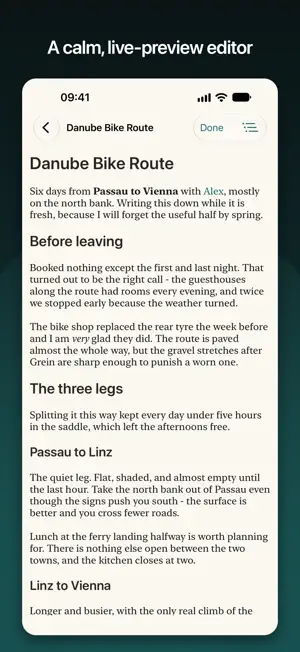


About Metis: Markdown Notes
Metis is a native Markdown editor and local-first knowledge base. Your notes are just .md files in a folder you own - Metis is a fast, beautiful, native view over them. No lock-in, no proprietary format, no account required to write. WRITE IN LIVE PREVIEW A clean Obsidian-style editor styles your Markdown as you type - headings, bold, lists, quotes and code - while keeping the raw syntax one tap away. It feels like writing in a document, not in code. On iPad it's a full three-pane workspace with hardware-keyboard shortcuts. CONNECT YOUR IDEAS Link any two notes with [[wiki links]]. Backlinks appear automatically, so you always see what references the note you're reading. An interactive link graph shows your whole knowledge base at a glance - zoom, pan, and drag nodes to explore the connections. READ BEAUTIFULLY Reading mode renders the full document: headings, tables, task lists, images, syntax-highlighted code, Mermaid diagrams, and real math (LaTeX) rendered natively - no web view. ORGANIZE YOUR WAY Tag anything with #tags, group notes into folders, and see typed properties (status, owner, due...) that live as YAML front matter and are preserved as you edit. A fast switcher and full-text search get you anywhere instantly. ON-DEVICE AI (Apple Intelligence) Summarize a note, suggest tags or related links, and ask your whole vault a question - all running privately on your device. AI is optional; the app is fully functional without it. SYNC ACROSS YOUR DEVICES Keep your vault in iCloud and the same notes are on your Mac, iPad and iPhone - still as plain .md files you can open anywhere. Edits sync in the background, and Metis helps you resolve conflicts if two devices change the same note. LOCK WHAT MATTERS Any note can be locked with your notes password and opened with Face ID or Touch ID. Locked notes are encrypted on disk and stay encrypted in iCloud - and they're kept out of search and previews. PRIVATE AND YOURS Everything stays in plain files on your device. No tracking, no cloud lock-in. Open the same folder in any other Markdown editor whenever you like. Import an existing folder of notes (from Obsidian or anywhere) and Metis just works. ONE PURCHASE, ALL YOUR DEVICES A single one-time purchase unlocks Metis Pro on your Mac, iPad and iPhone - no subscription. Try everything free for 7 days. Metis is made by Empiric Apps. Questions or feedback? [email protected]
What’s new
Version 2.9.1 · Updated October 20, 2026
Nested lists show their levels: sub-items step in one clear notch per level in the editor and in Reading, and Reading marks each depth with its own bullet. On foldable and large iPhones the columns fold to fit the screen and the editor fills it edge to edge. New installs start with a short "Start Here" note and a "Tips" tour.
App privacy
The developer, Burlac Mihail, reported these privacy practices to Apple.
Data Linked to You
The following data, which may be collected and linked to your identity, may be used for the following purposes:
- Purchases: Purchase History
- Contact Info: Email Address, Name
- Identifiers: Device ID
Used for: App Functionality
Alternatives to Metis: Markdown Notes
Looking for apps like Metis: Markdown Notes? Here are 6 similar apps on the App Store. The highest rated is Brainwave (2.0/5), and 4 of the 6 are free to download.
-
 Levity Markdown Notes
-
 Nodus - Zettelkasten
-
 Brainwave
2.0
Brainwave
2.0
-
 Mandrill - Markdown Editor
-
 MarkWrite
-
 Second Brain: Notes&Knowledge
| App | Rating | Price | Last updated | Compare |
|---|---|---|---|---|
| Metis: Markdown Notes | – | Free | October 20, 2026 | |
| Levity Markdown Notes | – | Free | Aug 18, 2026 | Compare |
| Nodus - Zettelkasten | – | Free | May 22, 2026 | Compare |
| Brainwave | 2.0 / 5 (1) | 0.99 USD | Nov 22, 2023 | Compare |
| Mandrill - Markdown Editor | – | 4.99 USD | Oct 19, 2026 | Compare |
| MarkWrite | – | Free | Sep 19, 2026 | Compare |
| Second Brain: Notes&Knowledge | – | Free | Aug 30, 2026 | Compare |