

LiDAR Room Scanner Floor Plan
Claudius Kristmann Productivity iPhoneiPadiPod touch
LiDAR Room Scanner Floor Plan is a free Productivity app for iPhone and iPad by Claudius Kristmann. Requires iOS 18.0. Updated October 1, 2026.
- Price
- Free
- on the App Store
- Size
- 21 MB
- Age 4+
- Updated
- Oct 1
- 2026 · v1.3
Screenshots



About LiDAR Room Scanner Floor Plan
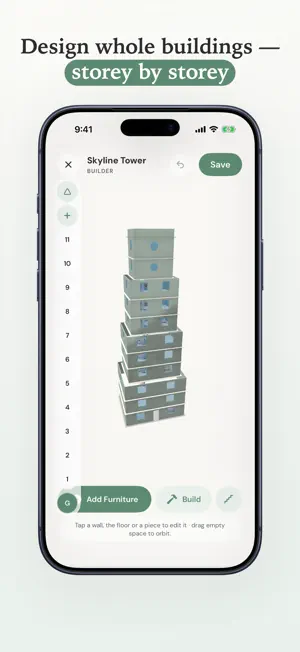
Scan rooms with LiDAR and turn them into precise, editable floor plans — all on your device. LiDAR Room Scanner uses Apple RoomPlan and the LiDAR sensor in iPhone Pro and iPad Pro to capture room geometry in minutes. Walk through a space, watch walls, doors, windows, and furniture appear live, and save a 3D model and a 2D floor plan with real measurements. FOR REAL ESTATE AGENTS • Properties: group scans with address, property type, status, client, notes and energy certificate, organized by floor • Living area per room and in total, according to the German WoFlV, Austrian and Swiss rules, ANSI Z765 (US/Canada) or as a simple sum • Room photos from the camera or your library, pinned to the floor plan • Exposé: a multi-page PDF with cover photo, property data, floor plans, room table, photos and a 3D view • Your branding (logo, company details, accent color, disclaimer) on floor plans and exposés • Share your agent profile with colleagues as a file OBJECT & SURFACE CAPTURE • Capture real objects and surfaces as 3D models with the camera and LiDAR • On-device photogrammetry builds a textured USDZ you can preview and share • Two modes: a guided object scan or free-form surface capture • Option to isolate the object from its surroundings BUILDING STUDIO • Design a home from scratch — no scan or LiDAR hardware needed • Draw floors and walls, then furnish rooms from a 3D furniture catalog • Move between a 2D plan and interactive 3D, add a gable roof, and build up storeys FLOOR PLANS • Drawn like an architectural plan: walls, door swings and window symbols • Edit geometry, labels, and furniture with full undo/redo • Grid snapping aligned to your longest wall, with compass indicator • Area and dimension metrics in metric or imperial units SCAN LIBRARY • All scans stored on your device — offline and private • 3D preview (USDZ) and 2D plan for every scan • Rename, organize, and revisit scans anytime • Search, sort and filter scans and properties EXPORT & SHARE • USDZ 3D models and RoomPlan JSON • Floor plans as PDF, SVG, DXF, PNG and CSV (Pro) • Exposé PDF for properties (Pro) • GPS location data in exports (Pro) • Import scans from other devices (Pro) PRO SUBSCRIPTION The free version includes 3 scans (rooms and objects combined), Building Studio, the floor plan editor, properties with living area calculation, and a preview of every export. Pro unlocks unlimited scanning, sharing floor plan exports (PDF, SVG, DXF, PNG, CSV) and exposés, GPS data in exports, and scan import. Available as a monthly or annual subscription — cancel anytime. REQUIREMENTS Room scanning requires a device with a LiDAR sensor (iPhone 12 Pro or a later Pro model, or iPad Pro from 2020). Object Capture requires iPhone 12 Pro or a later Pro model, or iPad Pro from 2021. Building Studio works on any supported device. Everything stays on your device — no account, no cloud upload, no tracking. Privacy Policy: https://www.lidarscanneriphone.com/privacy Terms of Use (EULA): https://www.apple.com/legal/internet-services/itunes/dev/stdeula/
What’s new
Version 1.3 · Updated October 1, 2026
Version 1.3 adds tools for real estate agents and anyone who documents properties. • Properties: group scans into a property with address, type, status, client, notes and energy certificate, and organize rooms by floor, each floor with its own combined floor plan. A single scan can become a property with one tap • Living area: calculated per room and in total according to the German WoFlV, Austrian and Swiss rules, ANSI Z765 for the US and Canada, or as a simple sum. The standard follows your device region and can be changed in Settings • Rooms: set the room type, ceiling height and notes, see the window orientation, and attach photos from the camera or your library • Photo pins: place numbered photo pins on the floor plan; they also appear in the floor plan PDF with a photo index • Exposé: export a multi-page PDF with cover photo, property data, energy certificate, floor plans, room table with living area, photos and notes, plus a 3D view. The preview is free, sharing requires Pro • Branding: add your logo, company details, accent color and disclaimer to floor plan and exposé exports • Floor plans in exposé style for PDF and PNG exports • Share your agent profile (branding and area standard) with colleagues as a file • Library: search, sort and filter scans and properties by status • Object Capture: option to isolate the object from its surroundings, plus more reliable reconstruction and saving • Building Studio: rename designs from the ⋯ menu on each card
App privacy
The developer, Claudius Kristmann, reported these privacy practices to Apple.
Data Not Linked to You
The following data, which may be collected but is not linked to your identity, may be used for the following purposes:
- Purchases: Purchase History
- Location: Precise Location
Used for: App Functionality
Alternatives to LiDAR Room Scanner Floor Plan
Looking for apps like LiDAR Room Scanner Floor Plan? Here are 6 similar apps on the App Store. The highest rated is MagicScan AI (5.0/5), and all 6 are free to download.
-
 Scannr - 3D & Room Scanner
4.2
-
 LiDAR Floor Plan: Room Scanner
-
 PlanShot: LiDAR Floor Plans
-
 Room Planner 3D LiDAR Scanner
-
 RoomTrace
-
 MagicScan AI
5.0
| App | Rating | Price | Last updated | Compare |
|---|---|---|---|---|
| LiDAR Room Scanner Floor Plan | – | Free | October 1, 2026 | |
| Scannr - 3D & Room Scanner | 4.2 / 5 (5) | Free | Aug 6, 2026 | Compare |
| LiDAR Floor Plan: Room Scanner | – | Free | Sep 15, 2026 | Compare |
| PlanShot: LiDAR Floor Plans | – | Free | Oct 7, 2026 | Compare |
| Room Planner 3D LiDAR Scanner | – | Free | Jul 23, 2026 | Compare |
| RoomTrace | – | Free | Sep 9, 2026 | Compare |
| MagicScan AI | 5.0 / 5 (1) | Free | Jun 18, 2026 | Compare |