

CamFusion: Live Dual Camera
Krishnaiah Indyala Photo & Video iPhoneiPadiPod touch
CamFusion: Live Dual Camera is a free Photo & Video app for iPhone and iPad by Krishnaiah Indyala. Requires iOS 17.6. Updated July 8, 2026.
- Price
- Free
- on the App Store
- Size
- 15 MB
- Age 4+
- Updated
- Jul 8
- 2026 · v1.0
Screenshots


About CamFusion: Live Dual Camera
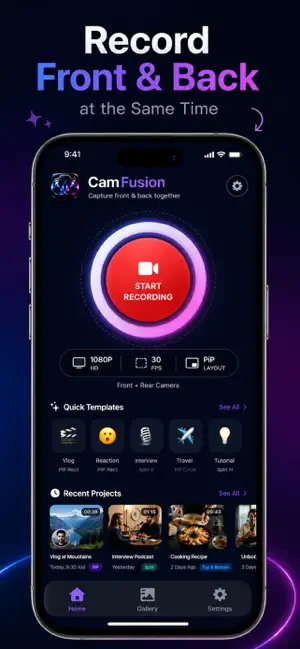
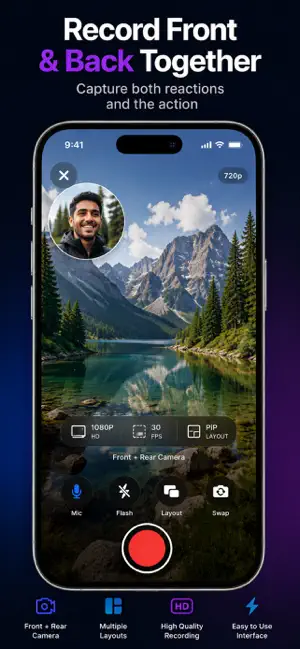
Capture every moment from both perspectives with CamFusion, the powerful dual camera video recorder for iPhone. Why record only what is in front of you when you can also capture your live reaction? CamFusion records with the front and rear cameras simultaneously, making it easy to create engaging videos for vlogs, reaction videos, interviews, travel, tutorials, events, and everyday memories. Whether you're a content creator, traveler, journalist, teacher, parent, or social media enthusiast, CamFusion helps you tell the complete story in a single recording. FEATURES Dual Camera Recording : Record with the front and back cameras at the same time. Capture your surroundings while keeping yourself in the frame for authentic reactions and commentary. Multiple Camera Layouts : Choose the layout that best fits your content. • Picture in Picture (PiP) • Side by Side • Split Vertical • Split Horizontal • Top and Bottom Creative PiP Styles : Personalize your videos with beautiful Picture in Picture layouts. • Rounded Rectangle • Circle • Heart Move the PiP window to any corner with a single tap. Portrait and Landscape Recording Record naturally in portrait or landscape orientation. CamFusion automatically adapts to your device orientation for a smooth recording experience. High Quality Video Recording Choose the recording quality that works best for your needs. • 720p HD • 1080p Full HD • 4K Ultra HD (Premium) Fast Local Processing Your videos are processed directly on your device for fast performance and better privacy. No cloud upload is required. Export and Share Save videos directly to your Photos library or share them with your favorite apps, including Instagram, TikTok, YouTube, Facebook, WhatsApp, and more. Perfect For • Vlogs • Reaction Videos • Travel Videos • Interviews • Tutorials • Product Reviews • Food Reviews • Live Events • Family Moments • Sports Reactions • Classroom Demonstrations • Online Content Creation Premium Features Upgrade to CamFusion Premium to unlock even more. • All camera layouts • All PiP styles • 4K recording • No advertisements • No watermark • Faster export performance Why Choose CamFusion? • Record front and back cameras simultaneously • Easy one-tap recording • Beautiful Picture in Picture layouts • Professional split-screen recording • High-quality video capture • Fast local processing • Privacy-focused design • Simple and intuitive interface • Optimized for creators and everyday users From travel adventures and family memories to professional interviews and creator content, CamFusion helps you record every angle without switching cameras. Download CamFusion today and capture both sides of every story.
App privacy
The developer, Krishnaiah Indyala, reported these privacy practices to Apple.
Data Not Collected
The developer does not collect any data from this app.
Alternatives to CamFusion: Live Dual Camera
Looking for apps like CamFusion: Live Dual Camera? Here are 6 similar apps on the App Store.
-
 DualShot Camera: Dual Format
-
 Camva: Dual Camera Recorder
-
 Creator Camera: Dual Capture
-
 FrameDuo: Dual Camera Video
-
 OnLens
-
 LifeCut - Vlog Camera & Editor
| App | Rating | Price | Last updated | Compare |
|---|---|---|---|---|
| CamFusion: Live Dual Camera | – | Free | July 8, 2026 | |
| DualShot Camera: Dual Format | – | Free | May 17, 2026 | Compare |
| Camva: Dual Camera Recorder | – | Free | Aug 10, 2026 | Compare |
| Creator Camera: Dual Capture | – | Free | Jul 31, 2026 | Compare |
| FrameDuo: Dual Camera Video | – | Free | Aug 26, 2026 | Compare |
| OnLens | – | Free | May 6, 2026 | Compare |
| LifeCut - Vlog Camera & Editor | – | Free | Sep 16, 2026 | Compare |