

PunchKit
Kristaps Dreija Music iPhoneiPadiPod touchMac
PunchKit is a free Music app for iPhone and iPad by Kristaps Dreija. Rated 4.9/5 from 56 ratings. Requires iOS 17.0. Updated October 22, 2026.
- Rating
- 4.9
- 56 ratings
- Price
- Free
- on the App Store
- Size
- 10 MB
- Age 4+
- Updated
- Oct 22
- 2026 · v1.11
Screenshots

About PunchKit
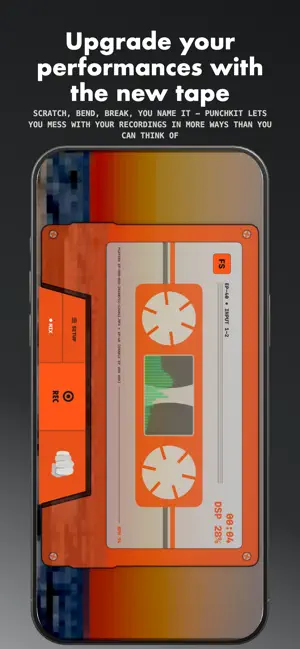
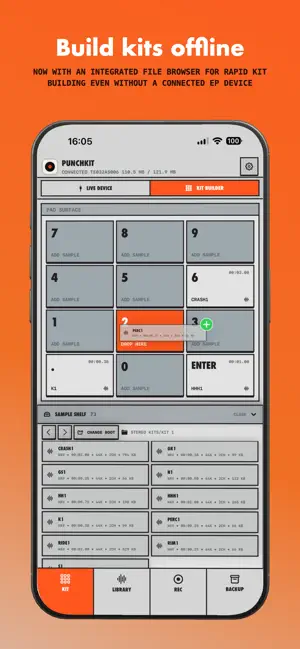
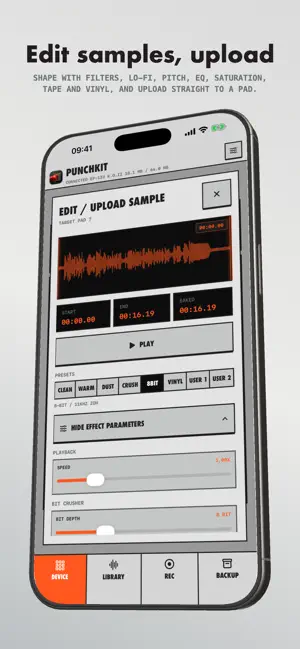
PunchKit is a local-first companion for the Teenage Engineering EP-133 K.O. II, EP-1320 Medieval, and EP-40 Riddim. Build kits, manage samples, record and process audio, separate stems, perform live effects, and create dependable backups from your iPhone or iPad. MIDI PLAYGROUND - Layer independent Chords, Melody, and Bass machines beside a connected EP - Follow EP MIDI clock with retained-BPM fallback if pulses stop - Use Auto Key or choose key, scale, harmony, voicing, inversion, octave, and expression manually - Shape chord feel with strum order, groove, timing, humanization, velocity, and release - Build melody and bass phrases on 16-step note grids, with octave transposition while playing OFFLINE KIT BUILDER - Build and save 12-pad kits without connecting an EP - Browse and preview samples from Files, then assign them to pads - Trim or convert samples for EP limits - Import, export, duplicate, rename, and share kit archives - Connect later to upload a kit to a chosen project and group DEVICE AND SAMPLE MANAGEMENT - Automatically detect compatible EP devices over USB MIDI - Browse projects, groups, pads, assignments, sounds, and memory slots - Browse one shared local Sample Shelf across Library, Projects, and Kit Builder - Drag a complete folder, including nested folders, to a Library slot - Review each file's path, duration, source size, converted device size, and memory before upload - Remove or edit individual pending samples without changing shelf files - Choose free-slot or sequential placement and explicitly confirm overwrites RECORD, EDIT, AND PUNCH - Record from the microphone or compatible USB audio inputs in WAV or M4A - Use signal-activated recording, waveform trimming, playback controls, and original/rendered versions - Monitor processed USB audio live with adjustable level and latency - Capture beat-synced loops using MIDI, detected audio, or tap tempo, then scratch and perform them from the cassette - Apply stackable Color and tempo-synced Motion effects with Direct or XY controls - Build a custom 12-slot Punch It page PIXEL BACKGROUND STUDIO - Turn short videos from Photos into pixel-art backgrounds - Trim, frame, process, and arrange clips locally - Available with Lifetime Pro LOCAL STEM SEPARATION - Separate a take into vocals, drums, bass, and other - Choose Fast, Balanced, or Best quality - Download the optional model once, then process locally - Mix, save, share, bounce, or upload stems BACKUP AND RESTORE - Back up banks, projects, or the complete device - Add PunchKit ZIPs and TE Sample Tool PAKs to the library without an EP - Opt in to iCloud Drive backup sync across iPhone, iPad, and Mac - Review source-device compatibility warnings before restoring MADE FOR IPHONE AND IPAD - Adaptive portrait and landscape layouts - System, Light, and Dark appearances FREE TO START, PRO FOR UNLIMITED WORKFLOWS PunchKit is free to download. Connecting, browsing, previewing, playing, sharing, renaming, deleting, restoring backups, and using existing files remain available without limits. The free tier includes three successful take creations, one local kit creation and one complete kit upload, three successful sample writes, one stem separation, and one bank, project, and complete-device backup. Allowances count only after an operation succeeds. One optional Lifetime Pro purchase removes these limits. There is no subscription, and Pro supports Apple Family Sharing. On iPhone and iPad, people who first downloaded PunchKit before version 1.3 receive Lifetime Pro automatically as founding users. LOCAL-FIRST BY DESIGN No PunchKit account, ads, third-party analytics, or tracking. Optional iCloud Drive backup sync uses your Apple account. Other content stays local unless you share or export it. Diagnostic reports are sent only when you choose and exclude audio, sample and project contents, and filenames. DISCLAIMER PunchKit is independent and is not affiliated with or endorsed by Teenage Engineering.
Ratings & reviews
4.9
56 ratings
What’s new
Version 1.11 · Updated October 22, 2026
PunchKit 1.11 brings optional iCloud backup sync, offline backup-library imports, and clearer restore compatibility guidance. • In Backup, enable Sync Backups with iCloud Drive on each device using the same Apple account. Existing archives are copied and verified; local originals are retained. The library shows upload/download status and offers a download action for cloud-only backups. • Turning sync off copies available cloud backups back to local storage without deleting cloud originals. Deleting an iCloud backup affects synced devices, but retained local originals remain independent. • Add one or several PunchKit ZIPs or TE Sample Tool device-level PAKs to the backup library without connecting an EP. Original source files are kept, and duplicate filenames do not replace existing copies. Share archived files or connect an EP to restore them later. PAK sample preview is not supported. • New project, bank, and full-backup manifests include source SKU when available. Cross-model and unknown-source restores require a separate warning and acknowledgement before Restore Anyway. You can back up the entire connected device first. Approval applies only to that restore attempt and connection session. • Restoring native project data between different EP models is not verified and may leave the device unusable until a factory reset that erases all projects and samples. Choosing Restore Anyway does not bypass archive-integrity checks or PAK storage and write-protection checks. • Project and bank switching now stops device playback first, avoiding active-target changes while the EP sequencer is running. PunchKit is independent and is not affiliated with or endorsed by Teenage Engineering.
App privacy
The developer, Kristaps Dreija, reported these privacy practices to Apple.
Data Not Collected
The developer does not collect any data from this app.
Alternatives to PunchKit
Looking for apps like PunchKit? Here are 6 similar apps on the App Store. The highest rated is M8 Music Tracker (5.0/5), and 5 of the 6 are free to download.
-
 Cornerman for K.O. II
2.5
Cornerman for K.O. II
2.5
-
 M8 Music Tracker
5.0
M8 Music Tracker
5.0
-
 Condukt: MIDI Controller
5.0
Condukt: MIDI Controller
5.0
-
 VU202
4.8
VU202
4.8
-
 TR4 — Four Track Tape Recorder
5.0
TR4 — Four Track Tape Recorder
5.0
-
 M8C Remote Display
4.8
M8C Remote Display
4.8
| App | Rating | Price | Last updated | Compare |
|---|---|---|---|---|
| PunchKit | 4.9 / 5 (56 ratings) | Free | October 22, 2026 | |
| Cornerman for K.O. II | 2.5 / 5 (11) | Free | May 21, 2025 | Compare |
| M8 Music Tracker | 5.0 / 5 (107) | 29.99 USD | Oct 1, 2026 | Compare |
| Condukt: MIDI Controller | 5.0 / 5 (8) | Free | Oct 14, 2026 | Compare |
| VU202 | 4.8 / 5 (35) | Free | Sep 17, 2026 | Compare |
| TR4 — Four Track Tape Recorder | 5.0 / 5 (5) | Free | Sep 16, 2026 | Compare |
| M8C Remote Display | 4.8 / 5 (19) | Free | Sep 10, 2026 | Compare |
Compare PunchKit with the top alternatives: ratings, updates, ASO score and keyword gaps →