

Tim AI
raza Kizilbash Productivity iPhoneiPadiPod touch
Tim AI is a free Productivity app for iPhone and iPad by raza Kizilbash. Requires iOS 18.0. Updated October 26, 2026.
- Price
- Free
- on the App Store
- Size
- 15 MB
- Age 12+
- Updated
- Oct 26
- 2026 · v1.36
Screenshots



About Tim AI
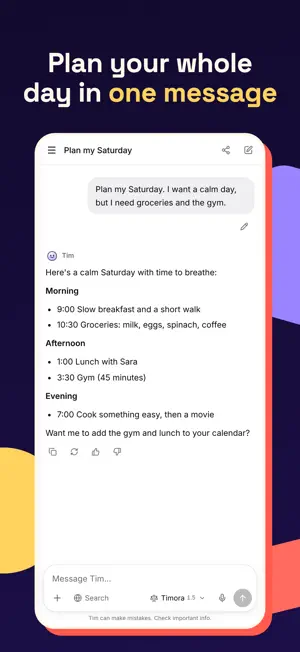
Tim AI is your personal assistant for everyday life. Plan your day, keep track of tasks and deadlines, get clear answers, and let Tim remember what matters to you. WHAT TIM CAN DO • Chat about anything: questions, ideas, writing, planning and learning. • Talk to Tim: tap the sound-wave button, hold the mic and ask out loud. Tim answers out loud, and the conversation stays in your chat. • Ask with Siri: "Hey Siri, ask Tim AI what's on my calendar", or "Hey Siri, ask Tim AI" and then your question. • Google Calendar and Google Contacts: ask what's on, add events (with Undo) and look up numbers. • Reminders that ring: "Remind me at 4pm to call Mom". Mark them done or snooze them from the notification. • Apple Calendar and Reminders: ask what's on your schedule, add events and reminders, and Tim checks for clashes first. You choose whether Tim asks first or adds right away, with Undo and Edit for 10 minutes. • Open in Mail: Tim writes the email, and you send it from your own Mail app. • Share to Tim AI from any app: links, text, photos, PDFs and voice recordings. Tim asks what you'd like: a summary, saving it to your Library, or something else. • Library: save links, notes, photos, PDFs and voice memos, then ask Tim about them later. Tim reads each item once and keeps a short summary. • Scheduled tasks (Plus and Premium): "Every morning at 7, give me my day and the weather." Tim does it on schedule and sends you the result with a notification. Scheduled tasks never take actions on their own. • Recordings: Apple's speech recognition turns audio into text (on your device when your language allows it), then Tim summarizes it. • My Reminders with priorities and times: choose when you're notified (on time, minutes before or a day before). They also appear in a "Tim AI" list in Apple Reminders, and completing one in either app completes both. • Memory: Tim can remember helpful facts you share. View or delete them anytime in Settings. • Incognito chats: nothing is remembered or saved. • Projects: group chats with their own instructions and personality. • Speak instead of typing. • Web search for up-to-date answers, and Deep Research for in-depth reports (Premium). • 9 languages for the app and Tim's replies: English, Spanish, French, German, Arabic, Urdu, Hindi, and Chinese (Simplified and Traditional). • Also on the web and Mac at tim-ai.app, with your chats in sync. THINKING MODES • Timo: quick and light. • Timora: balanced, Tim picks the best fit. • Timperia: the most powerful, for the hardest questions. PLANS • Free: basic daily usage, Timo and a limited Timora, and a Library of 10 items. • Plus: more than 3× the daily usage of Free, all thinking modes, Timora at full power and Timperia unlocked, a Library of 40 items and 3 scheduled tasks. • Premium: more than 6× the daily usage of Free (2× Plus), everything in Plus, Deep Research, an unlimited Library and 10 scheduled tasks. Subscriptions renew automatically unless cancelled at least 24 hours before the end of the current period. Manage or cancel anytime in your Apple ID settings. PRIVACY Tim's replies are written by AI models from Anthropic. Before your first message, Tim AI explains what is shared, and nothing is sent without your OK. Calendar and reminder access is optional, used only when you ask, and never stored by us. You decide in Settings → Privacy & control whether Tim asks first or adds right away, and you can pause everything at once. Privacy Policy: https://tim-ai.app/privacy Terms of Use: https://tim-ai.app/terms Support: https://tim-ai.app/support
What’s new
Version 1.36 · Updated October 26, 2026
• Fixes a crash when you talk while Tim is speaking. • Bug fixes and improvements.
App privacy
The developer, raza Kizilbash, reported these privacy practices to Apple.
Data Linked to You
The following data, which may be collected and linked to your identity, may be used for the following purposes:
- Usage Data: Product Interaction
- Purchases: Purchase History
- Location: Coarse Location
- Contact Info: Email Address, Name
- User Content: Photos or Videos, Customer Support, Other User Content
- Identifiers: User ID, Device ID
Used for: Analytics, App Functionality
Data Not Linked to You
The following data, which may be collected but is not linked to your identity, may be used for the following purposes:
- Usage Data: Product Interaction
- Diagnostics: Other Diagnostic Data
Used for: App Functionality
Alternatives to Tim AI
Looking for apps like Tim AI? Here are 6 similar apps on the App Store. The highest rated is Ask Ai (Free) - Snap & Solve (4.9/5), and all 6 are free to download.
-
 Frontier Voice
-
 Atomesus – Smart & Simple AI
-
 Ask Ai (Free) - Snap & Solve
4.9
Ask Ai (Free) - Snap & Solve
4.9
-
 Ace - Chat & Assistant
3.6
Ace - Chat & Assistant
3.6
-
 Authenticator App: 2FA・MFA・OTP
4.3
Authenticator App: 2FA・MFA・OTP
4.3
-
 Lovable: Build Apps With AI
4.8
Lovable: Build Apps With AI
4.8
| App | Rating | Price | Last updated | Compare |
|---|---|---|---|---|
| Tim AI | – | Free | October 26, 2026 | |
| Frontier Voice | – | Free | Aug 27, 2026 | Compare |
| Atomesus – Smart & Simple AI | – | Free | Oct 23, 2026 | Compare |
| Ask Ai (Free) - Snap & Solve | 4.9 / 5 (45) | Free | Oct 29, 2026 | Compare |
| Ace - Chat & Assistant | 3.6 / 5 (54) | Free | Oct 5, 2026 | Compare |
| Authenticator App: 2FA・MFA・OTP | 4.3 / 5 (213) | Free | Sep 14, 2026 | Compare |
| Lovable: Build Apps With AI | 4.8 / 5 (2,662) | Free | Oct 13, 2026 | Compare |
Compare Tim AI with the top alternatives: ratings, updates, ASO score and keyword gaps →