

Car Play Widgets: Dashboard
N5 Labs Utilities iPhoneiPadiPod touch
Car Play Widgets: Dashboard is a free Utilities app for iPhone and iPad by N5 Labs. Rated 4.1/5 from 15 ratings. Requires iOS 17.0.
- Rating
- 4.1
- 15 ratings
- Price
- Free
- on the App Store
- Size
- 102 MB
- Age 4+
- Updated
- Sep 24
- 2026 · v1.5
Screenshots

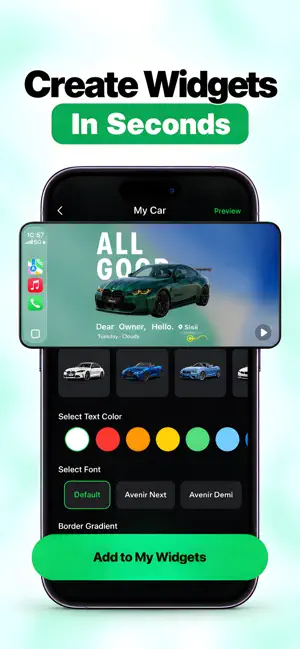
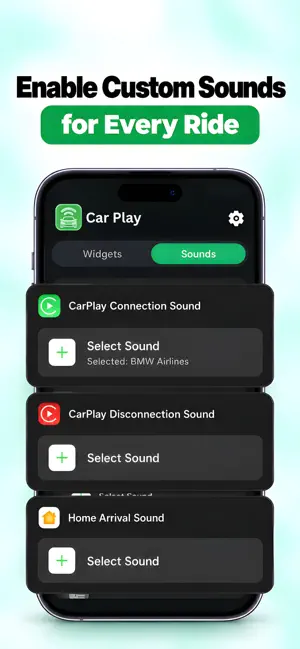

About Car Play Widgets: Dashboard
Make your iPhone and CarPlay dashboard feel more personal every time you drive. Create small widgets inspired by your car and your style for your iPhone Home Screen, then add them to your CarPlay dashboard on iOS 26. Start with a photo, then build a clock, date card, countdown, moon phase, affirmation, badge, flag, or custom text design. Pick colors and layouts that suit your setup. CAR-INSPIRED WIDGETS Choose from dashboard-style cards, vehicle artwork, photo layouts, countdowns, clocks, and decorative themes. Browse and customize freely; saving widget designs requires Pro. TEXT AND LYRIC-STYLE CARDS Design music-inspired cards using words, titles, and artist lines you enter yourself. The app does not include or synchronize a licensed lyrics catalog. STATIC MOTION-POSTER LOOKS Create bold poster-style widget cards. These are static WidgetKit designs, not video playback. OPTIONAL RIDE SOUNDS Use Apple Shortcuts to trigger a selected sound when CarPlay connects, disconnects, or when an automation runs after you arrive home. iOS runs the automation; the app supplies the shortcut actions and sounds. IMPORTANT Widgets appear on your iPhone Home Screen, and on iOS 26 you can also add them to your CarPlay dashboard. The app does not modify, reskin, or control the CarPlay interface. It does not read vehicle data or show live speed, fuel, mileage, or range, and it does not request location access. Privacy Policy: https://noamr13.github.io/n5labs.github.io/privacy/carminder App Terms: https://noamr13.github.io/n5labs.github.io/terms/carminder Apple Standard EULA: https://www.apple.com/legal/internet-services/itunes/dev/stdeula/
Ratings & reviews
4.1
15 ratings
What’s new
Version 1.5 · Updated September 24, 2026
A whole new look for iCar. • A cleaner, brighter design and a new app icon • Preview your dashboard: see your widgets on a car screen and tap an empty slot to add one • New editors for every kind of widget, and saved widgets reopen for editing • Browse the full sound library by category, with car maker logos on brand sounds • Quick Add stays on your Lock Screen, ready for your next widget • 1,470 cars from 121 brands, all clean studio shots facing the same way • A much smaller download
App privacy
The developer, N5 Labs, reported these privacy practices to Apple.
Data Linked to You
The following data, which may be collected and linked to your identity, may be used for the following purposes:
- Purchases: Purchase History
- Location: Coarse Location
- Identifiers: Device ID, User ID
- Usage Data: Product Interaction, Advertising Data, Other Usage Data
- Other Data: Other Data Types
Used for: Developer’s Advertising or Marketing, Analytics, App Functionality
Alternatives to Car Play Widgets: Dashboard
Looking for apps like Car Play Widgets: Dashboard? Here are 6 similar apps on the App Store. The highest rated is Car Dashboard Widgets: Dashly (5.0/5), and all 6 are free to download.
-
 Car Widgets & Dashboard: WiGet
3.0
-
 Car Play Widgets: Carget
3.8
-
 Car Widgets & Dashboard: CarUp
4.6
-
 Screenmade: Custom Widgets
4.7
-
 Car Dashboard Widgets: Dashly
5.0
-
 Car Sounds Dashboard Widget HD
| App | Rating | Price | Last updated | Compare |
|---|---|---|---|---|
| Car Play Widgets: Dashboard | 4.1 / 5 (15 ratings) | Free | September 24, 2026 | |
| Car Widgets & Dashboard: WiGet | 3.0 / 5 (4) | Free | Oct 10, 2026 | Compare |
| Car Play Widgets: Carget | 3.8 / 5 (34) | Free | Sep 27, 2026 | Compare |
| Car Widgets & Dashboard: CarUp | 4.6 / 5 (12) | Free | Sep 16, 2026 | Compare |
| Screenmade: Custom Widgets | 4.7 / 5 (11) | Free | Sep 20, 2026 | Compare |
| Car Dashboard Widgets: Dashly | 5.0 / 5 (6) | Free | Oct 10, 2026 | Compare |
| Car Sounds Dashboard Widget HD | – | Free | Apr 1, 2026 | Compare |