

Bloomling: Puzzles & Safe Web
RUEI YI WU Education iPhoneiPadiPod touch
Bloomling: Puzzles & Safe Web is a free Education app for iPhone and iPad by RUEI YI WU. Requires iOS 17.0. Updated October 23, 2026.
- Price
- Free
- on the App Store
- Size
- 9 MB
- Age 4+
- Updated
- Oct 23
- 2026 · v1.4.20261023
Screenshots


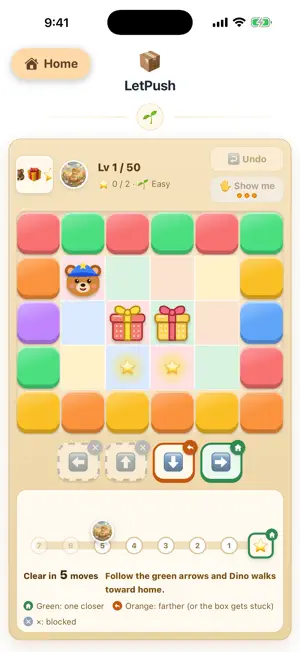
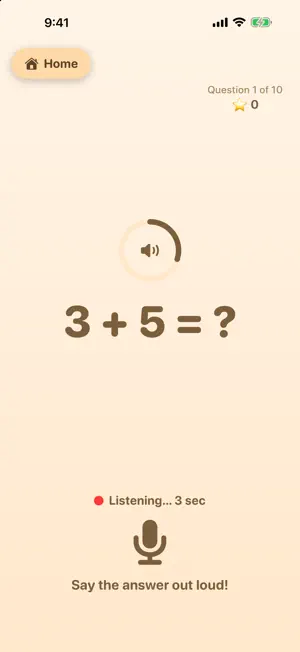
About Bloomling: Puzzles & Safe Web
Bloomling is one warm little garden with three things inside: 11 logic puzzles made by the developer, a set of fully offline learning activities, and a walled-garden web area you control - only the pages you hand-pick can open, and everything else is gently blocked. HAND-MADE LOGIC PUZZLES (NO ADS, NO SIGN-IN) • Slide Puzzle, Ball Sort, Tower of Hanoi, Pipe Flow, Shape Bridge, Push the Boxes, Car Trip, Rolling King, Matchstick Math, Smart Squares, Marble Run • 50-120 levels each, from gentle to tricky, every one machine-verified to be solvable; Easy mode hints the next move and every move can be taken back • They train spatial reasoning, cause and effect, debugging and number sense - not reaction speed • One card per game, ready to play; no in-app purchases inside the games, no lucky draws, no timers BUILT-IN LEARNING ACTIVITIES (OFFLINE, NO NETWORK NEEDED) • Math Tutor: generates arithmetic questions and reads them aloud; answer by voice or by tapping. Voice is recognized entirely on-device - audio is never uploaded or stored • Story Machine: original bundled stories, narrated entirely with on-device speech • Read-Along: follow along sentence by sentence, in English and Chinese All three sit right at the top of the home screen the moment the app opens - no setup required. THE WALLED-GARDEN WEB AREA • Strict allow-list: only the exact URLs you add will open - even other pages on the same domain stay blocked (the one exception is the developer's own Puzzle Garden, where the child can move between games and tap Back) • No search box, no address bar, no outbound links - tapping anything outside your list just shows "Ask a grown-up for this page" • YouTube videos and playlists, and single Instagram posts: embedded in a locked, distraction-free view you can't navigate out of • Parent settings behind a gate: adding / editing / deleting / reordering sites requires solving a multiplication problem, or entering a 4-digit passcode you set • Adding a card is quick: paste a URL and see a green check (tap it to preview), a red cross or a duplicate warning right away; the card name can be filled in from the page title or typed by hand TOOLS FOR PARENTS • Groups: sort web cards into groups you name; each group is its own section on the home screen, and the order of the sections (including Today's Activities) can be rearranged by drag and drop • Per-weekday scheduling: choose which days of the week each card and activity appears • Usage review: see which pages were opened and for how long, by day, week or month - stored only on the device • Clear browsing data: wipe the cache and website data left by the web area in one tap • Cross-device setup: configure on another device, then send it over via AirDrop or the same Wi-Fi - no Apple account, no cloud • Export the list as a plain-text file (.md), edit and group it on a Mac with any editor, then import it back • Text editor: the whole web list as one page of text - copy it all as a backup, or paste a list and save • One app for iPhone and iPad YOU CAN RELAX • 100% ad-free • No third-party analytics, ad, or tracking SDKs (all Apple-native) • Collects no personal data; all settings and records stay only on your device • Every feature costs nothing and there is no paywall; the only purchase is an optional tip jar in the grown-ups area, and it unlocks nothing Offline learning activities, plus one little garden you trust - explore with peace of mind.
What’s new
Version 1.4.20261023 · Updated October 23, 2026
What's new in this update: - iPhone Duo support: the app fills the cover screen when folded and the large screen when open. - Usage review now shows each day, week or month, with a daily bar chart and the average per day. Tap a bar to jump to that day. - Time is counted only while the app is on screen; leaving the app or locking the device no longer keeps the timer running. - Exported usage records now have one row per day, ready for a spreadsheet.
App privacy
The developer, RUEI YI WU, reported these privacy practices to Apple.
Data Not Collected
The developer does not collect any data from this app.
Alternatives to Bloomling: Puzzles & Safe Web
Looking for apps like Bloomling: Puzzles & Safe Web? Here are 6 similar apps on the App Store. The highest rated is Vocabloot: Learn Vocabulary (5.0/5), and all 6 are free to download.
-
 99乘法大挑戰:九九乘法練習
-
 Tutor247 - 你的專屬AI家教
-
 Vocabloot: Learn Vocabulary
5.0
-
 StatYou Home: Chores & Habits
-
 Kids Learn - ABC & Number
-
 GoldenGap - Family Schedule
| App | Rating | Price | Last updated | Compare |
|---|---|---|---|---|
| Bloomling: Puzzles & Safe Web | – | Free | October 23, 2026 | |
| 99乘法大挑戰:九九乘法練習 | – | Free | Oct 24, 2026 | Compare |
| Tutor247 - 你的專屬AI家教 | – | Free | Jul 1, 2025 | Compare |
| Vocabloot: Learn Vocabulary | 5.0 / 5 (3) | Free | Sep 29, 2026 | Compare |
| StatYou Home: Chores & Habits | – | Free | Oct 21, 2026 | Compare |
| Kids Learn - ABC & Number | – | Free | Jan 4, 2026 | Compare |
| GoldenGap - Family Schedule | – | Free | Aug 3, 2026 | Compare |